GitHub Copilot lets you choose where the agent runs and which model to use in VS Code

- Reading
- 6 min
- Tables
- 1
In the Universe 2026 releases for Copilot in VS Code, GitHub separates two decisions that used to come preset: where the agent executes and which model handles the task. The choice changes cost, latency, and what leaves (or doesn't leave) your machine.
The GitHub Changelog published, on October 28, 2026, in the wake of GitHub Universe 2026, the summary of the year's releases for Copilot in VS Code. The throughline isn't a single feature: it's giving developers two choices that until now were decided by the platform. Where the agent runs. And which model handles the task.
For anyone running a production stack, this isn't cosmetic. Where the code travels is a compliance question. Which model answers is a cost question. GitHub addressed both in the same batch of announcements.
Cloud or your own machine: the choice of where the agent runs
Until now, a Copilot agent was tied to the session it was born in. Close the VS Code window, lose the thread. The central novelty is Agent Host, a layer that isolates the Copilot session from the individual editor window, so the work keeps running in the background even after you close the project folder.
That gives rise to two opposite paths:
- Cloud session: started from the Agents window in VS Code, it runs on GitHub's own infrastructure. Closing the laptop doesn't stop the work, and the same session can be resumed in VS Code, in the GitHub Copilot app, on GitHub Mobile, on github.com, in Copilot CLI, or even in a conversation started via DM on Slack or Microsoft Teams.
- Remote session via Agent Host: using Remote SSH and dev tunnels, the agent runs on a machine different from the one you're using, with the same code, the same tools, and the same dependencies. The remote machine and its Agent Host need to stay on, but the work survives a disconnection from local VS Code.
The practical difference is where the project's code and secrets travel. A cloud session takes the load off your machine, but the work runs on GitHub's infrastructure. Remote Agent Host keeps everything within your own fleet of machines, which matters for teams that require sensitive code to never leave the internal network.
To control an agent running on your own machine from your phone, the command is code agent host --github-environment, run in a terminal opened in the project folder. GitHub Mobile becomes a remote control; the machine doing the actual work is still the development machine, which needs to stay on.
Comparing models before trusting just one
The second choice is which model handles the task, and here the new feature is Compare model results, still in preview. In the Agents window, you can run different models and harnesses in parallel on the same problem and review the results side by side. A Judge model can recommend which answer is best, and the Synthesize option combines ideas from the different attempts into a single solution.
This changes the cost calculation per task. Running three models in parallel costs more than running one, but for an architecture decision that will turn into production code, comparing approaches before accepting the first answer can be worth the extra expense. For a trivial refactor, it isn't worth it: use the cheapest available model and move on.
Alongside this change comes a consolidation of behavior: the Copilot harness, built on the Microsoft Copilot SDK, is now the default for new sessions both in the editor and in the Agents window. In practice, the agent behaves more similarly across VS Code, Copilot CLI, and the GitHub Copilot app, which reduces the surprise of switching clients in the middle of a task.
An easier CLI to install
Copilot CLI got a direct installation path through the VS Code installer: on Windows, through the installer itself; on macOS, by adding VS Code to the PATH; on Linux, by simply running copilot. It's a small detail, but it reduces the friction of bringing the same agent from the editor into the terminal.
Computer use: the agent clicking on your screen
The most experimental feature in the batch is computer use. With it, Copilot reads and interacts with desktop applications, including clicking controls and editing text outside the editor and the terminal. It's available on macOS and Windows, enabled in Settings via the chat.agentHost.computerUse.enabled key, followed by restarting VS Code and running /computer on in a Copilot session.
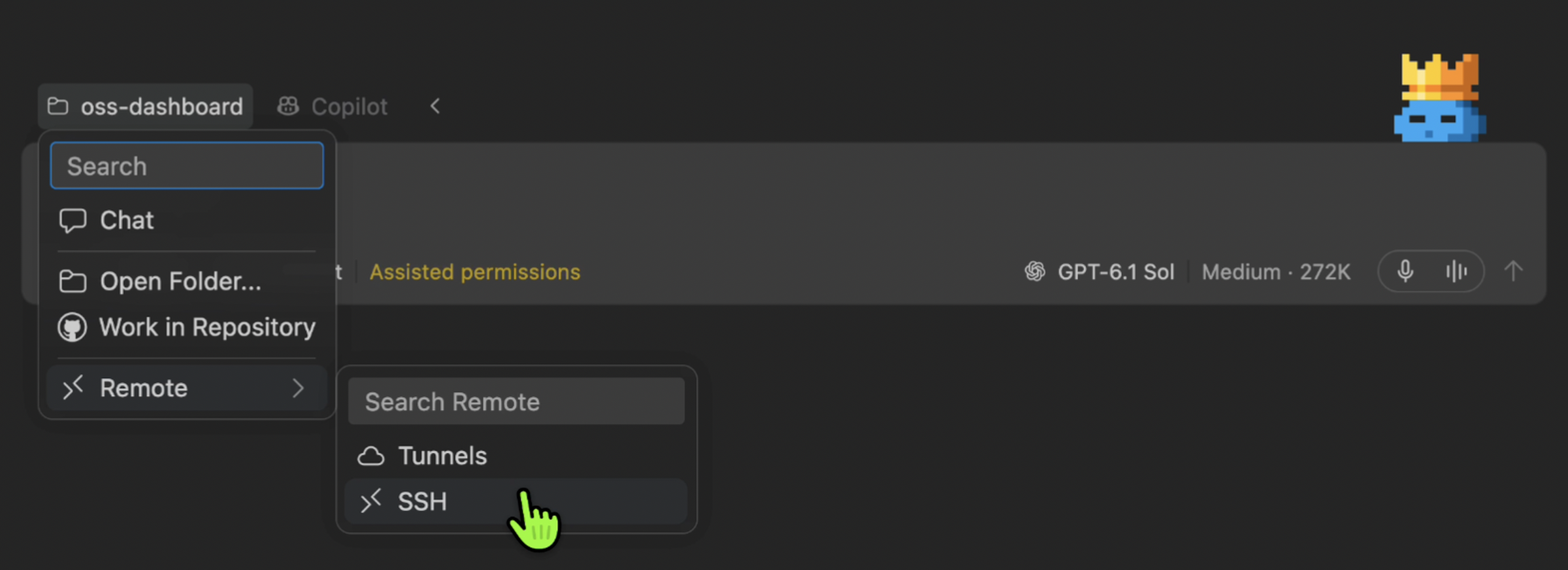
Each application requires explicit approval, and the setting is shared between Copilot CLI and the GitHub Copilot app, so on macOS the system permissions only need to be granted once. Organizations can disable the entire feature by policy. It's worth treating it as what it is: experimental, useful for automating tasks that have no API or CLI, but with no guarantee of stability across versions.
An open protocol for anyone who wants to build their own client
For those who don't want to depend solely on the official clients, GitHub has opened up the Agent Host Protocol (AHP), which lets any connected client stay in sync with a live session and resume state after a reconnection. The code agent host command brings up the host, and client libraries already exist for TypeScript, Rust, Go, Kotlin, and Swift.
This opens room for internal integrations: a team dashboard, an internal bot, an IDE extension other than VS Code, all speaking the same protocol that moves sessions between the cloud and the local machine.
Governance: marketplace, plugins, and connectors
The batch also includes governance adjustments that matter to anyone administering Copilot for a larger team:
| Feature | What it does | Status |
|---|---|---|
| Customization Marketplace | Brings together skills, MCP servers, plugins, and other customizations in one place, accessible via Chat: Open Customizations | Preview, enabled by default |
.github/copilot/settings.json | Registers plugin marketplaces and enables plugins by default at the repository level | Default, not enforced (can be disabled without an enterprise policy) |
| Copilot connectors | Brings context from Slack, Notion, and Microsoft Learn into the session without needing to install an MCP server | Preview, available on all Copilot plans |
Business and Enterprise admins who want these preview features need to enable Editor preview features first. Enterprise policies still control which plugins are mandatory or blocked, and strict marketplaces can turn off the built-in marketplaces entirely.
What to weigh before adopting
In short: the choice of where to run the agent and which model to use isn't free, it shifts cost and risk surface. Before changing the team's workflow, it's worth measuring three things: whether the gain in continuity across devices justifies keeping a GitHub cloud session active; whether the project's compliance requirement justifies keeping Agent Host running on a remote machine just for that; and whether the task at hand really needs comparing multiple models, or whether a single, cheaper model already solves it.
For teams with strong regulatory requirements, the natural path is remote Agent Host via SSH, even with the operational cost of keeping a machine always on. For those who prioritize speed and have no restriction on where the code runs, the cloud session with continuity across phone, editor, and github.com reduces real day-to-day friction. The two options coexist in the same product, and neither is the right answer for every stack.
Translated from the Brazilian Portuguese original · Read the original

GitHub Copilot Fusion automates AI model selection in code
The feature became generally available in GitHub Copilot on October 28, 2026, replacing the manual choice between Claude, GPT-4, and other models with a system that decides on its own, task by task.