
How to do a major PostgreSQL upgrade without downtime in a distributed cluster
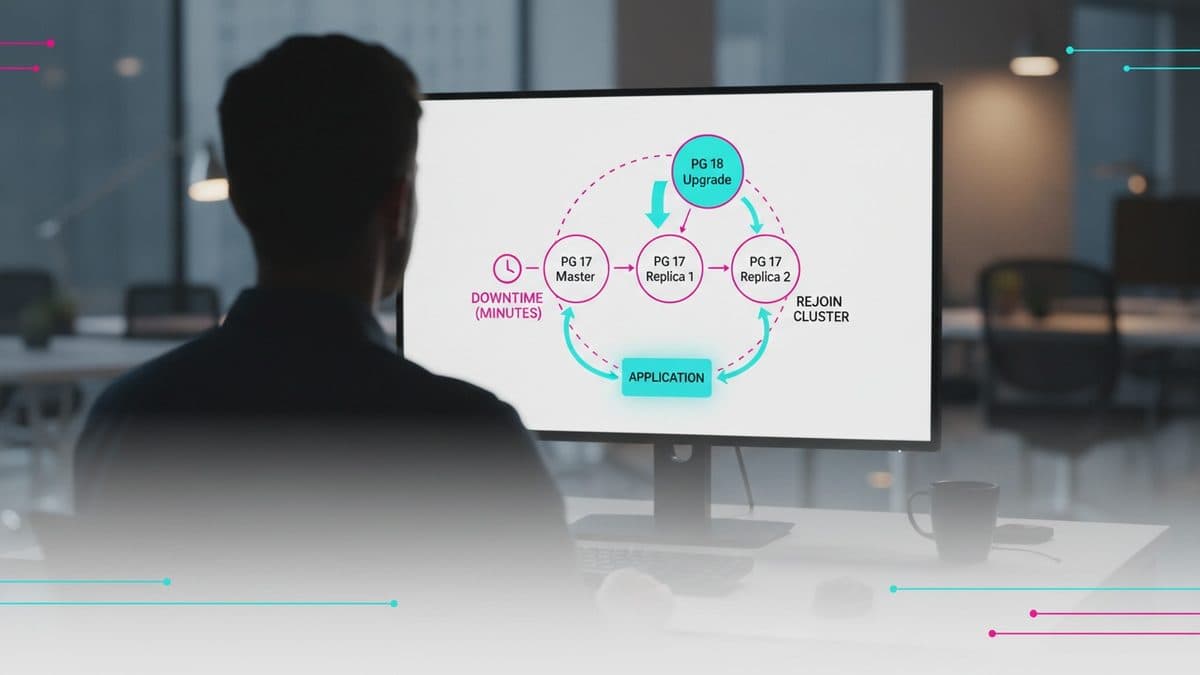
A test published by pgEdge on November 5 shows how to upgrade a PostgreSQL node from 17 to 18 without copying the entire database, using the other replicas in the multi-master cluster to keep the application running while the node drops out for a few minutes.

- Reading
- 7 min
- Tables
- 1
- Code
- 3
A test published by pgEdge on November 5 shows how to upgrade a PostgreSQL node from 17 to 18 without copying the entire database, using the other replicas in the multi-master cluster to keep the application running while the node drops out for a few minutes.
In a post published on November 5, 2026 on Planet PostgreSQL, Ahsan Hadi and Susan Douglas, from pgEdge, document a second way to do a major upgrade in a distributed cluster: updating each node in place, instead of spinning up a new machine for each one. It's a follow-up to an earlier post by the same authors about rolling upgrades, and it solves a practical problem: not every team has spare hardware to keep an extra copy of the database during the migration.
The scenario used in the test is a three-node Spock cluster (pgEdge's multi-master logical replication extension), running on two Rocky Linux ARM64 VMs. One of the nodes, with a physical standby managed by Patroni, went from PostgreSQL 17.10 to 18.6 with pg_upgrade --link. The result worked, but the road had potholes that pg_upgrade's --check doesn't warn about.
Two strategies, one direct trade-off
The difference between the two approaches is hardware versus manual operation time. In rolling upgrades, you spin up a new node already on the target version, let Spock sync it, and retire the old one: zero downtime even for that node itself, but it requires an extra machine per node during the transition. In in-place upgrades, the node goes offline for a few minutes, but the others keep accepting writes the whole time.
| Approach | Extra hardware | Node goes offline | Manual effort |
|---|---|---|---|
| Rolling (new node) | Yes, one machine per node | No | Lower |
In-place (pg_upgrade --link) | No | Yes, minutes | Higher, with undocumented steps |
In short: if the database is too large to duplicate or the infrastructure budget doesn't allow for a temporary copy, the in-place path is the option; the price is more manual work and more points of attention.
The playbook, node by node
The process described is sequential and requires at least three nodes in the cluster, so that two remain standing while one is being upgraded:
- Drain traffic from the node, pause Patroni, stop the standby first and then the primary node.
- Install PostgreSQL 18, run
initdbin a new directory, and put the Spock settings into it. - Run
pg_upgrade --link, which hard-links the data files instead of copying them. - Bring the node up on version 18 and manually restore Spock's replication progress.
- Return the node to Patroni and rebuild the standby from it.
Before starting, the post recommends checking server_encoding, the spock version installed via pg_extension, and the checksum version with pg_controldata. The new version needs to match exactly on these three values.
The default-checksum trap
Since PostgreSQL 18, initdb enables page checksums by default. If the old cluster doesn't use checksums, just running initdb without a flag doesn't solve it, and pg_upgrade --check stops right away with the error "old cluster does not use data checksums but the new one does". The fix is explicit:
/usr/pgsql-18/bin/initdb -D ~/n3data_new --encoding=UTF8 --no-data-checksumsThe second configuration blocker is Spock. The extension needs to be in shared_preload_libraries before running pg_upgrade, otherwise the check fails with "spock is not in shared_preload_libraries". The old node's settings (including wal_level = logical, track_commit_timestamp = on, and max_replication_slots) need to be copied into the new directory's postgresql.conf before the upgrade runs, not after.
The point that decides whether the technique works: replication origins
This is the most important part of the post: pg_upgrade only preserves native PostgreSQL logical replication slots. It carries over Spock's slots (if the source is PostgreSQL 17; on 15 or 16 not even that happens), but it does not carry over the replication origins, which are the mechanism Spock uses to know how far each subscription has already applied changes.
Without the origins, the upgraded node starts sending changes normally, but stops applying the ones it receives from the other nodes, and nothing in the subscription status warns about this. In the test, spock.sub_show_status() showed the other nodes as "replicating" while the log of the freshly upgraded node flagged:
ERROR: replication origin "spk_testdb_n1_sub_n1_n3" does not existThe fix is to recreate each origin at the position the provider-side slot last confirmed (the confirmed_flush_lsn, which survives the upgrade because it lives in the slot, not in the origin):
L1=$(psql -h 192.168.169.158 -p 5432 -d testdb -Atc \
 "SELECT confirmed_flush_lsn FROM pg_replication_slots WHERE slot_name='spk_testdb_n1_sub_n1_n3';")

psql -p 5442 -d testdb \
 -c "SELECT pg_replication_origin_create('spk_testdb_n1_sub_n1_n3');" \
 -c "SELECT pg_replication_origin_advance('spk_testdb_n1_sub_n1_n3', '$L1');"
This is the most important part of this post. Spock tracks how far each subscription has applied using replication origins, and pg_upgrade does not carry them over. It only does that for native PostgreSQL subscriptions.
pgEdge (post signed by Ahsan Hadi and Susan Douglas)
The practical lesson for whoever operates this: never trust only the subscription status after an upgrade. The recommended test is to write to one node and check whether the write shows up on the freshly upgraded node, in both directions, before moving on to the next node in line.
Patroni has surprises too
Returning the node to Patroni isn't just a matter of swapping data_dir and bin_dir in the YAML; a patronictl reload isn't enough, the Patroni process needs to be restarted. And then comes another obstacle: pg_upgrade generates a new system identifier (system ID) for the cluster, and etcd still holds the old one. Resuming Patroni in that state simply makes it go offline.
The solution is to remove the cluster's record from etcd with patronictl remove and let Patroni adopt the running instance again. This only works cleanly if Spock's settings (wal_level, shared_preload_libraries) are in the bootstrap.dcs section of Patroni's YAML; without that, Patroni overwrites those settings with its own defaults when adopting the node.
The standby doesn't follow the new version on its own
A physical standby can't follow a primary that went through a major upgrade: the system identifier changed, and trying a reinit through Patroni results in "system ID mismatch". The way out is to delete the standby's old data directory and let Patroni run pg_basebackup on its own from the new leader, which happens automatically when it finds an empty directory.
It's also worth remembering that everything configured via ALTER SYSTEM lives in postgresql.auto.conf, and that file isn't carried over by pg_upgrade. Parameters like synchronized_standby_slots, used to ensure the other Spock nodes don't advance past the standby, need to be reapplied manually after the upgrade.
Final checklist before moving on to the next node
pg_upgrade itself lists three final tasks, which the post reinforces as mandatory before considering the node ready:
psql -f update_extensions.sqlto update extensions whose version changed between builds.- Two
vacuumdbruns (one with--analyze-in-stages --missing-stats-only, another with--analyze-only) to rebuild statistics that the upgrade doesn't carry over. - Delete the old cluster only after confirming that the new one is stable.
When it makes sense to choose this path
This technique is specific to a distributed cluster with pgEdge's Spock, not a generic feature of vanilla PostgreSQL streaming replication. It pays off when resources are lacking to duplicate hardware or when the data volume makes it impossible to keep a full copy running in parallel during the migration. In exchange, it requires discipline on each of the points above: checksums, configuration order, manually recreated origins, a clean etcd, and a standby rebuilt from scratch.
Those who have the budget to spin up an extra machine per node, even temporarily, come out ahead with the simplicity of the rolling path described in the same authors' earlier post. The in-place path is only worth the complexity when that extra machine isn't an option.
Translated from the Brazilian Portuguese original · Read the original

UUIDv4 as Primary Key Drops Inserts by Up to 38% in Postgres, Test With 100 Million Rows Reveals
A test published by Nikolay Samokhvalov compares UUIDv4, UUIDv7, and bigint as primary keys across three identical tables in Postgres and measures the real cost of each in inserts, WAL, and index size.