Web tool inspects PostgreSQL pg_dump without restoring to a server
PostgreSQL Dump Viewer replays the backup file inside the browser to check tables, foreign keys, and run read-only SQL before any real restore.

PostgreSQL Dump Viewer replays the backup file inside the browser to check tables, foreign keys, and run read-only SQL before any real restore.
PostgreSQL Dump Viewer replays the backup file inside the browser to check tables, foreign keys, and run read-only SQL before any real restore.
Anyone who administers PostgreSQL in production knows the scene: a .dump or .sql.gz file of dubious origin arrives, and the only reliable way to know what's inside is to spin up a server, create an empty database, run pg_restore, and wait. If the file is large, that means minutes (sometimes hours) of waiting just to answer a simple question: is this the right backup? Does it have the table I need? What schema is in there?
A recent post on Planet PostgreSQL describes a tool that tackles exactly this bottleneck: the PostgreSQL Dump Viewer, a free service that opens a PostgreSQL dump without needing any server, restoring the content inside a real PostgreSQL that runs entirely in the browser tab.
The problem that traditional inspection doesn't solve well
Today, without a server, the options are limited. pg_restore and a well-placed grep can list the tables in the file and even display rows from a table as raw text, if the dump is in plain SQL format. But neither tool filters, sorts, or joins. There's no way to answer "how many active customers exist in this dump" or "do these two tables really have the foreign key I expected" without loading the actual data somewhere that understands SQL.
The post clearly separates the two problems: restoring a database means putting it back into operation; inspecting a dump means answering a specific question about a file. These are operations with different goals, and treating them as the same thing is what makes inspecting a received backup, or a pre-restore check, a disproportionately heavy process.
How the Dump Viewer works under the hood
The tool replays the dump inside a PostgreSQL instance that runs in the browser itself (via WebAssembly), without sending the file to any external server. The flow described in the source is straightforward:
- Open the PostgreSQL Dump Viewer in the browser.
- Drag the dump file in. The format detector reads the first bytes of the file, not the extension, so a plain dump saved as
.backupstill opens correctly. - Browse the schema and table tree on the left, with row counts per table, and open a table's data in the Data tab.
From there, the real differentiator shows up: a Diagram tab draws the tables and foreign keys that PostgreSQL recognizes after the replay (even treating partitioned tables as a single entity, not one per partition), and a SQL tab lets you run SELECT and WITH against the actual database, not against a parser that merely simulates PostgreSQL syntax. This matters because PostgreSQL's syntax, functions, and types work exactly as they would on a production server, without the pitfalls of tools that try to interpret SQL without actually executing it.
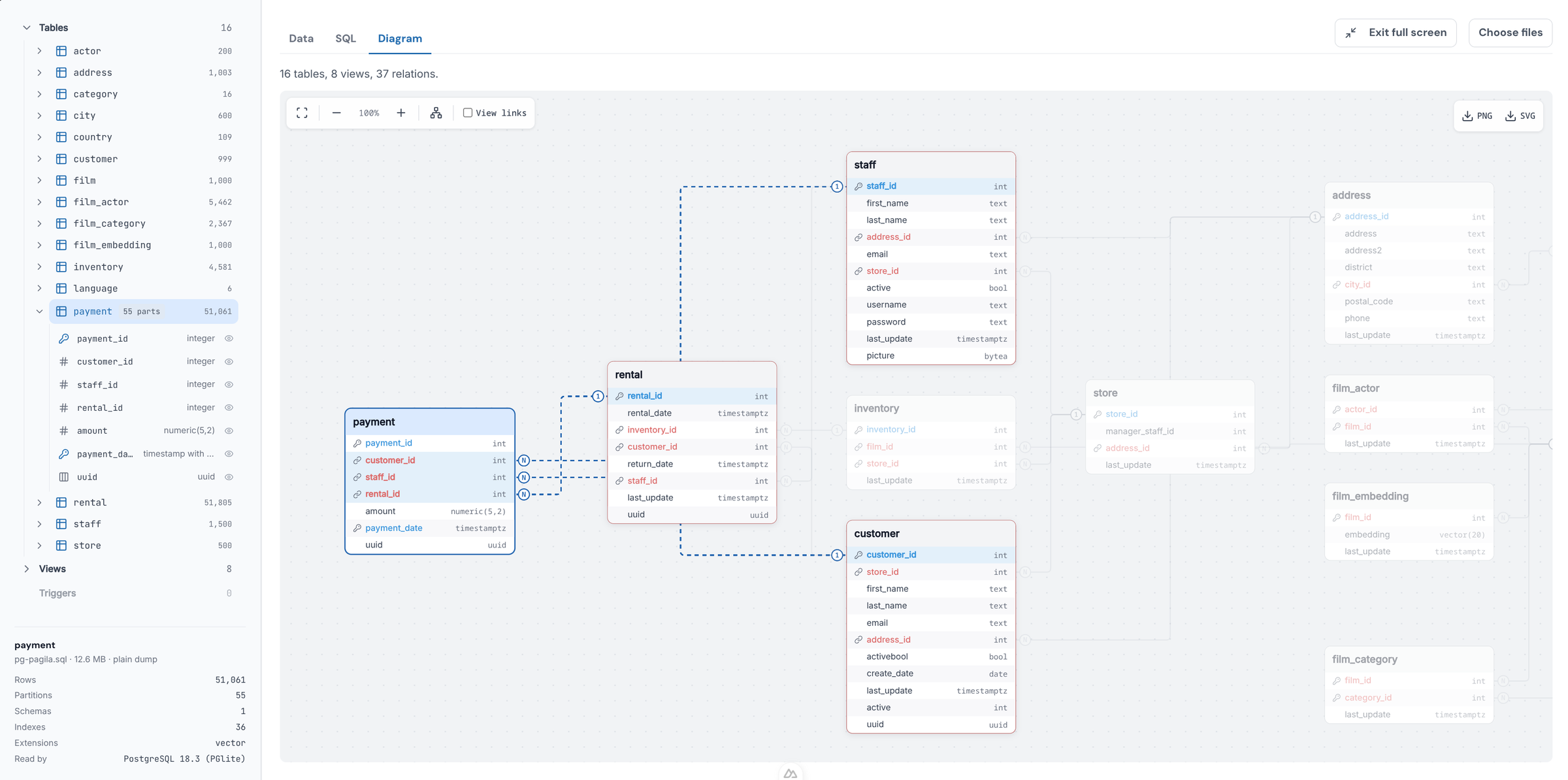
A practical example cited in the post: tables are accessible without a schema prefix, as in SELECT * FROM orders; you only need to qualify (sales.orders) when two tables from different schemas share the same name. The result of any query can be exported as CSV or JSON.
What opens and what doesn't
Here's the point every DBA needs to note before blindly trusting the tool: it doesn't read just any dump. Plain dumps work (.sql, including compressed ones like .sql.gz, .sql.zst, or .sql.lz4) as do tar files generated with pg_dump -Ft. Dumps in custom format (-Fc) and directory format (-Fd), the most common in production backup routines precisely because they are more compact and parallelizable on restore, don't open directly. They need to be converted first:
pg_restore -f dump.sql yourfile.dumpFor a directory-format dump, the command takes the folder instead of the file. In other words: anyone who uses -Fc by default (most pg_dump routines for medium and large databases) needs an extra conversion step before using the viewer, which slightly reduces the promised speed gain.
There's also a memory ceiling: the whole database needs to fit within the 2 GB available in the browser tab, and PostgreSQL itself consumes about a third of that. In practice, this limits the tool to small and medium dumps; a production database with tens of gigabytes still requires a real server. Extensions like PostGIS and pgvector are loaded automatically by the viewer; TimescaleDB is not supported, and objects that depend on it appear listed by name, without being materialized.
Restoring an unknown dump has a real security cost
This is the argument that matters most to anyone dealing with production databases: a dump is SQL, and restoring it executes that SQL with the privileges of the role used for the restore. On a real server, restored as a superuser, a malicious dump can run shell commands and read system files through COPY ... TO PROGRAM. This isn't a rare hypothetical scenario: dumps received from third parties, from clients, from vendors, or downloaded from public repositories for testing carry this risk any time someone decides to simply restore it "just to take a look."
In Dump Viewer, the same SQL runs inside a disposable PostgreSQL isolated in the browser tab, with no access to the network, file system, or shell, and the entire instance disappears when the tab is closed. For anyone who receives a dump from a source that isn't fully trusted and needs to decide whether it's worth actually restoring it, this is a difference in posture, not just convenience: inspection no longer requires the same trust that restoration demands.
Editor extension and the limits of automation
The same engine is available as an extension for VS Code, and via Open VSX for Cursor and VSCodium. An "Ask AI about this file" button lets the editor's agent query the dump in read-only mode and reply in natural language; the post cites as an example asking which customers rent the most movies and getting back the answer along with the executed query and a results table.
The usual caveat is worth noting with this kind of feature: the query is generated by a model, not by someone who knows the schema. It works well for initial exploration of an unknown dump, but any number headed for a business decision or an audit report deserves to have the query manually reviewed before being taken as truth, exactly like any AI-generated SQL.
Where this fits into a DBA's routine
The proposal described in the post is modest, and precisely because of that, honest: the tool doesn't replace pg_restore and isn't meant for production. It serves the moment before the decision to restore: confirming that this is the right backup, quickly seeing whether a specific table is present, checking whether the expected foreign keys actually exist in the exported schema. For an actual disaster recovery, spinning up a server, restoring in full, and validating the application remains the correct and necessary path. What changes is that the cheaper question, "does this file have what I need?", no longer has to cost the same time and the same risk as a full restore.
Translated from the Brazilian Portuguese original · Read the original

PostgreSQL gets tuning playbook to run analytics without sacrificing OLTP
Karen Jex, from Snowflake's PostgreSQL extensions team, detailed at PGConf.EU configuration techniques to isolate heavy analytical queries from day-to-day transactional traffic.