Agile and automated communication with Jira


Regardless of the industry and the complexity of operations, multinationals, small startups, and even mid-sized companies all need to monitor the tasks that are carried out. And far beyond tracking results, these companies need to ensure that everyone involved stays connected and in sync throughout the entire work process.
However simple a piece of information may be, if it doesn't reach a project team that needs it, delays and even errors can occur.
Human or digital communication within a work process must ensure that every piece of information important to a stakeholder and to the project as a whole reaches the interested parties correctly, and that they are aware of its existence and relevance.
If part of the work process has been completed and is ready to kick off another one, whether it belongs to a different team or not, but this hasn't been communicated to those involved for some reason, we end up with not only a delay in the production pace, but also idle time for the team that should have received it, and a loss of trust in the progress of the workflow and in those who failed to pass it along.
Business model demands become tasks, and these tasks are assigned to teams and responsible individuals who often need to pass them along and communicate about them to others involved in the company's production network. Many ways of organizing the workflow of each team and of the project as a whole can be adopted and developed within a company, and various management tools can be used in this type of process, from physical structures like Kanban boards full of post-it notes in the famous standard columns "to do," "doing," and "done," to digital versions of this approach such as Trello, Asana, and many other task, project, and team management systems available on the market.
Even though they offer similar features and capabilities, it's perhaps the functional focus that sets these tools apart from Jira, the on-premises server and cloud software from Atlassian, launched in 2004.
Working in the field of systems development, or even in industries or even bakeries, we can employ practices and frameworks aimed at adapting and bringing flexibility to work processes in order to pursue continuous improvement in the production and delivery of products or services through the agile methodologies available on the market, and even ones that can be developed internally by companies. And precisely in applying these methodologies, we notice that much of the "agility" of the processes is concentrated in communication.
Much of the culture of agile methodologies focuses on the ability to make and accept changes, and whether they are planned and expected or not, maintaining communication about their occurrence and their information is vital for the continuation and progress of a company's projects and processes.
Agile doesn't mean fast, agile means being flexible and adaptable
Even though it is a very important piece of data, a metric, and a significant asset for monitoring and planning projects, time loses some of its relevance when compared to knowledge of the project's progress. Knowledge that can only be achieved through the exchange of essential information with all stakeholders. There's no point in knowing how long a stage X takes to complete if it wasn't effective in moving things along to stages Y and Z.
That's why the features currently available in the Jira tool stand out so much from other physical and virtual systems on the market. Far more than a way to track tasks, activities, and completion time, Jira is a great solution for integrating communication among those involved in the work.
Just as on a Kanban board, all items remain visible, prioritized, and informative regarding their respective status in the project's progress, as well as clearly assigned to the responsible person or team. However, when there are distinct Kanban boards to organize the work of the respective teams that may relate the same items in their processes, with a digital tool like Jira, many features and options become available to make it easier to connect these views with external tools that can assist development, project repositories, automated messengers, and status and performance reports for each part of the workflow.
Not only does it offer standard adaptive solutions as part of the tool's package, but Jira also has the useful advantage of being able to integrate a wide range of add-ons and plugins available in the Atlassian marketplace, some of which allow you to work directly with the code that applies automation to the tool's features, such as Script Runner from Adaptavist, the division that provides Atlassian services around the world.

With this codable and customizable feature in the tool, through the object-oriented programming language Groovy, and other resources, we can run, schedule, and automate function scripts that monitor and perform various types of actions in Jira and its other integrated features, using this functionality to ensure agile communication among stakeholders, allowing everyone who needs to be involved to have all the necessary information through every communication channel possible and permitted for the progress of the workflow.
Some scripts for automation use cases for the Jira tool can be found at the link: https://github.com/GTessarini/JiraAutomations
By implementing programmed functions in the Script Listener, which stays "listening" (receiving) for certain actions that may trigger the start of its execution, we can send messages via e-mail or even via Slack to those involved in the project when a certain item is completed or has its work status changed to a specific identifier needed in the same or another Kanban project, for example, ensuring that no one has to dig through the Kanban boards of related team projects, hunting for changes on their own to get a sense of what's happening in the work process.
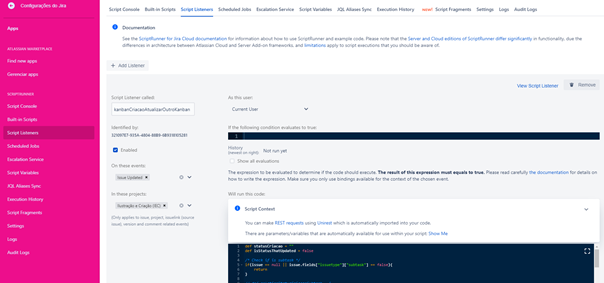
We can implement scripts that ensure notifications about the addition of attachments, files, and even comments on work items, acting as a gateway to the online messenger that would need to be used to notify the person involved. We can also accumulate logs and reports of this information in other items, task cards, and message and data repositories, ensuring awareness of and tracking the pace and scale of production during the project, and analyzing the results obtained at the end.
We can break or multiply a card, a work task, into other specific subtasks for its particular type or Kanban board, detailing each step that makes up the task as a whole, automatically every time it is created.
As in a web-like flow, where an item doesn't go from point A to point B, but is instead worked on and related in parallel at various points in a chain that comes together at a single point of interest for the project, perhaps the most interesting use case for this tool's capabilities is the ability to create each of these points and their tasks uniquely in a single main Kanban board that copies and connects the same task item to all the other necessary boards, exclusively at the time of their respective needs.

For example, if the organization is divided into a project management office that assists, monitors, and requests tasks from other teams, each with its own scope of responsibilities and subjects, we can implement functionalities in which a task, a card in Jira, only needs to be created once on a specific Kanban board for the project team, and it will automatically replicate and move to each necessary team exactly at the moment or status in which it is required to do so, maintaining and transmitting the relevant information to each project team in an integrated and synchronized way in real time, through an automatic link between each team board that has the related task within its scope, sharing all relevant details with everyone involved.
Whether on a production line or in an independent, intermittent project model, a sequential, parallel, or networked flow of work processes must be followed, bringing and carrying information and results to everyone committed to the business model. And integrated communication among all these stakeholders is crucial to avoiding delays, failures, and disinterest in the project. With the Jira tool, we can ensure this transparent and adaptive communication with everyone on the project, and also add and automate features that the tool doesn't currently provide by default, but that allow for free and reliable implementation through function scripts with Script Runner and other functionalities.
Translated from the Brazilian Portuguese original · Read the original