Neural networks roots – Part 03: show me the code
In this article, Ítalo José presents the third part of his series on neural networks. Here, he shows how to implement in Python what would be the equivalent of one (1) neuron.


As already explained in the first and second parts of the article on neural networks, we will implement in Python what would be the equivalent of one (1) neuron.
Detailing our problem a bit
We are an e-commerce and we have a historical database of our customer's behavior within our platform, and we also have the information about whether our customer bought a product or not.
Let's take a look at this data:
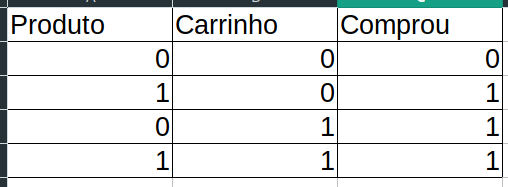
Here we have two pieces of information about our users, where each row is a "buyer" and each column corresponds to the following situations:
- If they entered the product page
- If they entered the cart page
- If they bought
Note that we have a pattern there, where depending on the user's actions, I am able to say whether they will buy something in the store or not!
Let's code this!
We'll start by defining some parameters for our network.
Note: we will not use the bias value here, since it is optional (but very important), and to simplify the example, we'll go without it, just to build the mindset of how a neuron actually works. We'll see more about this when we work with multiple neurons.
import numpy as np

entradas = np.array([[0,0],[0,1], [1,0], [1,1]])
saidas = np.array([0,1,1,1])
pesos = np.array([0.0, 0.0])
taxaAprendizagem = 0.1
We import the numpy library to easily handle some lists/matrices, define our input data (x) and our output data (y), where x = user behavior, which is what I'm going to use to know whether they will buy or not, and y = output data from people who have already gone through our platform, which we will use to check whether our classification data is correct.
We define our weights for each feature that will go into our neuron, and we also choose a learning rate that will be responsible for the convergence speed of our neuron. In other words, how fast it trains.
Once that's done, we can start coding our neuron for real. Let's start with our activation function, which is the last step of our neuron.
def stepFunction(soma):
    if (soma >= 1):
        return 1
    return 0
As explained in the first part of our article on neural networks (or the second), we use an activation function to convert the result of our regression (ax+b or wx+b) into a binary or percentage output (0.0, 0.1, 0.2…0.9).
In this case we will use the step function, which, given a sum of the inputs multiplied by the weights, gives us a value of 0 or 1.
Let's now code the neuron itself.
def calculaSaida(registro):
    #multiplica a matriz "registro"
    #pela matriz "pesos" e depois soma tudo
    soma = registro.dot(pesos)
    return stepFunction(soma)
Note that we are using a function called ".dot()" on this registro variable. Basically, we're going to receive a numpy array as a parameter in the calculaSaida() method, and every numpy array has the ".dot()" method, which takes another array or matrix and is responsible for multiplying these two arrays/matrices. In the end, it returns the sum of everything.
We pass this sum to the Step function, which returns a value of 0 or 1 for us, where 0 means our customer will not buy our product and 1 means our user will buy.
However, for our classifications to come out correct, we first need our correct weights.
How are we going to find these weights? We talked about this in the article on training – take a look.
def treinar():
    erroTotal = None
    #enquanto o erro não for igual à 0 (zero)
    while (erroTotal != 0):
        erroTotal = 0
        #faça o ajuste dos pesos para cada uma das nossas classes
        for i in range(len(saidas)):
            #faz uma classificação
            saidaCalculada = calculaSaida(np.asarray(entradas[i]))
            #Calcula o erro da nossa classificação
            erro = saidas[i] - saidaCalculada
            erroTotal += erro
            #para cada um dos pesos: atualize o valor dele com base no nosso erro
            for j in range(len(pesos)):
                pesos[j] = pesos[j] + (taxaAprendizagem * entradas[i][j] * erro)
                print('Peso atualizado: ' + str(pesos[j]))
        print('Total de erros: ' + str(erroTotal))
After having our weights adjusted, it's just a matter of classifying your users.
treinar()
print('Rede neural treinada')
print(calculaSaida(entradas[0]))
print(calculaSaida(entradas[1]))
print(calculaSaida(entradas[2]))
print(calculaSaida(entradas[3]))
You can find the complete code here.
In the next article, we will talk about multiple connected neurons.
Thanks!
Translated from the Brazilian Portuguese original · Read the original