

Vercel Security Review integrates vulnerability scanning into every push in public beta


- Reading
- 5 min
- Tables
- 1
In public beta for Pro and Enterprise teams, Vercel Security Review scans every push to GitHub for vulnerabilities and suggests fixes via an AI agent. The feature is free only until November 10, 2026.
Vercel has put Security Review into public beta, a feature available to teams on the Pro and Enterprise plans that automatically scans code for vulnerabilities. According to Vercel's official changelog, once enabled, every change pushed to a connected GitHub repository goes through this analysis, and the findings land in a Vulnerabilities panel inside the team's dashboard.
The detail that matters to anyone who lives by the pipeline is the chosen trigger: it's not the pull request, it's the push. That changes what the feature actually sees.
From pull-request review to review on every push
Most of the static analysis tools a front-end team already knows run on top of pull requests: open a PR, trigger the check. Vercel Security Review flips that logic and reacts to push events instead. In practice, this covers a common blind spot: a direct or forced push to the production branch, without going through any PR, also gets reviewed.
Another architectural detail matters to anyone working with a monorepo: when a single push affects multiple projects within the team, all of them get reviewed together, rather than in isolation on each individual deploy. That means a large push can generate a whole batch of findings at once for triage.
What goes into each finding
Every vulnerability reported in the dashboard comes with a package of context, not just a bare alert:
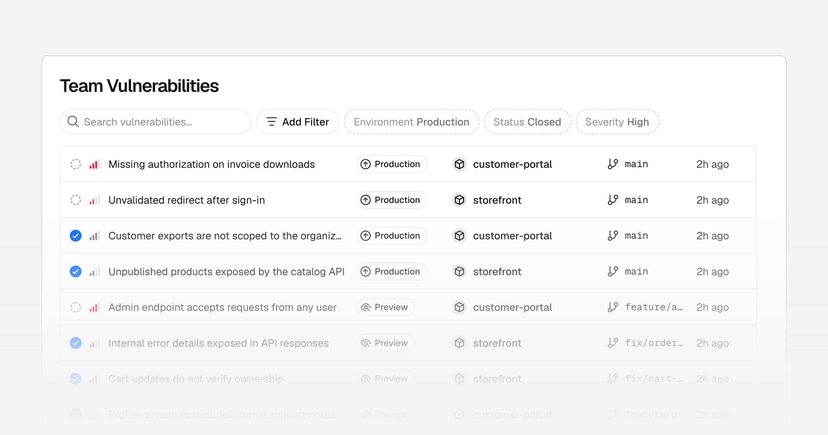
- The exact project, environment, branch, and commit where the issue appeared
- A summary of what was found
- A suggested fix
- An AI-generated severity rating
Security Review also adds its own GitHub check to every analyzed commit. When a pull request is involved, findings show up as review comments linked back to the item in the dashboard. In public repositories, on the other hand, the full detail of a finding stays inside Vercel's dashboard only, without exposure on the public PR itself, which is a sensible decision to avoid publishing an exploitation roadmap alongside open-source code.
Two paths to a fix: Vercel's agent or your own
For anyone who wants to fix things without leaving the flow, clicking "Fix with Vercel Agent" on a finding hands the problem off to Vercel Agent, which proposes a fix and opens a pull request. Nothing gets merged automatically: the PR sits waiting for human approval, which preserves the team's control over what makes it into production.
Anyone who already uses another code agent (Copilot, Cursor, Claude Code, whatever it may be) isn't locked into Vercel's agent. The vercel security vulnerabilities command in the Vercel CLI exposes findings to feed any external assistant, and you can also copy a specific finding as Markdown or JSON and paste it wherever needed. This command requires Vercel CLI version 65.10.0 or higher, so teams still running an older CLI in their pipeline will need to update before using the terminal flow.
Security policies in plain language
One point that sets this feature apart from a generic security linter is the ability to write policies in natural language to give context about how the team builds software. You can define a team-wide policy, valid across all projects, in the Agent settings, and project-specific policies in each project's Security settings.
In practice, this is useful for things like noting that a certain route is intentionally public, that a specific authentication pattern is what the team expects, or that a certain legacy library has a known workaround that shouldn't be flagged every time. It's Vercel's attempt to reduce false positives without requiring configuration in a structured format, which is usually the weak point of traditional SAST tools.
What the tool promises, and what it doesn't
Vercel's own documentation is direct about the feature's limit: Security Review analyzes source code. It's not a security audit, and it doesn't do runtime testing or penetration testing. It helps find vulnerabilities, but it doesn't guarantee the application is free of them.
This matters because it's easy to read "automatic security review on every push" and assume the team just got a complete safety net. It didn't. What exists is a static analysis layer built into the deploy flow, useful for catching what would slip by in a rushed code review, but it doesn't replace penetration testing, infrastructure review, or production behavior analysis. Teams that handle sensitive data still need a deeper security layer alongside this one.
The price after the free period
The billing model follows the same logic already used by Vercel Agent: AI provider inference at the provider's own token price, with no markup from Vercel, plus Vercel's own fee called the Vercel Token Rate.
| Component | What it covers | Price |
|---|---|---|
| Provider inference | Processing of the AI model used in the analysis | Provider's token price, no markup |
| Vercel Token Rate | Vercel's own fee on usage | $0.25 per million tokens (input, cache, and output) |
| Fix with Vercel Agent | Opening a fix PR via the agent | Charged at the same rate as Vercel Agent |
Since every push triggers a new analysis, cost scales with push frequency and the volume of changed code, not with the number of deploys. Until November 10, 2026, security reviews are free; only fixes made with Vercel Agent are already billed at the Vercel Agent rate. After that date, teams with a habit of many small commits and frequent pushes, something common among front-end squads doing continuous deployment, will see the cost show up in the platform usage bill alongside build and serverless function usage.
For anyone evaluating whether to adopt it, the practical math is simple: the feature is worth it if the team already trusts automated code review and wants one more gate without rewriting the pipeline, but asking it to run on every push of every repository without thinking about commit volume can turn a security tool into a significant extra line on the bill.
Translated from the Brazilian Portuguese original · Read the original

Vercel integrates Gemini Omni 1.2 Flash into AI Gateway to generate video via API
Vercel's AI Gateway now lists Google's video generation model Gemini Omni 1.2 Flash, accessible via the same key used for text and embeddings through the AI SDK.