How to connect internal MCP servers on Cloud Run to Gemini Enterprise without exposing infrastructure
- Reading
- 7 min
- Tables
- 1
- Code
- 1
Google Cloud published a reference architecture on November 20, 2026, to connect MCP servers hosted on Cloud Run to Gemini Enterprise over a private network, solving three real pain points for teams moving from prototype to production.
Anyone who has already put an MCP (Model Context Protocol) server to run on Cloud Run knows that the path from prototype to stalled production is short, until the first security block shows up. In a post published on November 20, 2026, Neeraj Agrawal, a Forward Deployed Engineer at Google Cloud, describes exactly this pain point: how to connect a StreamableHTTP MCP server hosted internally on Cloud Run to Gemini Enterprise without opening public ingress.
Cloud Run is a natural choice for hosting these servers: it scales on its own, manages TLS certificates automatically, and already integrates with Cloud IAM. The problem is that as soon as the company's security policy requires internal ingress, any public call from Gemini Enterprise gets rejected at Google's edge with an HTTP 404. That's the gap the reference architecture in the post closes.
The three obstacles that show up in production
The article lists three concrete problems every team runs into when taking an MCP server out of the lab:
- Blocked ingress: with internal ingress enabled on Cloud Run, public calls from Gemini Enterprise (which runs in a tenant project managed by Google, outside your VPC) are rejected right at the edge.
- Double identity check: it's not enough to authenticate the network call; you also need to validate the human user behind it. That means Cloud Run IAM on one side and OAuth 2.0 on the other, in separate layers.
- DNS at Shared VPC scale: large companies run hundreds of Cloud Run services on a shared VPC. Overwriting the entire
*.run.appdomain in a private Cloud DNS zone to resolve a single MCP server breaks routing for every other service on the network.
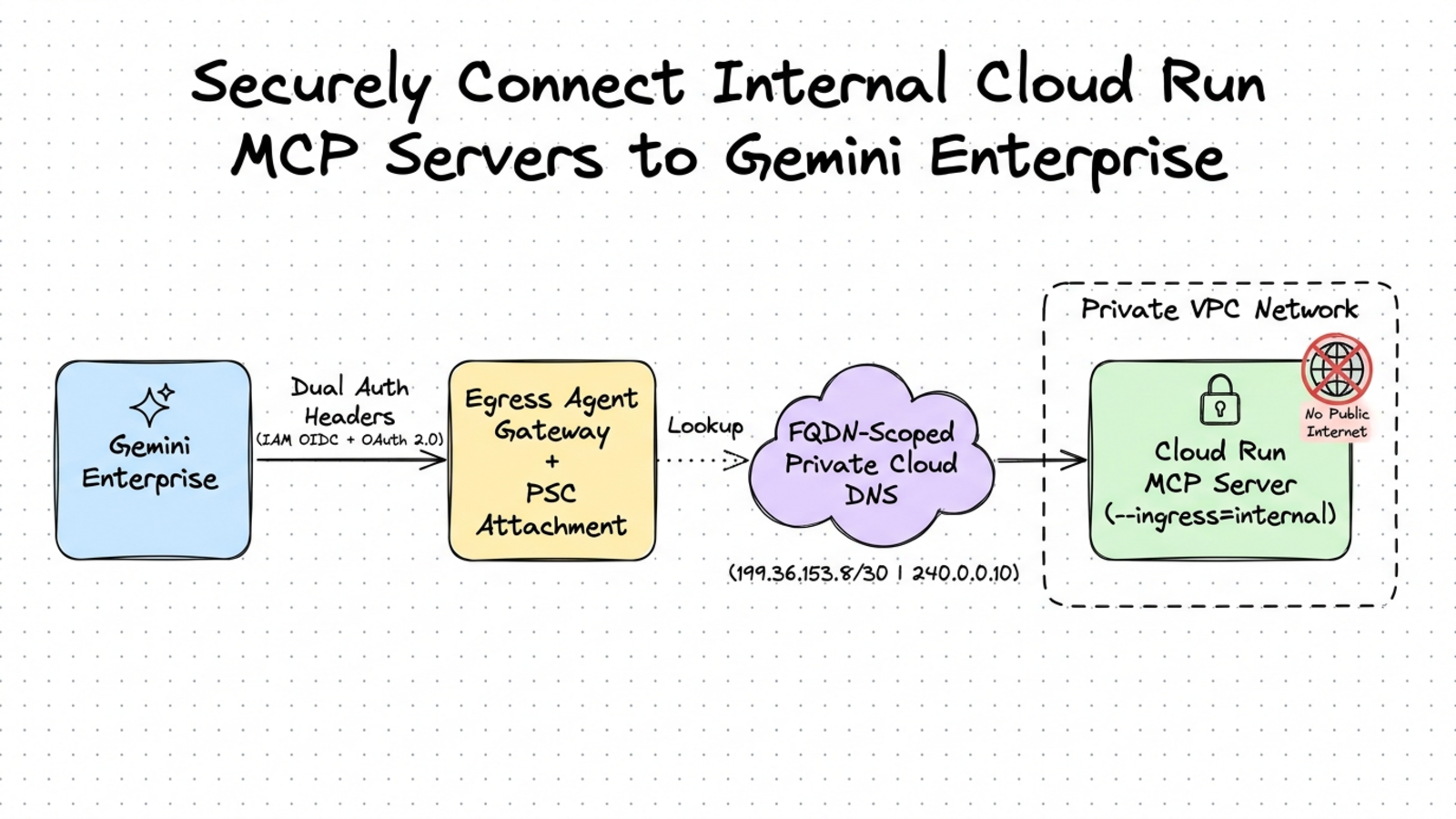
The proposed solution combines three pieces: Egress Agent Gateway, Private Service Connect (PSC), and a Cloud DNS zone scoped strictly to the service's exact FQDN.
How the private path works
Connecting Gemini Enterprise to an internal Cloud Run service requires crossing two network bridges and a tightly scoped DNS resolution, since Cloud Run is serverless and doesn't have a fixed internal IP inside your subnet the way a Compute Engine VM would.
Bridge 1 (entering your VPC): a regional Egress Agent Gateway, in Agent-to-Anywhere mode, connects to a PSC Network Attachment in your regional subnet (us-central1 or europe-west1). This places a managed network interface inside the VPC, with no public IP and no inbound firewall rule.
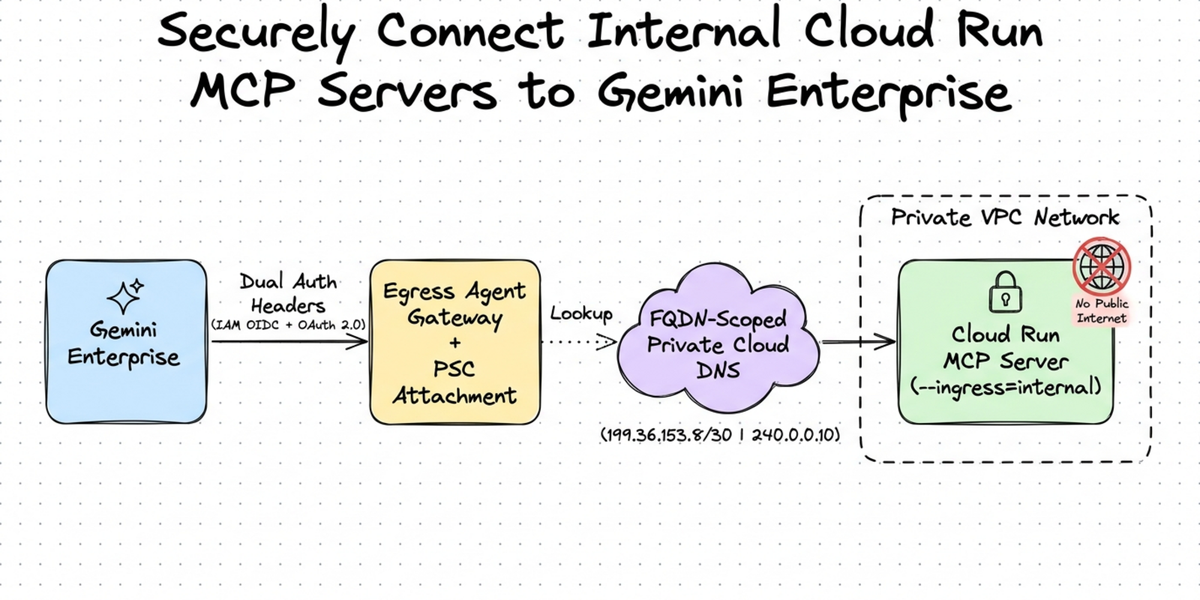
Bridge 2 (from your VPC to serverless Cloud Run): once the packet enters the subnet, it still needs to reach the Cloud Run serverless frontend privately, so the service recognizes the origin as your VPC and accepts the internal ingress rule. The post presents two options:
| Option | Mechanism | When to use |
|---|---|---|
| A: Private Google Access | Internal Google VIPs at 199.36.153.8/30, with no extra endpoint in the VPC | Standard VPCs that keep the 0.0.0.0/0 route to the internet |
| B: Global PSC Endpoint for Google APIs | Global internal IP 240.0.0.10 pointing to Google's all-apis bundle | Locked-down VPCs, without the default internet route, where Google injects a dedicated /32 route |
DNS only for your service, not the whole VPC
The Egress Agent Gateway needs to resolve your MCP server's hostname before injecting the packet into the VPC. Without a private Cloud DNS zone, the public resolution of .run.app points to public internet IPs, which the PSC Network Attachment can't reach, and the call times out with HTTP 502.
The temptation would be to create a private wildcard zone for *.run.app, but that would overwrite the resolution of every other Cloud Run service on the Shared VPC. Google's alternative is to create a Cloud DNS zone restricted to the exact FQDN of your MCP server and pair only that domain with the Agent Gateway. Since Cloud DNS resolves by longest-suffix match, the rest of the network keeps resolving normally, while the Agent Gateway opens the HTTPS connection preserving the original hostname in the SNI and the Host header, ensuring Cloud Run routes to the right container.
Two-layer authentication, in two headers
On every call, Gemini Enterprise sends two distinct authorization headers, which answer different questions:
- Infrastructure layer (
X-Serverless-Authorization): carries an OIDC ID token signed by Google for your project's Gemini Enterprise service agent. Cloud Run IAM validates this token against the Cloud Run Invoker role at the serverless edge and strips the header before the request reaches the container. - Application layer (
Authorization: Bearer): carries the logged-in user's OAuth 2.0 access token, intact, so the middleware inside your MCP server can validate the caller's identity and apply per-user permissions.
The reference repository includes a Python middleware that performs exactly this second validation, built on top of BaseHTTPMiddleware:
class OAuth2ValidationMiddleware(BaseHTTPMiddleware):
    """Validates the end user's OAuth 2.0 Bearer token on MCP requests."""

    async def dispatch(self, request: Request, call_next) -> Response:
        if request.url.path == "/health":
            return await call_next(request)

        auth_header = request.headers.get("authorization", "")

        if auth_header.lower().startswith("bearer "):
            raw_token = auth_header.split(" ", 1)[1].strip()
            verified = await _verify_google_oauth_token(raw_token)
            if verified is None and REQUIRE_OAUTH:
                return JSONResponse(
                    {"error": "Token Bearer OAuth 2.0 inválido ou expirado."},
                    status_code=401,
                )
        elif REQUIRE_OAUTH:
            return JSONResponse(
                {"error": "Cabeçalho Authorization: Bearer <token> ausente."},
                status_code=401,
            )

        return await call_next(request)
Notice that the X-Serverless-Authorization header check has already been handled by Cloud Run IAM before the request gets here: the middleware only needs to worry about the user's Bearer token.
The five configuration steps
The repository accompanying the post automates the deployment with sequential scripts, along with instructions in the Cloud Console:
- Lock down Cloud Run: deploy the StreamableHTTP server with internal ingress and IAM enabled, and grant the Cloud Run Invoker role to the Gemini Enterprise service agent.
- Provision the VPC, PSC Network Attachment, and Egress Agent Gateway: enable Private Google Access on the subnet, create the Network Attachment, create the managed Agent Gateway in Agent-to-Anywhere mode, and grant network and DNS permissions to the automatically created service accounts.
- Configure DNS restricted to the FQDN: create a private Cloud DNS zone only for your service's exact hostname, point the A record to the Private Google Access VIP (or to the internal PSC endpoint, on isolated VPCs), and configure DNS peering on the Agent Gateway for that single hostname.
- Bind the gateway and register the MCP server: in the Security Configuration section of the Gemini Enterprise console, associate the Egress Agent Gateway with your app, register the Custom MCP Server data store with the Cloud Run endpoint and the OAuth 2.0 credentials, and enable Actions mode on the connector.
- Verify in Cloud Logging: reload the custom actions, run a test prompt in Gemini Enterprise, and check the logs to confirm that tool initialization, discovery, and execution go through the private path, with service IAM and user OAuth 2.0 validated.
What changes for builders
For teams already running an MCP server on Cloud Run with public ingress just because they haven't yet hit the company's security policy head-on, this architecture is the missing roadmap before going into real production. The most useful part of the material isn't the Egress Agent Gateway itself, but the idea of scoping private DNS to the exact FQDN of the service: on a Shared VPC with hundreds of Cloud Run services, that avoids a routing incident that usually only shows up after something has already broken.
What remains open in Google's material is how this added cost of a Network Attachment, Egress Agent Gateway, and per-service DNS zone behaves at scale, with dozens of distinct internal MCP servers running at the same time. The GitHub repository cited in the post includes the complete Python server with a Dockerfile and local smoke tests, which helps validate your own case before replicating the architecture in production.
Translated from the Brazilian Portuguese original · Read the original

Inkling 2 Mini uses a looped transformer to run locally without a high-end GPU
Inkling 2 Mini, announced on November 20, 2026 by Thinking Machines Lab via the Hugging Face blog, uses a trick of repeated layers to simulate a larger model while weighing in at 3B active parameters per token.