Canva launches button to turn off all the tool's generative AI

- Reading
- 4 min
- Tables
- 1
Starting November 19, 2026, Canva lets users remove features like Magic Write and Magic Design from the menu, but keeps active tools that edit without generating new content.
The switch that turns off generative AI
On November 19, 2026, Canva announced a switch that turns off, all at once, a large part of the platform's generative AI features (The Verge). The option is located at Profile > Settings > Permission, in an item called Enable generative AI features. Turning it off removes from the menu Magic Expand (which extends photos with AI), Magic Write, Magic Design, Magic Layers, Magic Edit, Dream Lab, Canva Code, AI Shapes, and image generation through the platform's chatbot.
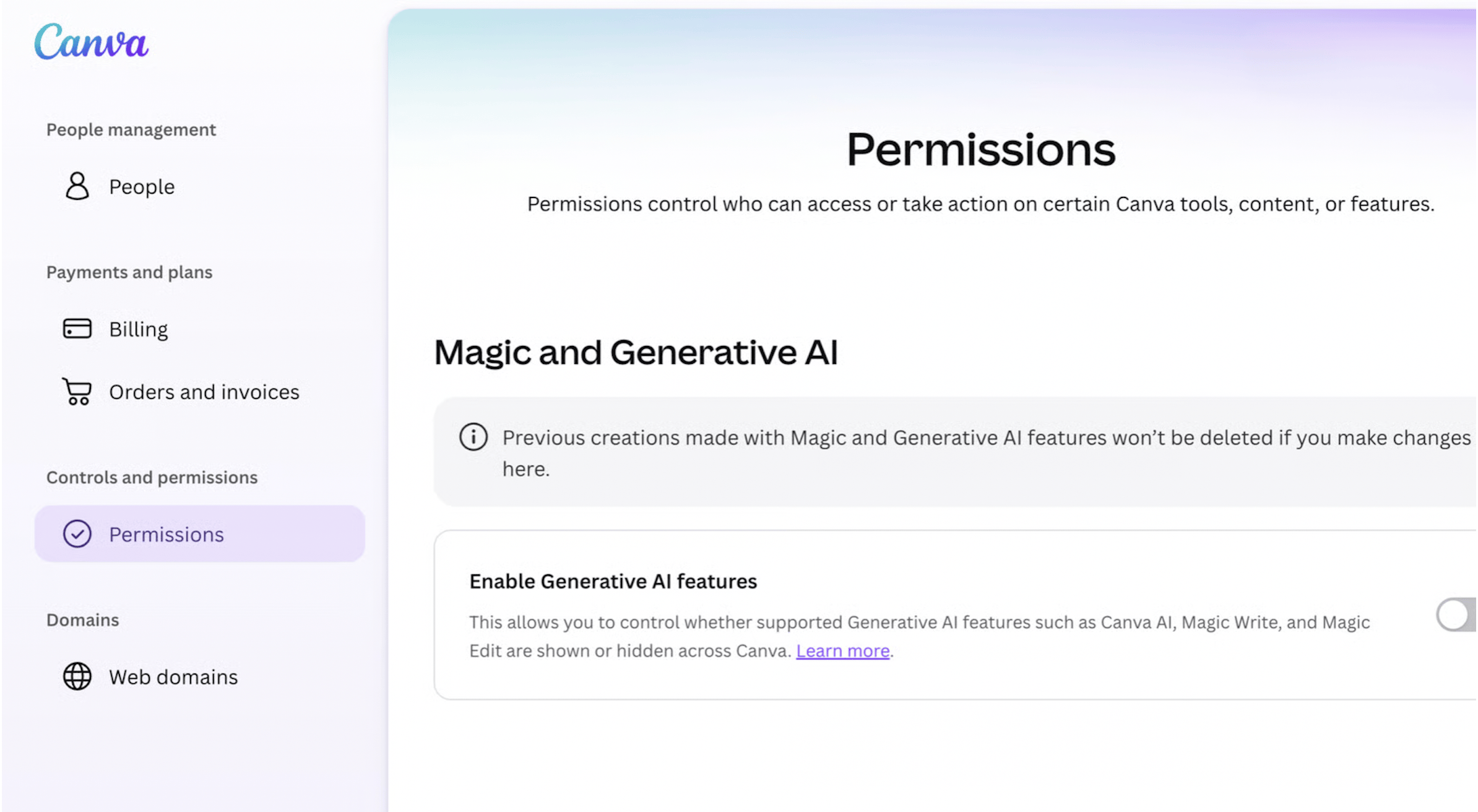
The toggle is available for both free and paid accounts, with no difference in access between plans. It's not a feature hidden in advanced settings: it sits alongside the account's general permissions, which signals that Canva treats it as a first-class option, not as a workaround for dissatisfied users.
What stays on, and why
Not every AI-powered tool disappears when the toggle is turned off. The background remover and Magic Grab, which lets you select an object in an image and move it elsewhere, remain active even with the general option turned off. Canva's justification:
These tools speed up everyday tasks without generating anything new.
Canva
It's a specific dividing line, and it's worth noting the criterion because it's replicable in any product: everything that edits what already exists in the file stays within the toggle; everything that generates new content from a prompt exits it.
| Stays on (editing) | Turns off with the toggle (generation) |
|---|---|
| Background remover | Magic Expand |
| Magic Grab | Magic Write |
| Magic Design | |
| Magic Layers, Magic Edit | |
| Dream Lab, Canva Code, AI Shapes | |
| Image generation in the chatbot |
For those who design product workflows, this table is more interesting than the announcement itself: Canva separated "AI as a productivity tool" from "AI as content author," instead of treating everything under the same marketing label.
The second toggle: less AI in the library
In addition to turning off generation, Canva added a second option: asking to see less AI-generated content in the library of templates, photos, and graphic elements itself. By turning on the setting at Profile > Your account > AI personalization and enabling the option to show less AI content, library searches start prioritizing material created by humans.
According to Canva, a "small portion" of the library is AI-generated, and every design that uses one of these elements carries an AI label in the file's metadata. This detail matters more than it seems for those who use Canva as a visual reference bank in product processes: until now, there was no way to filter real photos from synthetic images without opening each file and manually checking provenance.
Why Canva did this now
Canva has bet heavily on AI since 2023, and had been expanding its generative package without pause: in April 2026 it launched a prompt-based editing update, and in October 2026 it launched its first in-house developed AI model, Canva Craft. At the same time, as The Verge reports, some users started complaining about the volume of AI features pushed through the interface and asked for ways to turn them off.
The off button is, in this sense, a direct response to that fatigue, not a retreat in Canva's product strategy with AI. The company isn't abandoning the bet, it keeps launching its own model, prompt-based editor, image generation embedded in chat. What changes is offering the user the option to simply not see any of this, if they prefer.
What this means for product designers
This launch works as a product case study, not just as settings news. For those who decide what goes on the permissions screen of a creative tool, or of any SaaS with an AI layer, Canva left a concrete precedent for how to design opt-out without simply erasing the feature in a binary way:
- Granularity by function, not by brand: instead of a single "turn off AI" button, the separation between editing and generation preserves what the vendor defines as a productivity gain without synthetic authorship.
- Opt-out replicated in content discovery, not just in active generation: the library toggle tackles a different problem, trusting what appears as a search result within the product itself.
- Transparency via file metadata, instead of leaving that information stored only in the user's personal settings.
For teams evaluating corporate design tools, this gives a concrete argument in a conversation that until now was hard to have with creative SaaS vendors: asking not for a generic "turn everything off," but for a clear separation between editing automation and new content generation, with a visible provenance label on the asset itself.
What remains open
The Verge doesn't detail whether the toggle can be applied centrally to Canva for Teams accounts, nor whether an administrator can force the setting for all members of an organization at once. There's also no public indication, for now, of how many users have turned on the no-generative-AI mode since launch. The change works as a market signal: the pressure to turn off AI that nobody asked for is already strong enough for a company the size of Canva to build an entire interface just for that.
Translated from the Brazilian Portuguese original · Read the original


Apple contrata engenheiros para construir seu próprio agente de IA
A job listing identified by Bloomberg shows that Apple is looking for an engineer to lead an agent capable of browsing the web, operating across apps, and even writing code, entering the race against Meta, OpenAI, Anthropic, and Google.