GitHub Copilot gets team-shared plugin configuration
- Reading
- 4 min
- Tables
- 1
As of November 18, 2026, teams within GitHub organizations can set default Copilot plugins for all members, without requiring each dev to repeat the same manual setup.
What changed, exactly
On November 18, 2026, GitHub announced the general availability of team customizations for Copilot, a feature that was previously in an earlier phase and now applies to any team within an organization. In practice, team maintainers and organization owners can now choose approved Agent Plugins as defaults for the entire team.
Before this, Copilot's customization flow had only two levels: each dev's individual configuration in their own client (VS Code, the Copilot app, Copilot CLI) and the policy for the entire organization, set via admin. The middle ground was missing: a team of eight people using the same set of plugins had no way to share that setup without an internal tutorial or an onboarding script.
How to configure it in practice
The path is straightforward for anyone who already administers teams on GitHub. Team maintainers or organization owners open the organization's team page on github.com and go to the Copilot customization tab. From there, they can:
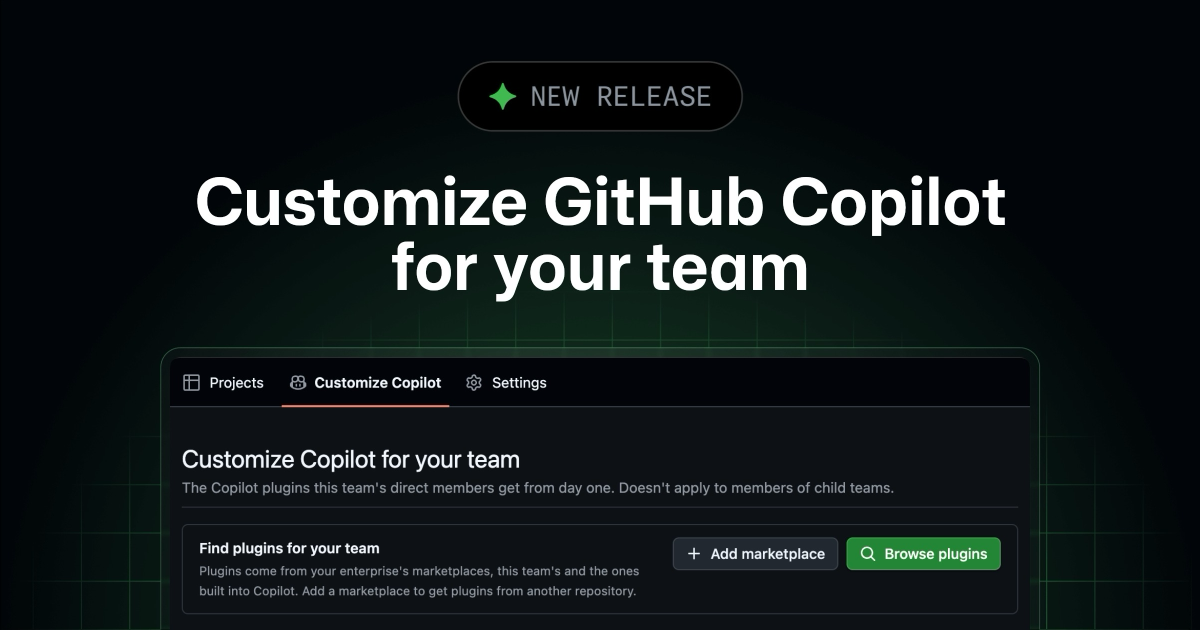
- Browse plugins available in the marketplaces built into Copilot, in the enterprise's own marketplaces, and in any marketplace the team has added;
- Add a marketplace from a GitHub repository that contains a plugin marketplace, making its plugins browsable;
- Select individual plugins to enable them as team defaults.
The chosen plugins are enabled by default for the team's direct members in VS Code, the GitHub Copilot app, and Copilot CLI. There's no need to reconfigure anything locally: as soon as someone joins the team, the plugin already shows up as available in whatever client that person already uses.
What's left out
The fine print matters here. Members of child teams don't inherit the plugins set at the parent team: each team needs its own configuration, a design choice that prevents a small team's policy from propagating unchecked across the organization's entire hierarchy.
It's also worth noting that the team default is just that: a default. Members can turn off a team plugin in their own Copilot client, as long as the organization's policy allows it. In other words, the team configuration isn't mandatory by default: it's a shared starting point, not a lock.
In short: enterprise and organization policies still take precedence over team choices. Copilot clients continue enforcing which marketplaces are allowed and which plugins are required or blocked: the team default doesn't override these controls, it operates within the space the policy leaves open.
How this compares to other ways of standardizing environments
Anyone who's already tried solving this same problem without a native feature recognizes the pattern. Sharing tool configuration among a team's devs is an old pain point, historically solved in very different ways depending on the ecosystem:
| Approach | Where the configuration lives | Maintenance effort |
|---|---|---|
.vscode/settings.json versioned in the repo | In the repository itself | Low, but only covers one project at a time |
| devcontainer | Docker image with everything pre-installed | Medium, requires maintaining the image |
| Onboarding script / dotfiles | Separate team infrastructure repository | High, someone has to remember to run it |
| Copilot team customizations | In GitHub itself, at the team level | Low, centralized and scriptless |
The difference is that the first three options require the dev to run something or clone something. Copilot's team customization is attached to the team's identity on GitHub: joining the team is already enough to inherit the default, with no manual step at all.
When this feature doesn't help
Team customizations is available only for Copilot Business and Copilot Enterprise: users on Copilot Individual or Free don't have this team layer, because the concept of an organization doesn't even exist on those plans. For squads that aren't under a formal organization on GitHub, the path remains individual configuration or onboarding scripts.
It's also not the right tool if the goal is to enforce behavior rather than suggest a standard. Since a dev can turn off the team plugin in their own client (when the policy allows it), anyone who needs to guarantee that a specific plugin is used by everyone without exception still has to rely on organization or enterprise policy, not the team default.
For the common case, though, the gain is concrete: a team that today maintains an "install this, configure that" list on an internal wiki for Copilot onboarding can retire that list and let GitHub itself distribute the setup. It's not much code, but it's real time saved every time someone joins the team.
Translated from the Brazilian Portuguese original · Read the original


JetBrains Will Fold PhpStorm Light Into Standard PhpStorm Instead of Keeping a Separate Build
Since June 2026, JetBrains had been testing a lean version of PhpStorm as an experimental build. Now it has decided to end that experiment and bring the optimizations to the standard version, gradually.