

AWS Lambda Now Supports GPU to Run AI Inference Without Managing Infrastructure
- Reading
- 5 min
- Code
- 3
AWS announced GPU instance support for Lambda Managed Instances functions, allowing model inference, media processing, and rendering to run without provisioning drivers, CUDA, or a cluster.
AWS announced, via the AWS News Blog, that Lambda Managed Instances (LMI) now supports G-series EC2 instances to run GPU workloads inside Event Functions. In practice, this means machine learning inference, media processing, rendering, and scientific computing using GPU with the same Lambda programming model: no driver provisioning, no reconciling CUDA versions, no Kubernetes cluster with a GPU device plugin.
Anyone who has tried running GPU in production knows the tedious part is never the model, it's the infrastructure around it. Choosing the right instance, keeping the NVIDIA driver and CUDA in sync with the image, sizing capacity, writing auto-scaling logic, and plugging that into AWS queues and events is repetitive work that adds nothing to the product. Lambda is trying to take that layer off your plate.
What changes under the hood
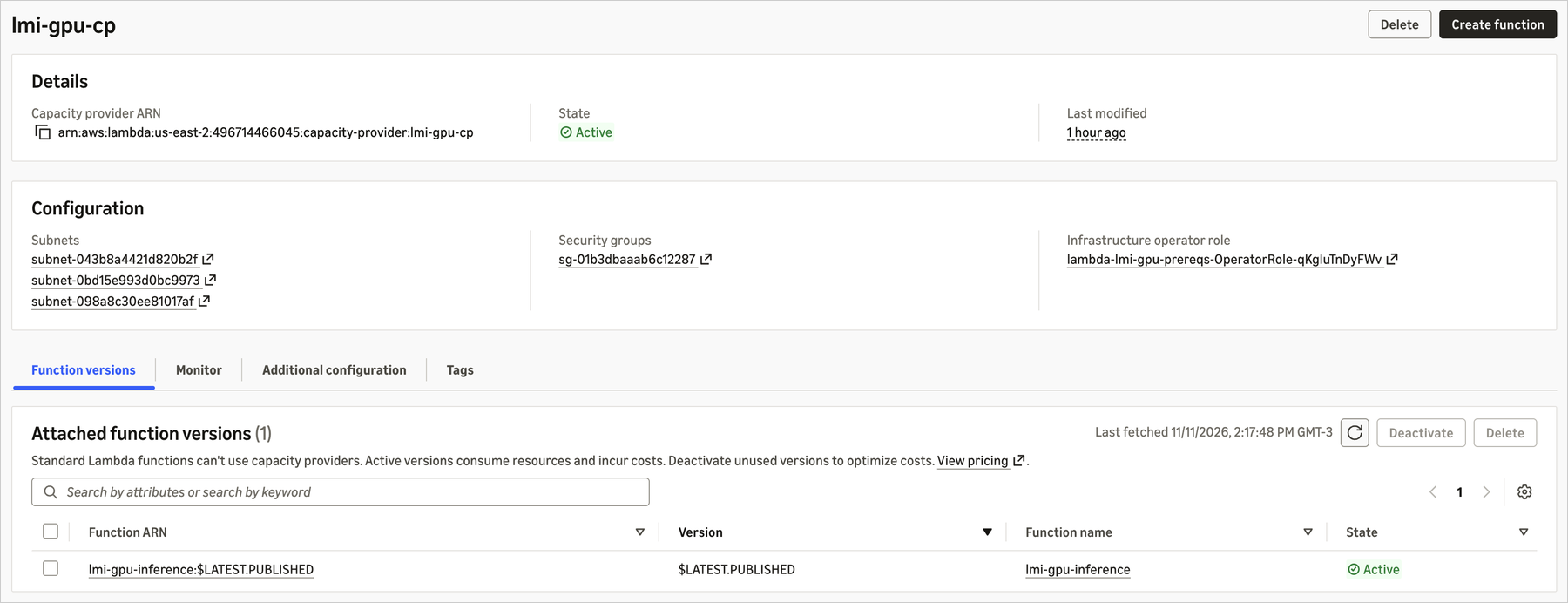
A GPU-accelerated function on Lambda is published as a container image (OCI), just like any container-based Lambda function, except it points to a CapacityProviderConfig with GPU. You create a capacity provider specifying the accepted instance types (g5.2xlarge, g6.2xlarge, g6e.2xlarge, for example), and Lambda picks the cheapest available option, falling back to another generation if capacity is tight:
{
 "CapacityProviderName": "lmi-gpu-cp",
 "InstanceRequirements": {
 "AllowedInstanceTypes": ["g5.2xlarge", "g6.2xlarge", "g6e.2xlarge"]
 },
 "CapacityProviderScalingConfig": {
 "ScalingMode": "Auto",
 "MaxVCpuCount": 96
 }
}
AWS provides curated base images (base:cuda, pytorch:cuda, vllm:cuda, sglang:cuda) that already come with CUDA toolkit, PyTorch, Transformers, and FFmpeg resolved. In the post's own example, the entire Dockerfile for serving an LLM via vLLM is one line:
FROM public.ecr.aws/lambda/deep-learning-containers/vllm:cuda-v1You point the MODEL_ID environment variable to a repository on Hugging Face, on ModelScope, or to an Amazon S3 bucket, and the runtime downloads the weights, manages GPU memory, and brings up an endpoint compatible with the OpenAI API. No inference code is written.
The concrete example: from zero to endpoint in 10 minutes
In the test published by AWS, the flow was: create the capacity provider, build and push the image to Amazon ECR, create the function pointing AcceleratorConfig.AcceleratorMemorySize to 16 GB, publish a version, and invoke it. Publishing the version is when the cold start happens: the execution environments spin up, download the model weights (Qwen/Qwen2.5-1.5B-Instruct in this case), and warm up the inference engine before becoming active, so whoever invokes it afterward doesn't pay that cost.
aws lambda invoke \
 --function-name 'lmi-gpu-inference:$LATEST.PUBLISHED' \
 --cli-binary-format raw-in-base64-out \
 --payload '{"messages": [{"role": "user", "content": "Explain serverless GPU inference in one sentence."}], "max_tokens": 128}' \
 /dev/stdout
Four concurrent invocations finished in the same time as a single one, because the PerExecutionEnvironmentMaxConcurrency parameter makes vLLM batch requests in the same GPU process, sharing one copy of the model in memory. It's this batching that determines whether the GPU you're paying for sits idle or busy: raising this value increases throughput without spinning up a new instance.
The price of convenience
Here lies the trade-off that anyone working with reliability and cost needs to look at head-on before migrating something to this model. You pay the rate for the underlying EC2 instance (eligible for Savings Plans and Reserved Instances), plus a 9.75% management fee on GPU instances, plus the standard Lambda request rate of US$0.20 per million. In exchange, you don't operate a GPU fleet, don't write scaling policies, and don't maintain drivers.
In short: the billing model penalizes idle GPU the same way self-managed GPU does, just trading operational work for a fixed percentage fee. For low-utilization workloads (an occasional batch of inference), this can still be cheaper than keeping a GPU node running 24/7 in an EKS cluster. For constant, high-utilization workloads, it's worth doing the math: the 9.75% fee on a g6e.2xlarge running non-stop can exceed the cost of operating a small, well-sized fleet in-house.
Another practical day-to-day point: new accounts start with a zero quota for on-demand G instances, listed as "Running On-Demand G and VT instances". You need to request a quota increase before testing, which can take hours or days depending on AWS's review, and it's an easy step to forget when planning a POC.
Where this fits into the programming model
A GPU-accelerated function doesn't live in isolation: it's one step within a larger Lambda flow. Lambda durable functions orchestrate multi-step workflows with checkpointing and automatic recovery around the GPU step, and Lambda MicroVMs run untrusted or model-generated code in an isolated sandbox, calling the GPU function only for the inference step. This matters for anyone already designing agents: the tool-use logic runs on cheap CPU, and only the heavy inference goes to GPU.
The feature also inherits the extended timeout from Lambda Managed Instances, up to 90 minutes for asynchronous invocations and event source mapping, which covers media transcoding and multi-step inference without rewriting the architecture around a 15-minute limit. Container limits (up to 32 GB, 10 GB per file), ephemeral storage (up to 32 GB), memory (2,048 to 32,768 MB), and up to 48 concurrent requests per execution environment define the practical ceiling of each function.
When it's not worth it
AWS itself is direct about the scope: the feature is optimized for inference, not training, and for small-to-medium custom models, not for the large foundation models already available on Amazon Bedrock. If the use case is consuming a generic foundation model, Bedrock remains the more direct path; GPU on Lambda pays off when the model is your own, fine-tuned, or a specific task (classification, extraction, computer vision, text-to-speech) embedded within a larger application.
It's also worth being wary in scenarios with critical first-access latency: although the cold start happens at version publication rather than on the first call, switching models or deploying a new version still requires that warm-up. And if the workload saturates the GPU all the time, the benefit of "not managing infrastructure" competes directly with the 9.75% management fee added to the full instance price, which can tip the math in favor of a well-optimized in-house cluster.
The feature is available today, covering the G4dn, G5, G6, G6f, Gr6, Gr6f, and G6e families, with more instance families promised for the future. For those who already use Lambda as the backbone for event orchestration, the missing piece to include GPU in the same model, without opening a second infrastructure stack just for that, finally exists.
Translated from the Brazilian Portuguese original · Read the original

AWS Emulator tests AWS applications locally without cloud cost
AWS released a free emulator that runs locally and responds to the same API calls as S3, DynamoDB, and other services, letting you run tests and code agents without waiting for cloud deploys.