How to Do a Major PostgreSQL Upgrade With No Downtime on a Distributed Cluster With Spock
Ahsan Hadi, from pgEdge, tested migrating PostgreSQL 17 to 18 on a multi-master cluster with Spock and documented the two traps that no status check reveals.

The problem every major upgrade carries
Upgrading the major version of PostgreSQL on a single primary has always raised the same question: how long can the application stay offline? pg_upgrade --link is fast, but it's still a stoppage, and afterward the replicas need to be rebuilt or resynchronized. Ahsan Hadi, from pgEdge, starts from that discomfort in a post published on October 23, 2026 on the company's blog, reporting a test upgrade from PostgreSQL 17.10 to 18.6 on a distributed cluster with Spock, pgEdge's open-source multi-master logical replication extension.
The core idea: instead of upgrading a stopped node, you bring up a new node already on the new version, let it join the cluster receiving and sending changes, migrate traffic to it, and only then retire the old node. Repeat this node by node until the entire cluster is on the new version, without the application ever losing, at any point, an endpoint that accepts writes.
Why multi-master changes the calculation
In a Spock cluster, every node accepts writes and replicates to the others logically, not via physical WAL. This is what allows adding a new node without bringing anything down: it joins as one more multi-master participant, not as a temporary substitute for a node already in production.
It's different from the path the PostgreSQL community is building for version 19, which combines pg_createsubscriber, pg_upgrade, and sequence synchronization in a blue-green scheme. Hadi is direct about this alternative:
This is not really ZERO downtime upgrade because the writes need to be paused for a certain period of time.
Ahsan Hadi, pgEdge
During the PostgreSQL 19 blue-green cutover, writes stop while the last changes drain, sequences sync, and the application switches sides. For a critical application, that pause is still downtime, even if brief.
The lab-tested playbook
Hadi documented the process on a two-node cluster (n1 and n2, both PostgreSQL 17.10 with Spock 5.0.12), running on Rocky Linux ARM64 VMs, and added a third node (n3) on PostgreSQL 18.6 alongside them. For each node that needs a version bump, the loop is always the same:
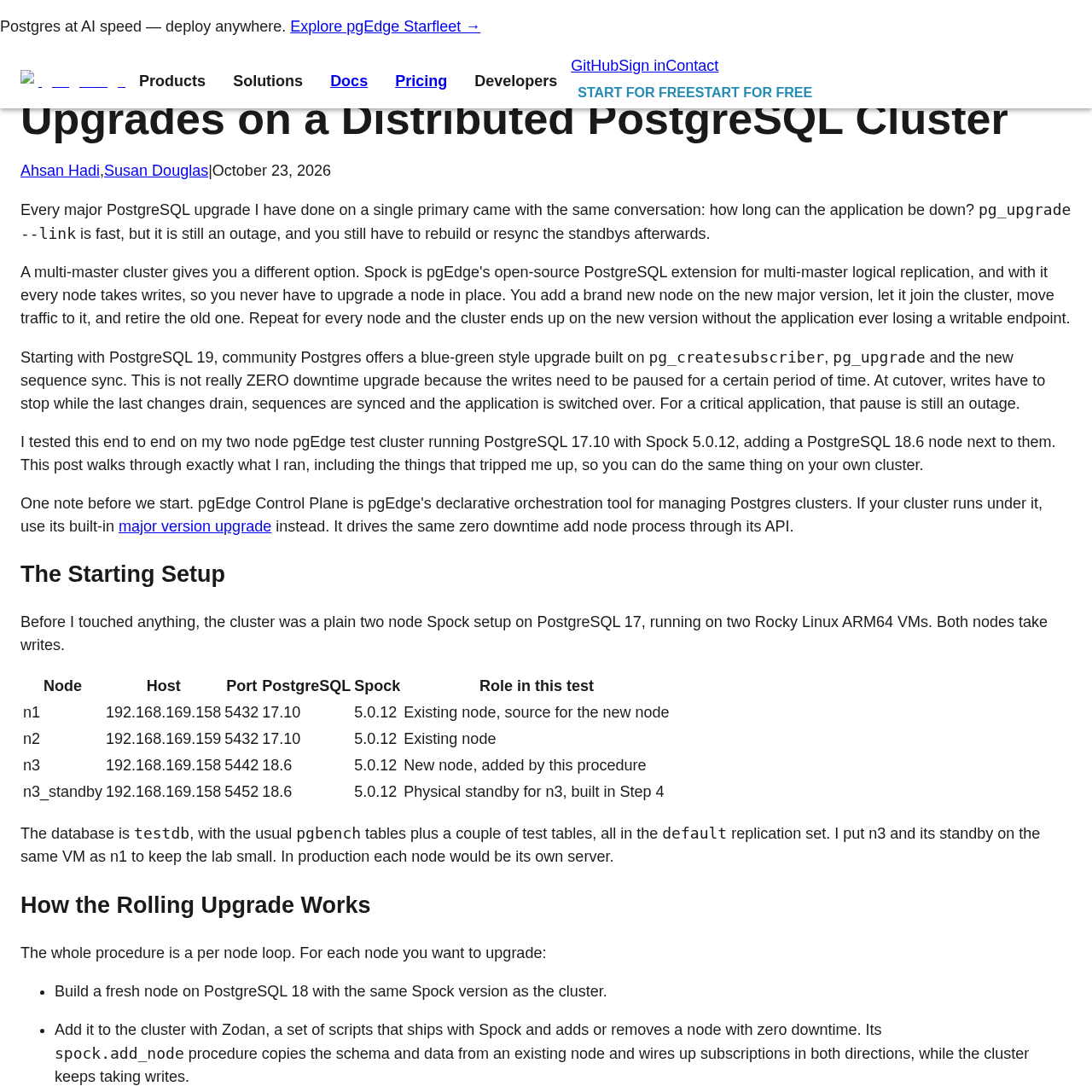
- Build a new node on the target version, with the same Spock version as the cluster.
- Add it with Zodan, a set of SQL scripts that ships with Spock and calls
spock.add_nodeto copy schema and data from an existing node and set up subscriptions in both directions, without stopping the cluster. - Verify that the new node both receives and sends changes.
- If the old node had a physical replica, build a new replica from the new node (he used Patroni for this).
- Move the application traffic and remove the old node with
spock.remove_node.
Before touching anything, you need to check the PostgreSQL version, the Spock version, the node names, and the existing roles with \du. Zodan refuses the addition if the Spock version or the roles don't match between the source node and the new one.
It's also mandatory to turn off automatic DDL replication on all existing nodes before starting:
ALTER SYSTEM SET spock.enable_ddl_replication = off;
SELECT pg_reload_conf();
This has a direct side effect on the operation: no schema change can come from the application until the migration is finished. The upgrade window needs to be planned around the deployment calendar.
The two traps the status check doesn't show
The most important point in Hadi's account isn't Zodan's automation, but two silent behaviors he only noticed by testing end-to-end writes, even with all subscriptions marked as replicating.
Empty replication sets on the new node. With DDL replication turned off, the structure copy creates the tables on the new node, but nothing adds those tables to its replication sets. The node receives everything and publishes nothing. According to the report, in a real upgrade, writes made on the new node would never reach the rest of the cluster, and would disappear for good as soon as the old node was retired. The fix is to copy the replication set association from the source node:
psql -h 192.168.169.158 -p 5432 -d testdb -Atc \
"SELECT format('SELECT spock.repset_add_table(%L, %L, false);', set_name, quote_ident(nspname)||'.'||quote_ident(relname)) FROM spock.tables WHERE set_name IS NOT NULL;" > n3_repsets.sql
psql -p 5442 -d testdb -v ON_ERROR_STOP=1 -f n3_repsets.sql
Slots without failover = true. The logical slots that spock.add_node creates on the new node, the ones other nodes pull changes from, come out with failover = false. PostgreSQL's native slot synchronization ignores these slots, which means that after a replica promotion, the other nodes would lose their read position. The fix requires pausing the subscriptions, altering the slot on a replication connection, and re-enabling:
SELECT spock.sub_disable('sub_n3_n1', true);
-- on a replication connection:
ALTER_REPLICATION_SLOT spk_testdb_n3_sub_n3_n1 (FAILOVER true);
SELECT spock.sub_enable('sub_n3_n1', true);
Patroni rewrites the Spock configuration without warning
To rebuild the new node's physical replica, Hadi put n3 under Patroni instead of running pg_basebackup manually. Patroni took over the running instance and silently changed shared_preload_libraries from spock to None, track_commit_timestamp from on to off, and wal_level from logical to replica.
Nothing breaks until the next restart. After that, the node either refuses to come up or comes up without Spock. Patroni only accepts parameters like wal_level coming from the cluster configuration in etcd, so each Spock requirement needs to be registered there before restarting anything:
patronictl -c ~/patroni/n3.yml edit-config --force \
  -p wal_level=logical -p track_commit_timestamp=on \
  -p shared_preload_libraries=spock -p max_worker_processes=16 \
  -p max_wal_senders=10 -p max_replication_slots=10 \
  -p max_active_replication_origins=10 \
  -p sync_replication_slots=on -p hot_standby_feedback=on
Since these values are stored in etcd, the replica that Patroni subsequently builds with pg_basebackup already inherits the correct configuration, without needing the same manual adjustment.
What changes for those running the database in production
For those already running PostgreSQL with high availability based on physical WAL (Patroni, repmgr, pg_auto_failover), this flow requires rethinking the topology: the zero-downtime gain in the upgrade comes from already having multi-master with Spock running before the upgrade is needed, it's not something you switch on the night before the migration.
A few points of attention come straight out of the report:
- Changing the version doesn't eliminate the need to test writes in both directions before removing any old node: subscription status alone doesn't detect a node that only receives and never publishes.
- The DSN passed to
spock.add_nodeis stored inspock.node_interfaceon every node in the cluster, which reinforces keeping the password out of the connection string, via~/.pgpass. - In production, pointing the Spock DSN at a VIP or DNS name, not at the server's IP, is what allows the subscription to survive a Patroni failover.
- Those already running pgEdge Control Plane, pgEdge's own declarative orchestration tool, don't need to repeat this manual procedure: the same zero-downtime node-adding logic is built into the tool's major version upgrade flow.
When this path isn't worth it
The whole procedure assumes the application already tolerates, or already uses, a multi-master cluster with write conflicts resolved by Spock's logic, which is a much bigger architecture change than simply swapping the database version. For those running a single primary with one or two physical replicas and no other business reason to move to multi-master, the native blue-green approach arriving in PostgreSQL 19 (still with its write pause at cutover) tends to be the simpler path, even though it isn't truly zero downtime.
Hadi also leaves a warning: he hasn't yet tested a full failover in this multi-node scenario during the upgrade, and promises a follow-up post. Until then, it's worth treating the playbook as validated for the happy path (adding a node, replicating both ways, promoting the standby), but not as covering the failure scenario in the middle of the migration window.
Translated from the Brazilian Portuguese original · Read the original

PostgreSQL gets tuning playbook to run analytics without sacrificing OLTP
Karen Jex, from Snowflake's PostgreSQL extensions team, detailed at PGConf.EU configuration techniques to isolate heavy analytical queries from day-to-day transactional traffic.