Thread pool in Percona Server: how to configure it to gain throughput under high concurrency
A Percona benchmark shows that thread pool can multiply throughput by nearly 18 times in high-concurrency scenarios, but it can also worsen performance if misconfigured. Understand the parameters that determine the outcome.

The context: thread pooling is no longer a paid-only feature
Until version 26.7.0 / 9.7.2 of MySQL Community, released in July 2026, anyone who wanted native, free thread pooling had three options: the Percona Server for MySQL plugin, the feature built into MariaDB, or third-party plugins such as xiezhenye/mysql-plugin-threadpool, available on GitHub. Oracle's official plugin always existed, but it was restricted to MySQL Enterprise Edition.
With the feature now also available in MySQL Community, Percona published a benchmark comparing its own thread pool implementation with the new MySQL Server option. This first article in the series, authored by Bogdan Degtyariov and published on October 5, 2026, focuses exclusively on Percona Server: how thread pool works internally and which parameter combinations actually deliver gains. The direct comparison between Percona Server and MySQL Server is left for Part 2.
For those already running Percona Server in production, or considering migrating to it, the value of this material lies less in the announcement and more in the configuration table: the benchmark makes clear that turning on thread pool without criteria can indeed worsen performance.
Why the default threading model breaks down under load
By default, MySQL creates a dedicated thread for each client connection, executes the queries, and destroys the thread when the connection ends. This model is simple and works well with few simultaneous connections.
The problem appears when the number of connections grows far beyond the number of available CPU cores. Creating, destroying, and context-switching among thousands of threads consumes system resources and generates contention, dropping throughput exactly when it's needed most.
Thread pool tackles this problem by reusing a fixed set of pre-created threads to serve multiple connections, instead of creating one thread per connection.
How Percona Server's thread pool works
The mechanism is organized into four pieces that work together:
- Thread groups: the pool divides threads into distinct groups, each associated with a specific CPU core. That's why the number of groups tends to be close to the number of physical cores (though, as the benchmark shows, the ideal isn't always equal to the number of cores).
- Round-robin: client connections are distributed evenly across groups as they arrive.
- Listening and queuing: within each group, a listener thread monitors incoming queries and places them in either a high-priority queue (queries within an active transaction) or a normal/low-priority queue.
- Execution and reuse: worker threads pull queries from the queues, prioritizing high-priority ones, execute them, and wait for the next request instead of terminating.
This design avoids the cost of creating and destroying threads for each connection, but it introduces a new variable: the size and shape of the pool matter as much as the available hardware.
The three parameters that determine the outcome
The benchmark varied three key Percona Server settings. Understanding the role of each is what separates effective tuning from an adjustment that makes things worse:
| Parameter | Range tested | What it controls |
|---|---|---|
thread_pool_size | 10 / 20 / 40 / 80 / 120 / 160 | Number of thread groups in the pool |
thread_pool_max_threads | 12,000 | Maximum number of threads in the pool |
thread_pool_oversubscribe | 2 / 3 / 4 | Threads that can be active simultaneously within the same group |
The baseline for comparison was thread_handling=one-thread-per-connection (thread pool off). With the pool active, thread_handling=pool-of-threads. A test with thread_pool_size=5 was also run, but the result was poor enough to be left out of the final report.
How the benchmark was set up
The test used sysbench OLTP Read-Write against Percona Server for MySQL 9.7.1-1, running on an Intel Xeon Gold 6230 server (2x20 cores, hyper-threading, 80 logical CPUs), 187 GiB of RAM, and 2.9 TB of NVMe SSD storage, on Ubuntu 24.04 with kernel 6.8.0-60-generic.
The dataset had 24 GB (100 million rows) spread across 20 fixed tables. Concurrency ranged from 40 to 5,120 simultaneous client threads, and the ratio between buffer pool and data size was tested across three scenarios: 1:12 (I/O bound, 2G buffer), 1:2 (partially buffered, 12G), and 1:1 (fully buffered, 32G). Each run had a 10-minute ramp-up and a 15-minute measurement window, with a single round per configuration.
The up-to-18x gain, and where it shows up
The most efficient configuration found was thread_pool_size=10 combined with thread_pool_oversubscribe=4, in the I/O-bound scenario (2G buffer against a 24G dataset). With 2,560 simultaneous connections, this combination delivered 2,304 TPS versus just 129 TPS without thread pool: 17.9 times faster.
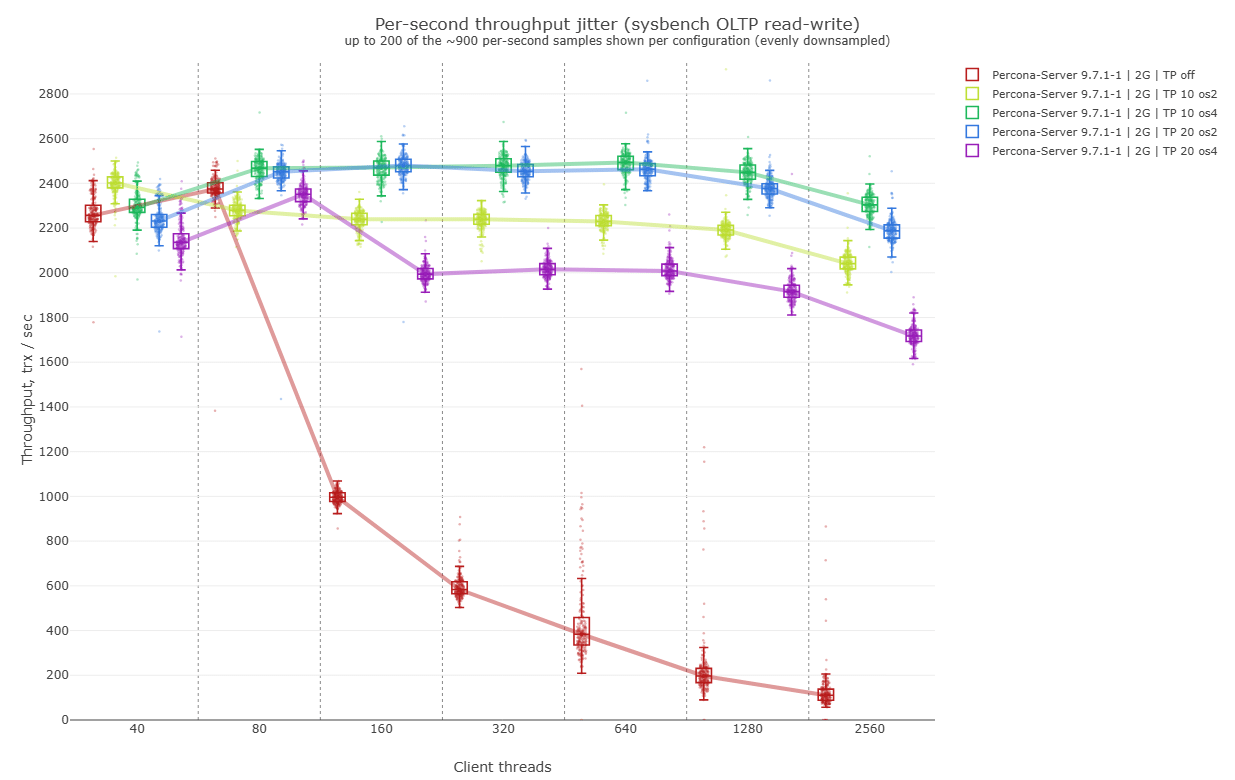
But the gain isn't linear or guaranteed:
- At low concurrency (40 to 80 connections), the effect of thread pool is small; it only stands out from 120 connections onward, when the no-pool configuration starts to plummet.
- Increasing
thread_pool_sizebeyond the optimal point worsens the result: the curves with 40, 80, 120, and 160 groups all stayed below the curve with 10 groups, even though 40 physical cores were available. - Switching
thread_pool_oversubscribe=4tothread_pool_oversubscribe=2in the same configuration (thread_pool_size=10) already cost 11% of TPS (2,304 versus 2,043).
With a partial buffer (12G, covering half the dataset), the optimum shifts: thread_pool_size=20 becomes the best configuration, no longer 10. In other words, there's no fixed recipe: the right value for thread_pool_size depends on the ratio between buffer pool and data size for each workload.
When the dataset fits entirely in the buffer, thread pool loses on the raw metric
With the dataset fully buffered (32G of innodb_buffer_pool_size for 24G of data), the configuration without thread pool won on raw TPS across all connection ranges tested. The biggest difference appears between 80 and 640 connections; after that, all configurations converge to about 16,000 TPS.
In this scenario, varying thread_pool_oversubscribe had practically no effect. And the configuration with thread_pool_size=10, which was the champion in the I/O-bound scenario, became the slowest when the data fits in memory: larger pool sizes performed better here.
In summary: thread pool helps more when I/O is the limiting factor, and the ideal value of the parameters changes according to the ratio between buffer pool and dataset. There's no universal thread_pool_size.
The argument the TPS metric hides: p95 latency
Even in cases where thread pool didn't win on raw TPS (fully buffered dataset), it proved superior on a criterion that matters more to those operating the database in production: latency predictability.
With 2,560 connections and a fully buffered dataset, the slowest 5% of clients (p95) had to wait more than 787 ms without thread pool. With the pool active, that same slice of clients stayed within a much narrower range, between 235 and 297 ms. Some outliers without pool reached 2,000 ms of latency.
This matters because aggregate throughput doesn't tell the whole story: if your application executes several transactions in sequence to complete an operation, it's the latency tail (not the average) that defines the end user's experience.
What this changes for those administering Percona Server
Some practical points for those evaluating turning on thread_handling=pool-of-threads in production:
- Don't turn on thread pool thinking it's a "more performance" button: at low concurrency and with data fully in memory, it may not help TPS.
- Test
thread_pool_sizeat ranges below the number of physical cores before assuming more groups is better. In the benchmark, the optimal value (10) was a quarter of the 40 physical cores available. - Treat
thread_pool_oversubscribeas a sensitive parameter: a suboptimal choice cost 11% of throughput even withthread_pool_sizealready correct. - If your
innodb_buffer_pool_sizecovers a small fraction of the dataset (I/O-bound workload), thread pool tends to deliver the biggest relative gain. - Monitor p95 and p99 latency, not just average TPS. That's where thread pool shows value even when raw throughput doesn't improve.
Percona's own post recommends reading Vadim Tkachenko's article, which compares how thread pool works to urban traffic control, a useful analogy for explaining the concept to teams that don't work with databases day to day. Part 2 of this series, not yet published, promises to pit this optimized Percona Server configuration against the native thread pool in MySQL Community 26.7.0 / 9.7.2.
Translated from the Brazilian Portuguese original · Read the original
Domain, enum, check, or reference table: how to choose the right guardian of integrity in PostgreSQL
A post on Planet PostgreSQL shows why a simple region column exposed the limits of trusting only the application to guarantee data integrity in PostgreSQL.