C# 8.0 – Get to Know Its New Features
In this article, Rafael Cruz presents the new features of C# 8.0 and shows how C#, with each new version released, becomes more powerful.

Hey folks!
In April, the newest version of Visual Studio 2019 was released, and with this new version came C# 8.0.
In this article, I will show the new features of C# 8.0, and we will see how C#, with each new version released, becomes more powerful.
Want to know more about Visual Studio 2019? Read this article, where I present an overview of this fantastic IDE.
- First of all, enable the new C# 8 features in Visual Studio 2019
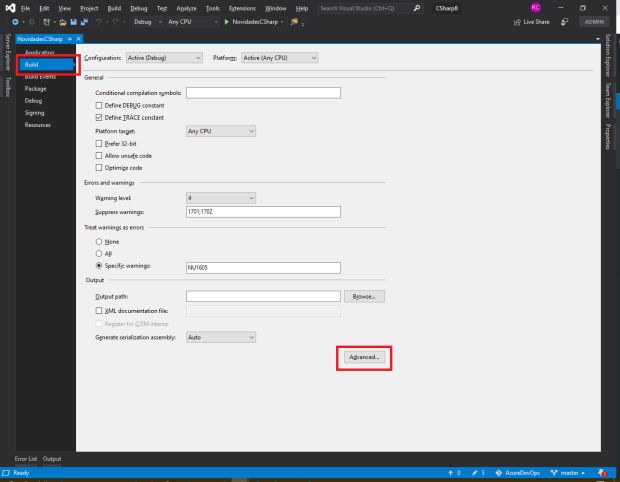
For you to be able to use the new C# 8.0 features, we will need to enable it inside VS 2019. To do this, go to your project's properties, choose the Build option, and click Advanced.
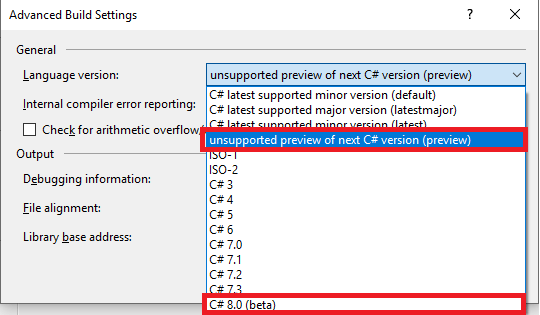
Then, select from the combo box, C# 8.0 (Beta) or unsupported preview of next C# version (preview).
1 – Range and Index
With the new C# 8.0, we no longer need to use System.Linq to slice an array. Now, with the new Range and Index types, we can select a range of items within an Array.
See the example below:
public class RangeSample
{
    static void Main(string[] args)
    {
        string[] techs = new string[] { "ASP.NET", ".NET Core", "SignalR", "Azure", "C#", "Docker", "Visual Studio", "Visual Studio Code" };
         //Returning elements from indexes 1 to 5
         foreach (var item in techs[1..5])
            Console.WriteLine($"{item}");

         //Returning elements from position 1 to the second-to-last
         foreach (var item in techs[1..^1])
             Console.WriteLine($"{item}");
         //Returning up to the element at position 5
         foreach (var item in techs[..5])
             Console.WriteLine($"{item}");
         //We can use the Range type and use it as a variable
         Range range = 0..6;

         foreach (var item in techs[range])
            Console.WriteLine($"{item}");
         //We can also use the Index type
         Index last = ^1;
         Console.WriteLine(techs[last]);
    }
}
2 – Async ForEach
A new type called “IAsyncEnumerable” was introduced, and with it, we can make our collections asynchronous. Also, in this new version, we can now use the await keyword in ForEach.
See the following example:
 public class AsyncForEach
 {
    public struct Data
    {
        public Data(int value1, int value2) => (Value1, Value2) = (value1, value2);
        public int Value1 { get; set; }
        public int Value2 { get; set; }
    }
    public static async IAsyncEnumerable<Data> GetDataAsync()
    {
        var r = new Random();
        for (int i = 0; i < 10; i++)
        {
             await Task.Delay(100);
             yield return new Data(r.Next(100), r.Next(100));
        }
    }
    public static async Task DemoAsync()
    {
        await foreach (var x in AsyncForEach.GetDataAsync())
        {
            Console.WriteLine($"{x.Value1} {x.Value2}");
        }
    }
}
3 – Switch Expressions
In this new version of C# 8.0 we have Switch Expressions, which are a powerful way to write cases.
With this new C# Feature, we can create powerful expressions for each situation and make our Switch Cases more streamlined.
See the example:
var result = operation switch
{
    "+" => a + b,
    "-" => a - b,
    "/" => a / b,
    "*" => a * b,
    _   => throw new ArgumentException("Operação não encontrada")
};
We can also use Switch Expressions for Tuple operations, see how powerful Switch becomes:
 public enum State
 {
     Open,
     Closed,
 }
 public static State GetState((State, State) state, bool warning = false)
 {
     return state switch
     {
         (State.Open, State.Open) when warning => State.Closed,
         (State.Open, State.Open) => State.Open,
         (State.Open, State.Closed) => State.Closed,
         (State.Closed, State.Closed) => State.Closed,
         (_, _) => State.Closed
     };
 }
4 – Property Patterns
Still talking about Switch Expressions, we have Property Patterns, which aims to make it easier to implement expressions that use properties of a given object.
Check out below how we can use it:
public class Address
{
   public string State { get; set; }
   public decimal CalcularTaxa(decimal salePrice)
   {
       return this switch
       {
           { State: "RJ" } => salePrice * 0.06M,
           { State: "SP" } => salePrice * 0.75M,
           { State: "MG" } => salePrice * 0.05M,
           _ => 0M
       };
   }
}
5 – Using Declarations
We can use the using keyword to tell the compiler that the variable being declared should be removed at the end of the scope. This makes our code much more readable, since we don't need to keep opening using blocks all the time.
See the example:
public class UsingSample
{
   public void EscreverNoArquivo(IEnumerable<string> lines)
   {
       using var file = new System.IO.StreamWriter("file.txt");
       foreach (string line in lines)
       {
          file.WriteLine(line);
        }
    }
}
The “file” variable will be discarded at the end of the execution of the “EscreverNoArquivo” method.
I hope you enjoy these new C# 8.0 features, and with each new version the language becomes more powerful, making our day-to-day work easier and easier.
Cheers, and see you next time!
Translated from the Brazilian Portuguese original · Read the original