Vercel introduces Virtual Models in AI Gateway to swap AI models without redeploying

- Reading
- 6 min
- Tables
- 1
- Code
- 3
New AI Gateway layer separates the model ID used in code from the actual configuration behind it, allowing you to swap model, fallback, and retention policies without a deploy.
Vercel introduced Virtual Models in AI Gateway, a layer that decouples the model name used in production from the actual configuration behind it. In practice, this changes where engineering teams store decisions that today live scattered across the code.
Vercel introduced Virtual Models in AI Gateway, a layer that decouples the model name used in production from the actual configuration behind it. In practice, this changes where engineering teams store decisions that today live scattered across the code.
Vercel announced on its official blog the Virtual Models, a new AI Gateway layer that separates the model identifier used in code from the actual configuration running behind it. Instead of pointing an AI call directly at anthropic/claude-opus-5.5, the team now points it at an ID like vmc/coding-agent, and decides elsewhere which model, fallback, and retention policy that ID represents.
It's a small architectural change on paper, but one that tackles a real problem for anyone running AI agents in production: the speed at which models change no longer matches the deploy cycle of the app that consumes them.
The problem: swapping models still means a redeploy
Vercel's AI Gateway already treated model swaps as a one-line change: the developer edits the model string in the code, and the Gateway routes the call to a healthy provider, with automatic fallback if one fails. According to Vercel, in the last 90 days 125 new models from more than 10 different labs became available in the Gateway, an average of about 10 per week.
The friction wasn't in deciding to swap models, it was in propagating that swap. A line of code is still a line of code: it lives in a repository, goes through review, needs a build, and ends in a redeploy. For a team running dozens of different agents and tasks, every model swap turned into a full CI/CD cycle just to update a string.
In short: Virtual Models take that string out of the code and put it in an AI Gateway dashboard (or in the CLI). The app keeps calling the same ID; what changes the model behind it is configuration, not a deploy.
How it works in practice
Creating a virtual model happens through the Vercel CLI or the team's dashboard. The command below creates the ID coding-agent, points it at a specific Anthropic model, and already turns on Zero Data Retention:
vercel ai-gateway virtual-models create coding-agent \
 --model anthropic/claude-opus-5.5 \
 --config '{"speed":"fast","zeroDataRetention":true}'
In the application code, the only thing that changes is the string passed as model to the AI SDK, which now uses the vmc/ prefix (virtual model config) instead of the provider/model pair:
import { streamText } from 'ai';

const result = streamText({
 model: 'vmc/coding-agent',
 prompt: 'Remove the deprecated API calls from this module.',
});
When a better or cheaper model comes along, the team edits the virtual model, not the code:
vercel ai-gateway virtual-models edit coding-agent --model openai/gpt-6.1-solAccording to Vercel, every app and agent that calls vmc/coding-agent starts using the new model within minutes, with no code change and no new deploy. This also applies to coding agent harnesses like Claude Code and Codex: after running vercel ai-gateway setup, you just select the virtual model in each tool's model picker.
One ID per task, not one ID per app
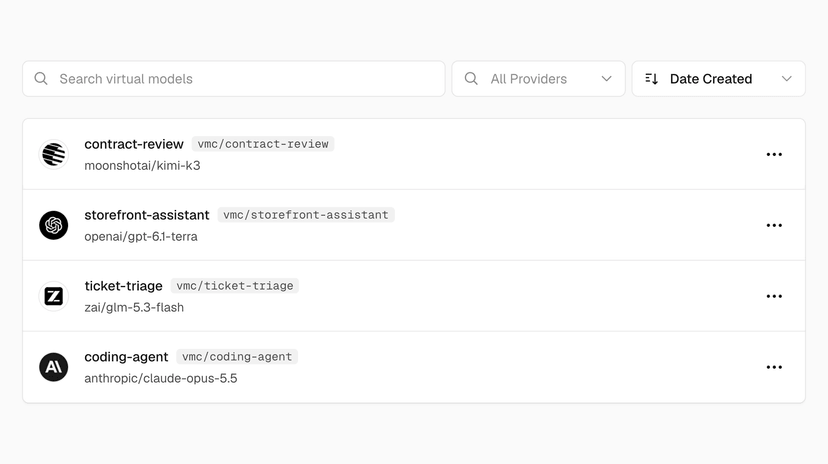
The approach Vercel proposes isn't "one virtual model per application," it's one virtual model per task. The logic is simple: support ticket triage runs hundreds of times per hour and needs to be cheap; legal contract review runs a few times a day and requires more expensive reasoning. Each task gets its own ID, with model and configuration sized to what it actually needs:
| Virtual model | Use case | Key configuration |
|---|---|---|
vmc/coding-agent | Code agent (Claude Code, Codex, internal apps) | Fast mode, Zero Data Retention required |
vmc/ticket-triage | High-volume support triage | Providers ordered by cost |
vmc/storefront-assistant | Storefront assistant, latency-sensitive | Ordered by time to first token, with fallback defined |
vmc/contract-review | Legal contract review | High reasoning effort, Zero Data Retention required |
Fallback, Zero Data Retention, and tags are tied to the virtual model, not to the specific model. Swapping the model behind a virtual model keeps those policies in place; what changes are the previous provider's specific options, which stop applying and need to be reviewed manually. According to Vercel, for example, an Anthropic-specific setting stops being valid once the virtual model starts pointing at an OpenAI model, which is why it's worth reviewing provider options whenever the swap involves different providers.
Vercel recommends a validation path before swapping a virtual model that already serves production traffic: create a second ID, such as vmc/coding-agent-candidate, point it at the new model, run the team's evals against it, and only then promote the swap to the original ID. If quality drops after the switch, the way back is to point the ID at the previous model again, with no deploy to roll back.
Governance: who decides what the team calls
Anyone on the team can call a virtual model by its ID, but team roles control who can change the configuration behind it. This gives platform and security teams a single point of control: opening up access to new models for everyone, while keeping the decision of which model actually runs in the hands of whoever is accountable for cost and compliance.
The precedence design is the most important detail for anyone running this in production: virtual model settings always win over individual request settings. An app can't override the provider order, the fallback, or the service tier defined centrally, even if it tries to specify something else in the call.
The same applies to data retention: if a virtual model requires Zero Data Retention or providers that don't train on request data, that requirement holds even if a specific call tries to turn off zeroDataRetention or disallowPromptTraining. Tags follow the same rule, overriding any tag sent by the application, so that spend and volume for each task show up correctly on the Virtual Models page, regardless of how each app labels its own calls.
What this replaces, and where the limit still lies
Virtual Models don't replace AI Gateway, they're a layer on top of it: billing still reflects the provider's price, with no markup and no platform fee on inference, including on BYOK (Bring Your Own Key) calls. The feature works with every type of model supported by the Gateway, including image, video, speech, embedding, and real-time models, and is compatible with the AI SDK and with the OpenAI- and Anthropic-compatible APIs.
The real gain is operational, not model performance: teams that already centralize model and configuration in their own feature flag service or internal proxy gain little by adding yet another layer of Vercel abstraction on top. Where the feature pays off is the opposite scenario, common in smaller squads or products with many agents: model strings scattered across dozens of files, with no fallback standard, and no central visibility into spend per task.
It's also worth noting what the feature doesn't solve on its own: swapping the model behind a virtual model doesn't guarantee the prompt and the agent's behavior will still hold up well with the new model. Vercel's own suggested validation flow (candidate ID, run evals, only then promote) makes clear that responsibility for response quality still rests with whoever writes the prompt and the tests, not with the routing infrastructure.
Translated from the Brazilian Portuguese original · Read the original

Paseo Runs AI Agents on Vercel Sandbox with Persistent Sessions Between Laptop and Phone
A plugin connects Paseo to Vercel Sandbox: the conversation with the agent is saved in the cloud, you can switch devices mid-task, and the AI Gateway key never enters the execution environment.