FLUX.3 Image Klein arrives in Diffusers with bounding box layout control
Black Forest Labs released the open model with native support in Diffusers, multi-reference image generation, and coordinate-guided editing; see how to install it, GPU costs, and what changes in the code.

What changes with FLUX.3 Image Klein
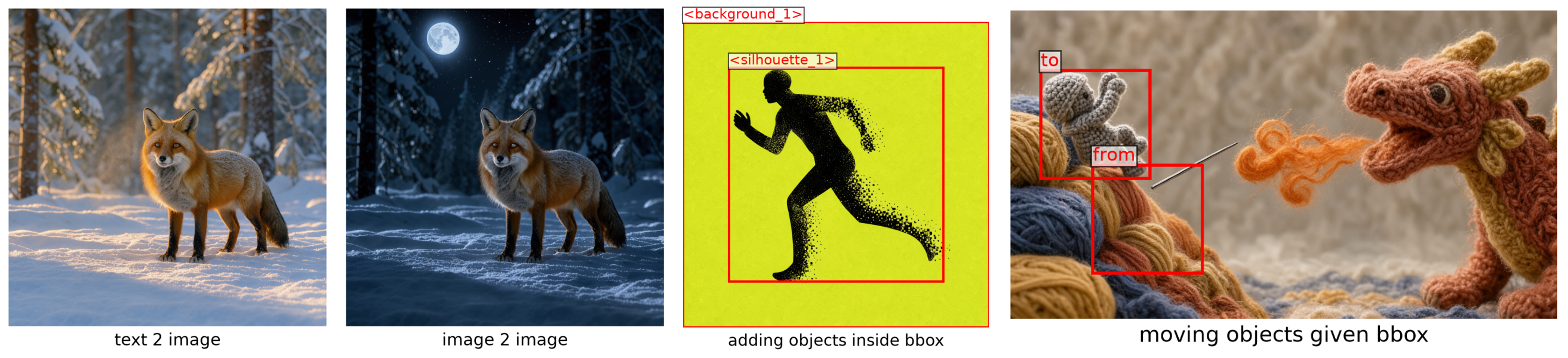
Black Forest Labs released FLUX.3 Image Klein on October 15, 2026, a new open image-generation model that has run in Hugging Face's Diffusers library since launch day. The main news isn't just another text-to-image generator: the same checkpoint handles text-to-image, editing with multiple reference images, and, for the first time in the FLUX family, bounding box layout control. The user writes in the prompt where each element of the scene should go, in normalized coordinates, and the model follows it.
There are two open versions, gathered in the FLUX.3 Image Klein collection on Hugging Face: black-forest-labs/flux-3-image-klein, distilled by timestep (16 steps, no classifier-free guidance), designed for fast inference; and black-forest-labs/flux-3-image-klein-base, the base model, with 50 steps and CFG, recommended as the starting point for fine-tuning. You can also try it without installing anything, through the space Black Forest Labs made available on Hugging Face.
Running locally with Diffusers
The integration shipped ready via ModularPipeline, the modular architecture the Diffusers team has been consolidating. To install it, according to the official Hugging Face Blog post, you need to pull the latest version of the package, because FLUX.3 uses Qwen3-VL as the text encoder:
pip install -U diffusers transformersLoading the distilled checkpoint and generating an image takes just a few lines:
import torch
from diffusers import ModularPipeline

pipe = ModularPipeline.from_pretrained("black-forest-labs/flux-3-image-klein")
pipe.load_components(dtype=torch.bfloat16)
pipe.to("cuda")

pipe(prompt="a red fox", output="images")[0].save("fox.png")
The source recommends full descriptive prompts (subject, setting, light, composition, style) instead of loose keywords. To change resolution or the number of steps, the height, width, and num_inference_steps parameters go directly into the pipeline call.
Multi-reference and layout control
What sets FLUX.3 Image Klein apart from earlier models in the family comes in two parts. In simple editing, you pass an image via image=, and the prompt works as a caption for the desired result, already including the change. With more than one reference, each image is cited in the prompt as <ref_image_0>, <ref_image_1>, and so on, in the order they appear in the list passed to image, which makes it possible to combine elements from different photos into a single scene.
Layout control comes as a JSON block appended to the prompt, with a list of regions. Each region has an id, a bbox (coordinates [y_min, x_min, y_max, x_max], on a 0-to-1000 scale, independent of the actual image size), and a desc. For editing, instead of a single bbox, each region carries an src_bbox (where it comes from, in the reference) and a tgt_bbox (where it goes, in the output); when the two are equal, the element stays in place.
The amigurumi knight example, used in the official Hugging Face Blog post (signed by Aritra Roy Gosthipaty, Sayak Paul, and Linoy Tsaban, from the Diffusers/Hugging Face team) to illustrate the model's launch, shows the use case: moving only the knight figure in the image, keeping the background, cliff, needle, and dragon intact, each with src_bbox equal to tgt_bbox to lock the position. It's a form of coordinate-guided editing that until now relied on hand-painted masks or less predictable inpainting.
Quantized variants, for those without an H100
Black Forest Labs also publishes the transformer as a single file, in bf16 and in two quantized formats, fp8r (per-row FP8) and nvfp4, loadable with from_single_file without downloading the full bf16 weight:
from diffusers import BFLQuantizationConfig, Flux3Transformer2DModel, ModularPipeline

model_id = "black-forest-labs/flux-3-image-klein-base"
variant = "fp8r"  # or "nvfp4"

transformer = Flux3Transformer2DModel.from_single_file(
    f"https://huggingface.co/{model_id}/blob/main/variants/{variant}/model.safetensors",
    config=model_id,
    subfolder="transformer",
    quantization_config=BFLQuantizationConfig(compute_dtype=torch.bfloat16),
    dtype=torch.bfloat16,
)

pipe = ModularPipeline.from_pretrained(model_id)
pipe.update_components(transformer=transformer)
fp8r has fast kernels on GPUs with compute capability 8.9 or higher (Ada, Hopper, Blackwell); on older cards, the weight is dequantized at every step, which saves memory but doesn't speed anything up. nvfp4 follows the same logic, except it requires Blackwell with flashinfer-python and flashinfer-cubin at the same version to gain speed.
The memory numbers published by Hugging Face offer a yardstick for deciding which variant is worth it:
| Variant | GPU | Peak after loading | Peak after inference |
|---|---|---|---|
| nvfp4 | RTX6000 | 13.4 GiB | 15.3 GiB |
| fp8r | H100 | 14.35 GiB | 16.27 GiB |
| bf16 | H100 | 18.80 GiB | 20.72 GiB |
For even more modest GPUs, the post suggests freeing the text encoder after using it (it runs once per image, before denoising) and turning on automatic offload via ComponentsManager.enable_auto_cpu_offload, which moves each component to the GPU only while it's in use. Hugging Face itself didn't measure this path, so there's no reference number for it.
How much it costs to run, in time
The published speed tests were run on a single 80 GB H100, without offload, with the default attention backend, averaging three runs after warm-up, using the distilled checkpoint (16 steps):
- Text-to-image, 1024×1024: 1.93 s, peak of 23.8 GiB
- Image-to-image, one 1024×1024 reference: 3.87 s
- Layout editing (the knight example), 1360×768 reference: 4.10 s
A single reference nearly doubles the time because its tokens enter the same sequence as the text and the image being generated: a 1024×1024 reference adds 4,096 tokens to every transformer call. It's the kind of cost that needs to factor into the latency budget before putting a feature with multiple references per call into production, because the time grows with each extra image, it doesn't stay fixed.
Fine-tuning with LoRA
Diffusers already ships DreamBooth LoRA scripts for both tasks, text-to-image and image editing. The official example trains a tarot style from the multimodalart/1920-raider-waite-tarot-public-domain dataset, triggered by the trtcrd keyword:
accelerate launch train_dreambooth_lora_flux3_klein.py \
  --pretrained_model_name_or_path="black-forest-labs/flux-3-image-klein-base" \
  --dataset_name="multimodalart/1920-raider-waite-tarot-public-domain" \
  --caption_column="caption" \
  --instance_prompt="trtcrd" \
  --output_dir="trained-flux3-tarot-lora" \
  --mixed_precision="bf16" \
  --resolution=1024 \
  --use_aspect_ratio_buckets \
  --train_batch_size=1 \
  --rank=16 \
  --lora_alpha=16 \
  --learning_rate=1e-4 \
  --lr_scheduler="constant" \
  --max_train_steps=1500 \
  --validation_prompt="a trtcrd of a cat, tarot style" \
  --validation_epochs=25 \
  --seed=0 \
  --push_to_hub
It's the base checkpoint (50 steps, with CFG) that serves as the starting point for fine-tuning, not the distilled one: the post is explicit about that. For those with less VRAM, three flags change the cost directly: --gradient_checkpointing recomputes activations in the backward pass (less memory, slower), --cache_latents pre-encodes the images and frees the VAE, and --use_8bit_adam keeps the optimizer state in 8 bits. For instruction-based editing, the train_dreambooth_lora_flux3_klein_img2img.py script trains on triplets of reference image, target image, and instruction.
Under the hood: two attention stages
The architecture explains why layout works so well. FLUX.3 is a flow-matching model in latent space: the VAE (the same one from Flux.2) compresses the image 8x in each direction, producing 32 channels, and packs each 2x2 block of that latent into a single 128-channel token. That gives one token per 16x16-pixel patch; a 1024x1024 image becomes a grid of 4,096 tokens, and each reference goes through the same path, keeping its own size.
The text goes through Qwen3-VL, but FLUX.3 doesn't use just the last layer: it reads the hidden states from 8 of the 36 layers (4, 8, ..., 32), stacks that into a 20,480-dimension vector, and projects it to the transformer's 3,072 dimensions, bringing in information from multiple depths of the language model, not just the final layer.
The transformer processes everything in two stages. In the first, each modality (text, noisy image, references) goes through 5 blocks with its own weights, without talking to each other. In the second, the three sequences are concatenated into [text | image | reference] and go through 28 blocks with shared weights, where everything attends to everything. It's a design difference from Flux.2, whose "double-stream" blocks already let text and image talk from the start; FLUX.3 separates first, fuses later.
Another detail underpins coordinate-based editing: each token receives its own modulation timestep. Noisy image tokens are modulated by the current timestep; text and reference are always modulated by timestep 0, that is, "already clean, no denoising needed," which explicitly marks a reference as given context, not as something to be generated. Positioning uses RoPE on four axes, (t, h, w, l), and since the reference uses the same (h, w) coordinates as the output, "the same point in the reference" has a precise meaning for the model, exactly what src_bbox/tgt_bbox exploits.
What changes for those building with it
For those who already integrate image generation into a product, two points matter more than the rest. First, layout control via normalized coordinates removes a layer of uncertainty that mask-based inpainting always carried: you can version a prompt with a bounding-box JSON and expect reasonable reproducibility, instead of redrawing a mask on every attempt. Second, the cost of a reference doubling inference time needs to factor into the latency budget before a multi-photo editing feature goes into production, because it grows with each extra image in the call.
Those who already use Diffusers with FLUX.1 or FLUX.2 don't need to relearn much: the API changes little, and the pipeline remains modular, you can swap individual blocks via ModularPipeline. The practical decision lies in the variants: nvfp4 only pays off on Blackwell with the right libraries at the same version, fp8r already gains speed on any Ada, Hopper, or Blackwell GPU, and the bf16 path remains the most predictable for those with GPU to spare who want to run without complications.
Translated from the Brazilian Portuguese original · Read the original

How to measure whether an AI agent really works, according to Google
An agent can look perfect in the demo and still blow past cost limits, get stuck in a loop, and fail silently in production. Google details, in a playbook published on October 15, how to structure a real evaluation beyond manual testing.