Google's A2UI and CopilotKit bring generative UI to TypeScript agents

- Reading
- 7 min
- Code
- 5
On October 29, Google and CopilotKit published a guide showing how agents built with LangChain, Google ADK, AWS Strands, and Mastra can draw reactive interfaces, not just text, using the open A2UI standard.
From text lists to the interface the agent draws
Until recently, asking an AI agent to put together a trip meant getting a block of running text: six packages to Bali in March, each with dates, hotel, flight, and price, all in prose. You picked one, the agent sent a link, and the actual booking happened somewhere else.
The problem wasn't that the agent couldn't plan. It was the lack of a standard way for it to draw, within the conversation itself, a selectable list, a destination map, or a date picker that carried the user through to the end of the flow.
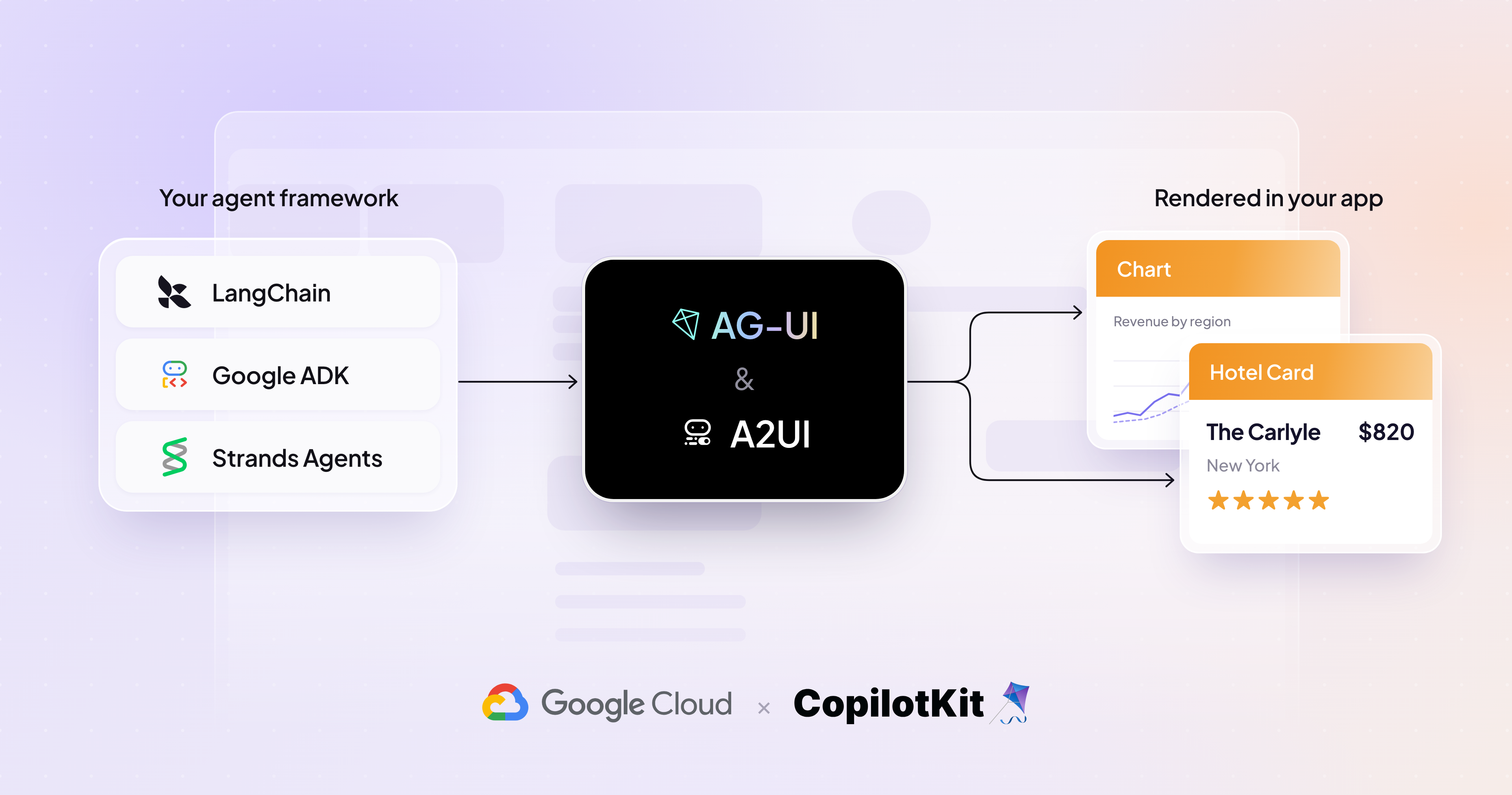
On October 29, 2026, the Google team published, together with Atai Barkai, CEO of CopilotKit, a guide showing how to close this gap with two components: A2UI (Agent-to-UI), Google's open standard for describing agent-generated interfaces, and CopilotKit, an integration layer that connects that standard to frameworks such as LangChain, Google ADK, AWS Strands, and Mastra. In this tutorial, I follow the path the two teams documented, from the Python backend to the component catalog in the TypeScript frontend.
What exactly A2UI is
A2UI addresses a spectrum of problems, not a single point. At one end, you define each component in advance and the agent only chooses which one to use and with what data: it's brand-safe, but doesn't truly personalize. At the other end, the agent returns an entire UI program in HTML, JavaScript, or Dart, run in an isolated iframe: it covers any unforeseen case, at the cost of straying from your design system and running code a model wrote.
The declarative mode, the most commonly used in practice, sits in the middle: the agent assembles the screen from pre-declared components, in a common language any renderer understands. Three characteristics underpin this mode:
- Safety by default: A2UI is declarative data, not executable code. The client maintains a catalog of trusted components, and anything the agent invents outside of it is blocked before it reaches the screen.
- LLM-friendly streaming: the response is a flat list of small JSON messages that reference each other by ID, so the agent emits them gradually and the client renders components as they arrive.
- Real portability: the same response runs on React, Lit, Angular, SwiftUI, Jetpack Compose, and Flutter, plus community renderers for Vue and even terminal.
A2UI's basic catalog ships with 18 layout, display, input, and container primitives. In practice, most production projects define their own custom catalog, because 18 generic blocks rarely suffice for a FlightCard or a map with a route drawn in real time.
The role of CopilotKit and AG-UI in all this
A2UI is the format. CopilotKit is what connects that format to your agent and your interface. It's built on top of AG-UI (Agent-User Interaction Protocol), which already has SDKs for several agentic backends and knows how to carry A2UI payloads as typed events.
This underpins the proposal's cross-framework angle: since LangChain, Google ADK, AWS Strands, and Mastra are all AG-UI compatible, the configuration on the CopilotKit side stays identical no matter which framework runs the agent behind it. Switching from LangChain to Strands shouldn't require rewriting the UI part.
Getting the agent running
The guide uses Google ADK as a backend example. The ag_ui_adk package wraps any ADK agent and exposes an AG-UI endpoint via FastAPI:
from fastapi import FastAPI
from google.adk.agents import LlmAgent
from ag_ui_adk import ADKAgent, add_adk_fastapi_endpoint

root_agent = LlmAgent(
    name="flight_agent",
    model="gemini-3.8-flash",
    instruction="Help users find and book flights. Call generate_a2ui to show results.",
)

adk_agent = ADKAgent(
    adk_agent=root_agent,
    app_name="flights",
    user_id="demo_user",
    use_in_memory_services=True,
)

app = FastAPI()
add_adk_fastapi_endpoint(app, adk_agent, path="/")
Notice that the agent calls generate_a2ui without that function having been defined in the backend. This happens because, in this example, the A2UI catalog is dynamically configured by the client and sent along with the request, instead of being fixed on the server. A2UI supports both models, fixed or dynamic, and the choice changes where the catalog's source of truth lives.
On the application side, you register that endpoint with the CopilotKit runtime at /api/copilotkit. It's standard configuration, with nothing A2UI-specific, covered in the Google ADK quickstart.
Defining what the agent can draw
The part that actually connects A2UI to your interface happens on the client, where your components already exist. You declare what the agent can draw, map each definition to a renderer, and pass that catalog to the CopilotKit provider:
import { CopilotKit, CopilotChat } from '@copilotkit/react-core/v2';
import {
  createCatalog,
  type CatalogDefinitions,
  type CatalogRenderers,
} from '@copilotkit/a2ui-renderer';
import { z } from 'zod';

const catalogDefinitions = {
  FlightCard: {
    description: 'A flight result with airline, times, and stops.',
    props: z.object({
      airline: z.string(),
      departs: z.string(),
      arrives: z.string(),
      stops: z.number(),
    }),
  },
} satisfies CatalogDefinitions;

const catalogRenderers = {
  FlightCard: MyFlightCard, // your existing React component
} satisfies CatalogRenderers<typeof catalogDefinitions>;

const catalog = createCatalog(catalogDefinitions, catalogRenderers, {
  catalogId: 'flight-catalog',
  includeBasicCatalog: true,
});<CopilotKit runtimeUrl="/api/copilotkit" a2ui={{ catalog }}>
<CopilotChat />
</CopilotKit>Each component's description goes into the agent's prompt, so it's what teaches the model to choose FlightCard instead of a generic card when the response is a flight. The Zod schema validates the props that come back: if the agent sends stops as a string, validation catches it before the component breaks on screen. This dual role, description as instruction and schema as contract, is the point worth spending time reviewing: a vague description leads to the wrong component choice just as often as a vague prompt leads to a bad response.
When the user also talks to the agent through the interface
Most agent-generated UIs on the market so far are one-way: the agent draws, you read, and the screen goes stale as soon as something changes. A2UI's edge on top of AG-UI is that surfaces are bidirectional and components reactive, which enables multi-step flows within the same screen.
Two elements make this back-and-forth work: inputs bound to a data path (path), and a button that carries an action naming which paths to send back:
{
  "id": "cabin",
  "component": "ChoicePicker",
  "variant": "mutuallyExclusive",
  "options": [
    { "label": "Economy", "value": "eco" },
    { "label": "Business", "value": "biz" }
  ],
  "value": { "path": "/booking/cabin" }
},
{
  "id": "confirm",
  "component": "Button",
  "child": "confirm_label",
  "action": {
    "event": {
      "name": "confirmBooking",
      "context": {
        "cabin": { "path": "/booking/cabin" },
        "email": { "path": "/booking/email" }
      }
    }
  }
}
Validation runs on the client: a malformed email shows an inline error without spending a call to the model. Nothing reaches the agent until the button fires. When it fires, the client sends the bound values and the agent re-emits the surface against the same surfaceId, so that flight search, results, passenger data, and confirmation all live on the same screen, without swapping components at every step.
What you get for free by running on top of AG-UI
Because A2UI runs on top of AG-UI, some guarantees come built in instead of being your own work:
- Minimal server setup: the catalog reaches the agent through configuration; registering it on the client is already enough.
- Generation in a dedicated sub-agent: the catalog and protocol rules stay out of the main agent's context, and the surface reaches the client as the sub-agent produces it.
- Automatic correction: invalid generations are caught and the specific error goes back to the model to fix, so nothing broken reaches the screen.
- Graceful failure: once correction attempts are exhausted, the surface resolves into a short message and the conversation continues instead of getting stuck in an error state.
To run it on your machine now
The fastest entry point is the official generator:
npx copilotkit@latest create --name my-app --framework a2uiIt spins up a complete A2UI application already integrated with an agent via CopilotKit. The CopilotKit Dojo has runnable demos: a fixed schema defined on the server, a dynamic schema against a custom catalog, and an error-recovery example where an initial invalid generation corrects itself.
What's still up to you
The material from Google and CopilotKit solves transport and validation, but it doesn't solve design. Defining a good custom catalog, with descriptions the model can interpret without ambiguity, is still as much UX work as engineering work: the basic catalog of 18 primitives is deliberately not meant for production.
It's also worth noting that adopting A2UI via CopilotKit ties the frontend to the AG-UI protocol as the transport layer. That's not a problem in itself, it's precisely what allows switching from LangChain to Strands without rewriting the UI, but it's an architectural decision, not an implementation detail, and it's worth evaluating before shipping to production with real traffic.
Translated from the Brazilian Portuguese original · Read the original
Arca shows how AI agents sustain financial decisions for up to ten days
On the Latent Space podcast, Arca's lead AI engineer explains how the fintech sustains financial tasks that take up to ten days without letting the agent decide on its own. The architecture combines persistent per-customer memory, a custom harness, and deterministic guardrails beyond the model's reach.