

GPT-6's Intelligent UI makes ChatGPT generate interface, not just text
OpenAI launched Intelligent UI alongside GPT-6 on October 7: the model now decides, with each response, whether to draw a chart, a button, or a calculator. For those building products with AI, what matters isn't the visuals, it's the engine behind them, and what it still doesn't open up.

OpenAI announced Intelligent UI on October 7, a feature arriving alongside GPT-6 that changes how ChatGPT presents responses. Instead of just text, the model now decides, in real time, whether the best response is a paragraph, an interactive diagram, a tappable button, or a custom calculator. TechCrunch's original story treats this as an interface change. For those building with AI, it's more than that: it's the model learning to produce and render UI as part of its own reasoning.
What Intelligent UI really is
According to what Exame and Olhar Digital gathered at the press conference, OpenAI built a library of native components (charts, forms, buttons, sliders) that GPT-6 can combine. A compiler processes this interface as it's generated, rendering pieces of the screen even before the response is finished. In practice, it's a generative UI pattern: the model doesn't return a closed block of text, it returns a tree of components that keeps being assembled while the model is still generating.
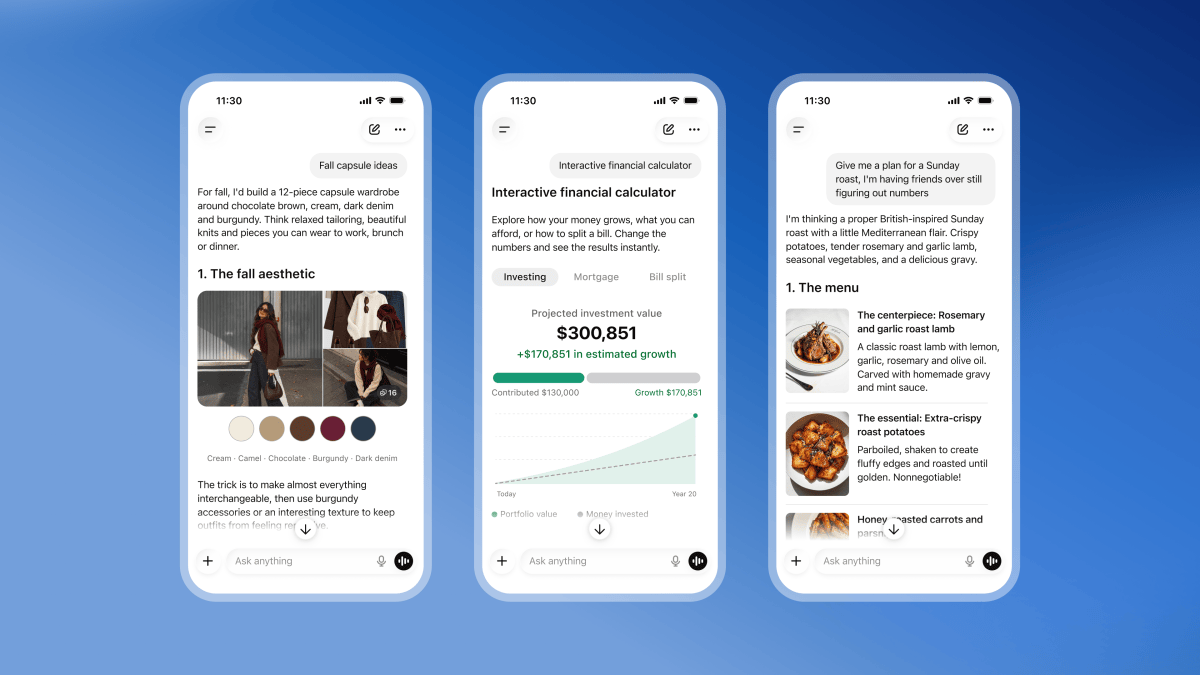
Anyone who has already built agents knows this pattern isn't entirely new: product teams had already been trying to manually assemble component schemas that the model fills in via function calling, which the application then renders as an interface. The difference here is that OpenAI internalized this behavior into the model itself and into the product itself: GPT-6 was trained to decide on its own, without the dev needing to design the schema, when a diagram helps more than a paragraph.
How the model decides what to draw
The examples shown in the sources give an idea of the criteria: a student asks how an airplane wing generates lift and receives a series of diagrams; someone asks for a rent calculator for San Francisco and gets income and expense sliders; another user compares airplane cabin layouts by tapping on seats. OpenAI says it evaluated the generated interfaces according to criteria of clarity, usefulness, and completeness, as if it were a quality criterion for output, not just for text.
Aarush Selvan, OpenAI's product manager, summed up the motivation to Exame:
When ChatGPT launched, it was just a text tool, and that was very popular, but we always thought that the way you use AI should adapt to what you need.
Aarush Selvan, product manager at OpenAI
The feature is adjustable: those who prefer more direct responses can reduce the number of visual elements. This matters because generating UI has a cost, in latency and in the risk of generating something confusing, not just in the risk of wrong text.
Why this matters to those building products with AI
The angle left out of the announcement stories is this: it validates, at a scale of more than 1.2 billion weekly users according to OpenAI itself, a pattern that product teams had already been trying to replicate by hand with tool calling and JSON schemas. If the industry's reference model learns to do this natively, the bar for a "good response" from any chatbot or agent with a conversational interface rises along with it.
But there's a caveat that none of the four sources highlights clearly: nothing in the announcement mentions API access. Intelligent UI appears in the Chat tab of ChatGPT, the consumer product. Those building their own application on top of OpenAI's model, via the API, still receive text (or JSON, if they request function calling) and need to build their own rendering layer, exactly as before.
Codex is left out
The Exame and Olhar Digital sources are explicit on a point worth highlighting for devs: the change applies to the Chat experience, while the models used in Work and Codex aren't altered by this launch. In other words, those using Codex to generate code remain in a plain text flow. This suggests OpenAI treats Intelligent UI as a consumer product feature (learning, planning, everyday calculations), not as a tooling piece for developers.
The risk of a cluttered interface
OpenAI itself acknowledges that generating UI on demand carries a risk of visual clutter. In an interview with Wired magazine, reproduced by UOL, Selvan spoke about this balance:
We have a design team that spent a lot of time understanding when adding a diagram, chart, or buttons adds value and when it starts to look cluttered.
Aarush Selvan, product manager at OpenAI, to Wired
This is the same problem any team that has tried to automate UI generation with an LLM knows well: the model tends to overdo visual elements when it doesn't have a strong stopping criterion. OpenAI's solution was to train GPT-6 itself to evaluate the clarity and completeness of the interface it generates, an extra step that traditional function calling doesn't cover on its own.
Response streaming, not just interface
The launch also touches something that directly affects those measuring product latency: GPT-6 was trained to start responding before it finishes "thinking," delivering the response in parts while it keeps processing in the background. According to OpenAI's internal evaluation, for questions requiring web search, GPT-6 Instant starts responding, on average, 44% sooner than GPT-5.6 Instant. The company itself notes that this percentage only measures the time until the response begins, not an equivalent reduction in the total task time.
Two models, two audiences
The rollout follows plan by plan, with different model names for each tier:
| Model | Plans | Availability |
|---|---|---|
| GPT-6 Sol | Plus, Pro, Business, Enterprise | October 7 |
| GPT-6 Luna | Free, Go | October 8 |
On Enterprise, the rollout still depends on configuration set by the organization's administrators, which is relevant for those managing a corporate account and who need to warn their team before the interface changes on its own.
What remains open
None of the four sources details whether Intelligent UI's component library will, at some point, become a primitive exposed via API, which would be the natural move for those who want to use this generative UI engine in their own product. There's also no information about the accessibility of the generated interactive elements (reading by assistive technology, keyboard navigation) or about how the model versions or updates these components over time.
For those following the generative UI space, these are the questions that will decide whether Intelligent UI is just a nice consumer feature or the draft of a new interface layer that every AI application will need to consider.
Translated from the Brazilian Portuguese original · Read the original
MCP 2025-06-18: what breaks in agents and integrations when upgrading versions
The 2025-06-18 revision of the Model Context Protocol, published more than a year ago, removed JSON-RPC batching and changed the contract for tool responses. Anyone who hasn't updated their code yet risks a silent break.

