How to measure whether an AI agent really works, according to Google
An agent can look perfect in the demo and still blow past cost limits, get stuck in a loop, and fail silently in production. Google details, in a playbook published on October 15, how to structure a real evaluation beyond manual testing.


An agent can look perfect in the demo and still blow past cost limits, get stuck in a loop, and fail silently in production. Google details, in a playbook published on October 15, how to structure a real evaluation beyond manual testing.
Why eyeballing it doesn't work anymore
When a team starts building an AI agent, the initial test is usually always the same: connect a model, give it a few tools, run three or four prompts in the terminal, and judge the response by eye. If it looks reasonable, it goes to production. The problem, described in an article published on October 15, 2026 on the Google Developers Blog by Hugo Selbie, Dani Zamora, and Jesse Carah (Google's Customer & Partner Solutions and Incubation teams), is that this method breaks quickly as soon as the agent gains complexity.
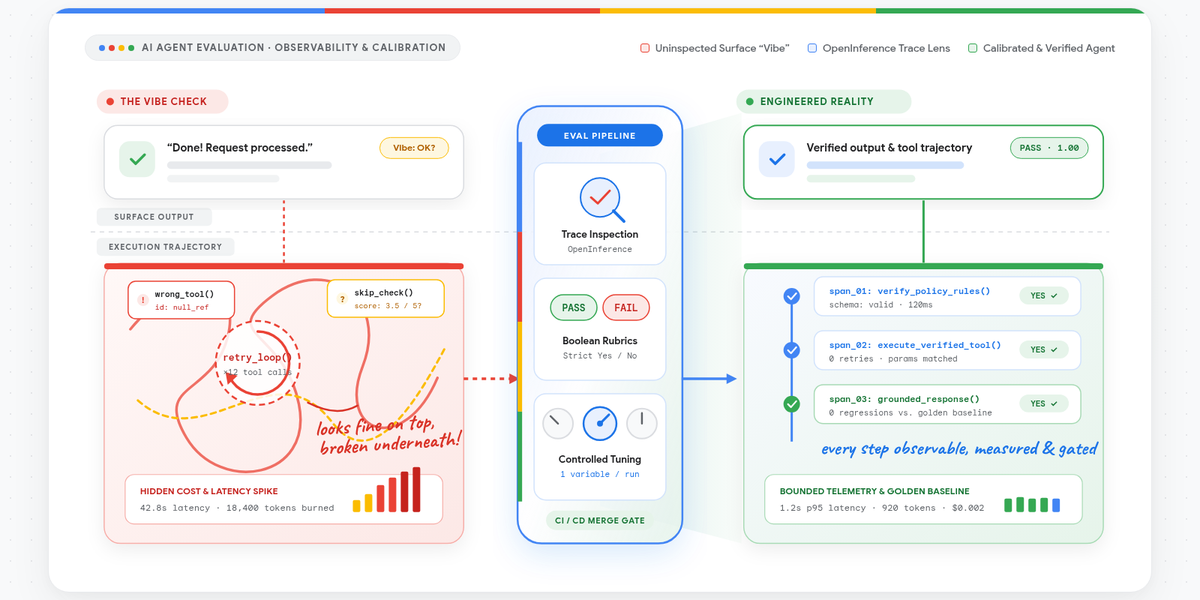
A system prompt tweak that fixes an edge case in one flow can make the agent stop calling a required tool in another. Worse: agents fail in ways that no visual test catches. An agent can get stuck in a retry loop, fire off multiple tool calls, and still return a polite, plausible-sounding response at the end.
This silent failure is costly in production:
- It inflates the cloud bill and token consumption without warning.
- It blows past rate limits and quotas on downstream APIs.
- It leaves the user staring at a loading spinner.
- It triggers duplicate side effects in external systems, all while the final response looks perfectly normal.
In short: the output text can be flawless while the system behind it is broken. That's exactly what manual testing fails to catch.
Critical user journeys: the foundation of everything
The first pillar of the framework is to stop testing against abstract benchmarks and anchor tests in "critical user journeys" (CUJs): descriptions of what the user expects from the system, structured around persona, goals, constraints, and verification conditions. The article gives an example of what a well-written CUJ looks like:
As an operations analyst, I expect the agent to ingest a counterparty trade discrepancy email, identify the disputed transaction, verify the trade economics against our internal ledger within 30 seconds, and draft a response reverse-translating our internal trade IDs back into the broker's nomenclature without human intervention.
Example CUJ, Google Developers Blog
Each clause of this sentence becomes a separate evaluation point: did the agent resolve the correct transaction? Did it check the ledger before drafting the response? Did it map the internal IDs back to the external nomenclature? This is the kind of granularity that's missing from a terminal test based purely on impression.
From simulated users to real traffic
You don't need months of production logs to put together the first set of baseline tests. The recommendation is to break each CUJ down into concrete scenarios, covering both the happy path and edge cases, and feed that to an LLM user simulator (the article cites ADK user simulations as a reference). With a persona and behavioral constraints, such as an impatient analyst who gives incomplete ticket numbers, the simulator reproduces the messiness of real phrasing, typos, and multi-turn conversations.
Running the agent against these synthetic users lets you record complete execution traces, including tool call logs, before any real user even touches the system. As production traffic starts flowing in, those synthetic scenarios are gradually replaced by real traces, in a continuous transition rather than an abrupt change of method.
Four layers, not a single score
A single scorecard will never tell you why an agent failed. To isolate the root cause, the framework splits evaluation into four layers:
- Unit tests: validate isolated components, such as parsing a tool's parameters.
- Deterministic metrics: tool call counts, output schema checks, latency.
- LLM-as-a-judge with rubrics: a model assesses whether a qualitative condition was met.
- Integration tests: validate the full end-to-end flow.
The four most common pitfalls
| Pitfall | The mistake | Why it matters |
|---|---|---|
| Discarding tests | Deleting or swapping test cases between runs | Invalidates the baseline: there's no way to know if the agent improved or the test changed |
| Rating from 1 to 5 | Asking an LLM judge for a subjective scale | The line between "3" and "4" shifts from run to run; boolean (yes/no) questions are more stable |
| Evaluating only the text | Ignoring cost, latency, and tool calls | A perfect response that took 40 seconds and cost sixty cents per query is still a production failure |
| Framework-specific pipeline | Rewriting the test suite every time the orchestrator changes | Different frameworks emit OpenTelemetry, but with distinct semantic conventions for tool calls and tokens |
For the fourth pitfall, the proposed solution is to standardize traces around the open OpenInference specification, decoupling evaluation from whichever orchestration framework is used, be it LangGraph, Google ADK, or a custom runtime.
The rollout: from Day 0 to Day 2
The article organizes adoption into three stages, using the open-source toolkit agent-eval as the reference tool. It combines OpenTelemetry trace capture with the Agent Evaluation service on the Gemini platform, formerly Vertex AI Evaluation.
In Day 0, the team writes scenarios for the main CUJs, runs simulations, and reads the execution traces from start to finish using what the article calls a "red pen": marking every point where the agent hesitated, hallucinated a parameter, picked the wrong tool, or stalled in its response. Manually reading twenty traces seems slower than generating an automatic chart, but it's this exercise that shows how the system actually breaks, instead of guessing at hypothetical failure modes.
In Day 1, the red-pen annotations become automated checks:
agent-evalruns multi-turn scenarios against the agent via HTTP, using the--base-urlflag, or offline.- It ingests traces structured in OpenInference conventions, regardless of the framework used.
- It routes everything to the Agent Evaluation service to run the deterministic checks and boolean rubrics, without custom API code.
Every time there's a prompt change, a model swap, or an edit to a tool's docstring, the same test battery runs again and the result is compared against the baseline. The article also insists on one point: no automated judge metric should be trusted without first being validated against the traces the team has already reviewed by hand in Day 0.
In Day 2, the pipeline becomes a merge gate. Running headless in CI/CD, such as Cloud Build or GitHub Actions, it applies two rules: the suite must meet a minimum pass floor (95% boolean success, in the article's example), and no metric that was already passing can regress, even if the overall scorecard stays stable. The artifacts from each run, such as raw JSONL traces, prompt hashes, model versions, and latency profiles, go to a data warehouse such as BigQuery or Cloud Storage, feeding a dashboard shared by the team.
The fine-tuning cycle: dozens of rounds, not rewrites
According to the article, reaching production quality usually takes 50 to 60 small iterations, not full rewrites of the system prompt every morning. One tweak clarifies a tool parameter's description; the next adds a negative constraint; the one after that adjusts the output JSON schema.
The HTML report generated by agent-eval on each run brings together, in a single view, the boolean pass/fail metrics and the operational numbers: latency, token consumption, API cost, cache usage, and the tool call execution path. It also includes an automatic root-cause analysis done by Gemini for every turn that failed, pointing to the prompt guideline or parameter that triggered the problem.
This view prevents decisions made by gut feeling. A prompt change can look much better in a manual check and still have the test battery reveal that latency doubled and tool-call hallucinations rose 15%. The lesson the authors draw from this is direct: small, measured changes consistently beat big rewrites.
What changes for those who build agents
For those already working with LangGraph, Google ADK, or any agentic stack, the article's proposal is less about adopting a specific tool and more about a habit: treating evaluation as part of the development cycle from the very first prototype, not as a later step. The entry point is cheap, a small set of test scenarios and an afternoon spent carefully reading traces, and the value shows up exactly when the pretty demo starts receiving real traffic.
The reverse warning also applies: teams that already have some ad-hoc test suite gain more by deleting less of it. The pitfall of discarding tests between runs is one of the easiest to fall into, because it looks like code cleanup, but in practice it sweeps the baseline under the rug. Before celebrating that a new prompt improved the scorecard, it's worth confirming that the test set used is exactly the same as before.
Translated from the Brazilian Portuguese original · Read the original

Convex Agent centralizes memory, threads, and RAG for AI agents in the same serverless backend
The official @convex-dev/agent component bundles threads, persistent history, and hybrid context search within the same serverless database that Convex already offers, eliminating the need for a separate vector DB to give AI agents memory.