
Claude Meetings joins video calls and already turns discussion into tasks during the meeting

- Reading
- 6 min
Anthropic launched Claude Meetings this Tuesday, which puts the assistant as a visible participant in video calls, along with Claude Whiteboards and Claude Sheets. The package enters the race with OpenAI and Meta for a place in teams' work tools.
A Anthropic anunciou nesta terça-feira (10) um pacote de recursos voltado a times de trabalho, com destaque para o Claude Meetings: o assistente entra como participante visível em uma videochamada e começa a trabalhar enquanto as pessoas ainda estão falando.
(translation below)
Anthropic announced this Tuesday (the 10th) a package of features aimed at work teams, with Claude Meetings standing out: the assistant joins as a visible participant in a video call and starts working while people are still talking. Alongside it came Claude Whiteboards and Claude Sheets, according to a report by TechCrunch.
The launch comes just weeks after OpenAI unveiled a batch of tools that let ChatGPT visualize company data and build presentations, and also after Meta entered the race with its Muse agent, capable of building mini-apps on demand. The three companies are competing, each in its own way, to become the default productivity suite for teams, territory currently dominated by Microsoft and Google.
What Claude Meetings does during the call
With the feature enabled, any participant can add Claude to a call as a participant equal to the others. From there, as the conversation progresses, it:
- drafts the plan being discussed;
- builds a timeline on a whiteboard;
- answers questions in the meeting chat;
- accesses connected work apps to pull data, such as last year's numbers.
After the call ends, the meeting notes, action items and other generated materials become available on claude.ai. Anthropic describes this as a workflow shift: today, post-meeting work usually only starts after everyone turns off their camera; with Claude in the call, the team leaves the meeting with the material already done.
Identification and access limits
The assistant identifies itself as a participant and posts a notice in the meeting chat as soon as it joins. Two limits stand out for anyone running meetings with clients or external partners.
In short: Claude does not join calls with external guests without explicit authorization from an administrator, and it automatically leaves if an external guest appears on the call. This makes the feature, for now, a tool designed for internal meetings, with the decision to open the door to third parties resting with the account admin, not the regular user.
Claude Meetings is in beta on Team and Enterprise plans, and at launch it only works with Google Meet. Anthropic says support for other video call platforms should come later, but it did not commit to dates or name which platforms will come next.
Whiteboards: from brainstorm to document without copy and paste
Claude Whiteboards solves a friction point that Anthropic itself acknowledges: many people already brainstorm with Claude, but until now, to share the result with the team, you had to copy and paste the content somewhere else. Now, the team works directly on the same whiteboard, in real time, together with the assistant.
When the brainstorm ends, Claude can turn the whiteboard into a document or a slide presentation. The feature also works inside Claude Meetings: the board gets built up as people talk during the call, according to the company. Whiteboards is in beta on paid plans, available on the web, desktop and mobile.
Sheets: a spreadsheet the AI builds and edits alongside the team
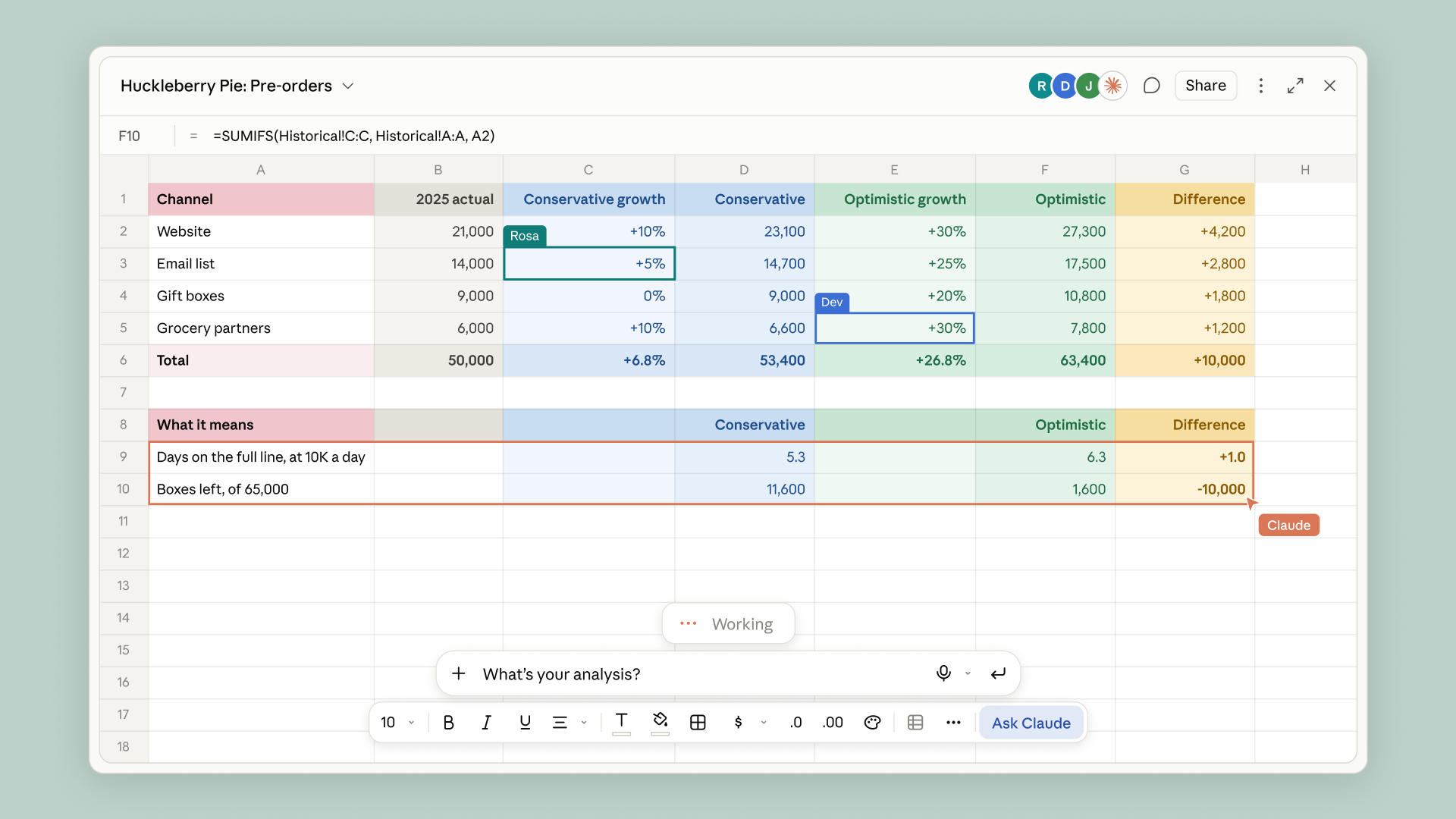
Claude Sheets lets teams create and edit spreadsheets collaboratively. A team can ask, for instance, for the assistant to build a marketing campaign tracker or a hiring budget, and Claude generates a functional spreadsheet from that.
Anthropic states that Claude handles the initial build of trackers and budgets, while the team continues refining and updating the same spreadsheet afterward. Each spreadsheet can have multiple tabs, formulas, formatting and dropdown menus. The assistant also edits cells directly, side by side with whoever is using the spreadsheet, and describes each change made, so the team can keep track of what changed. Sheets is also in beta on paid plans, on web, desktop and mobile.
Claude Data exits beta, and interactive connectors arrive
Besides the three beta launches, Anthropic confirmed that Claude Data, previously called Claude Dashboards, is now generally available. The feature connects the assistant to systems where the company keeps its numbers, such as a data warehouse or a CRM. From there, the user asks questions and Claude responds with dashboards, written data stories or narrated videos.
The company also announced interactive connectors that open the full version of apps such as Adobe, Atlassian and HubSpot inside Claude itself. According to Anthropic, this makes it possible to open these apps side by side with the conversation and ask the assistant to work directly inside them, bringing existing workflows into the same workspace.
What this changes for product and engineering teams
For product and engineering teams, the most concrete angle is Claude Meetings inside meetings like planning, backlog refinement or retrospectives: the decision made live comes out already documented, without relying on someone taking manual notes or transcribing it afterward. With the Atlassian connector, in theory, this material can feed directly into work-tracking tools the team already uses, although Anthropic did not detail, in the source, exactly which automatic actions the connector allows.
The restriction to Team and Enterprise accounts, combined with the requirement for admin authorization for external guests, suggests that Brazilian teams running mixed meetings (internal and with clients) will need to decide, case by case, when it's worth turning on the feature. This is our own reading, not a claim made by Anthropic: teams with sensitive data policies tend to prefer keeping Claude out of calls with participants from outside the company until they better understand how the content is handled.
The fact that Claude Data now accesses data warehouses and CRMs directly also raises a governance question that any technical team should assess before enabling it: which credentials and access scopes this connector receives, and how that fits into the company's internal data policies. The source report does not detail this point, and for now it is up to each organization to look into Anthropic's documentation before connecting production databases.
What's still unclear
Anthropic did not disclose, in the source consulted, specific pricing for the Team and Enterprise plans with the new features, nor a timeline for support for other video call platforms beyond Google Meet. It also remains unclear whether Claude Meetings will, in the future, offer native integration with task management tools beyond the generic Atlassian connector. For engineers and product managers evaluating adoption, the natural path now is to test the beta in low-risk internal meetings before bringing the assistant into any call with a client or external partner.
Translated from the Brazilian Portuguese original · Read the original
Git fixes six critical vulnerabilities in clone, merge, and patches
The Git project released patches for six CVEs ranging from code execution in recursive clones to memory corruption in merges and binary patches. GitHub already recommends updating immediately.