How to separate user, connector, and agent authentication in a custom Gemini Enterprise UI
- Reading
- 7 min
- Tables
- 1
A guide published by Google Cloud on November 20, 2026 breaks down the three authentication layers that Gemini Enterprise's out-of-the-box app hides, and that any custom UI needs to reimplement by hand.
Users of Gemini Enterprise's standard web app don't even notice the identity engineering running behind the scenes: the employee logs in with Google Identity or Workforce Identity Federation (Microsoft Entra ID, Okta), search results already respect document-by-document ACLs, and the login popup for a federated connector or custom agent appears on its own at the right moment.
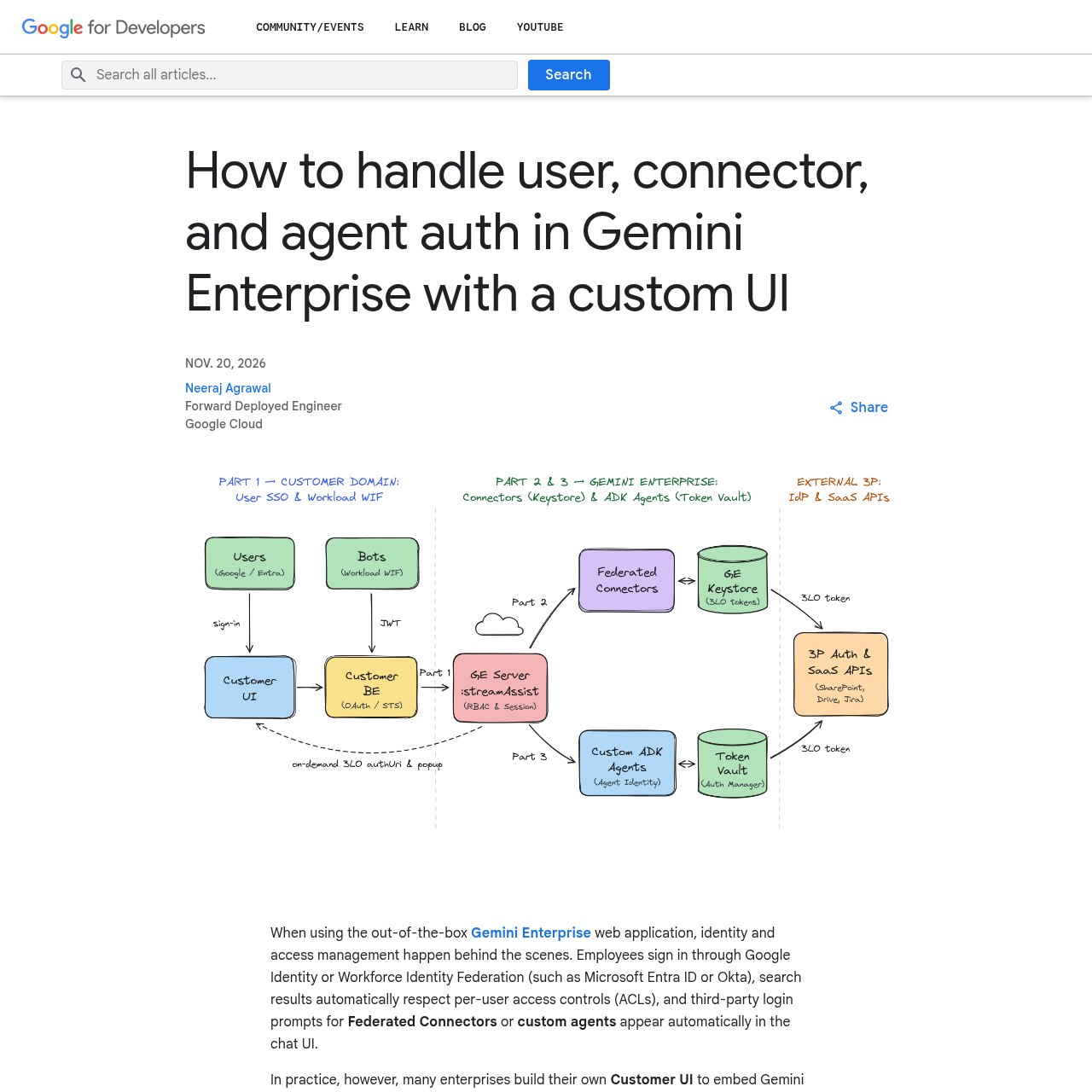
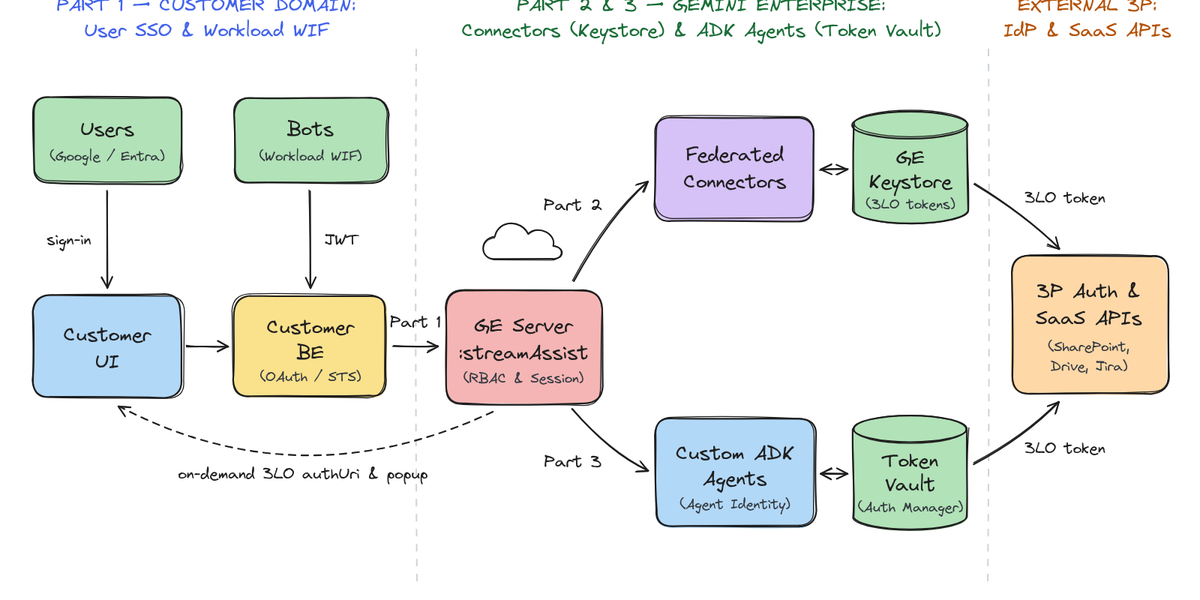
The problem starts when a company decides to embed Gemini Enterprise into an internal portal, intranet, or line-of-business system with its own UI. In this scenario, described in a technical guide published on the Google Developers Blog on November 20, 2026 and authored by Neeraj Agrawal, forward deployed engineer at Google Cloud, the custom UI ("Customer UI") and its backend ("Customer BE") start calling the StreamAssist API directly. And the three authentication layers that the out-of-the-box app used to handle on its own become the responsibility of whoever built the integration.
Layer 1: who is authenticating against StreamAssist
The first decision is whether the call to the StreamAssist API represents a specific human user or a shared service with no individual identity. The guide describes three patterns, none of which involve a Service Account key on disk:
| Pattern | When to use | Flow |
|---|---|---|
| 1A: Google Identity | Employee logs in with Google Workspace/Cloud Identity | OAuth 2.0 login with Google Cloud scope generates an access token sent directly as a Bearer token to the StreamAssist API |
| 1B: Workforce Identity Federation | Employee logs in via Entra ID or Okta, and the engine already uses WIF | The Customer BE exchanges the external IdP's OIDC token at the Google Security Token Service (STS) against the already configured Workforce Pool Provider |
| 1C: Workload Identity Federation | Backend bot, Slack/Teams webhook, portal with no individual user | The Customer BE exchanges a machine JWT (client credentials from the IdP) at the Google STS against a project Workload Identity Pool |
Every principal that calls the StreamAssist API needs the Discovery Engine User IAM role on the GCP project. For patterns 1A and 1B, the user (or the Workforce Pool group) also needs an active Gemini Enterprise user license in the Admin Console, which tends to be the detail that blocks production integrations when it goes unnoticed on the checklist.
The choice between patterns isn't just cosmetic. Since pattern 1C authenticates a machine, not a person, every request reaches Gemini Enterprise with the same workload identity. That works well for non-personalized bots over a shared knowledge base, but it rules out per-document ACLs, per-user 3LO connectors, and custom agents with restricted permissions, all of which depend on knowing exactly who is asking.
Layer 2: federated connectors and the Keystore
With the user authenticated against the StreamAssist API, the next layer comes into play when the engine has Federated Connectors active: Google Drive, SharePoint Online, Jira, Box, ServiceNow, Confluence. These connectors query the third-party API in real time and apply that specific user's permissions, which requires three-legged OAuth (3LO) per person, not per application.
Gemini Enterprise's out-of-the-box app handles this with a built-in "Connect" button. A custom UI doesn't have that button, so the guide describes an 11-step flow that the Customer BE needs to orchestrate:
- Discover the engine's connectors and check the Gemini Enterprise-managed Keystore to see whether the user already has a valid token for each one.
- When consent is missing, open the authorization URL in a popup (3P Auth Server).
- After login, the redirect lands on the GE FE Server's
/oauth-redirectpage, which forwards the callback URL (authorization code and state) to the Customer UI via the browser'spostMessageand closes the popup. - The Customer UI forwards that callback to the Customer BE, which exchanges the code for a token at the third-party endpoint and saves the refresh token inside Gemini Enterprise's own Keystore.
- From then on, the Customer BE includes the connector's data store in calls to the StreamAssist API, and searches start covering that third-party system.
The thing that trips up most people building this integration for the first time is the fixed redirect: the GE FE Server's /oauth-redirect endpoint, by default, only sends the postMessage to the origin of Gemini Enterprise's embedded web app. A custom UI running on a custom domain needs to ask the Gemini Enterprise team to enable the custom origin flag, otherwise step 7 of the flow simply won't deliver the callback back.
Layer 3: per-tool OAuth in custom ADK agents
The third layer appears when the UI doesn't just search documents: it registers a custom ADK agent, published on Vertex AI Agent Engine, that orchestrates multiple corporate APIs (Google Drive and SharePoint Online, for example) within a single assistant. Here the guide explicitly rules out the obvious approach.
Attaching a static OAuth configuration directly to the root agent's registration blocks the entire agent before even the first interaction. If the assistant talks to Drive and SharePoint, the user is forced to log into both just to ask a generic internal-policy question that touches neither. Besides, that root-level OAuth was designed with the embedded web app in mind, not with tool-specific authorization prompts via the StreamAssist API.
The proposed solution has three configuration steps:
- Isolate OAuth at the tool level, not the agent level: tools that don't need login run as regular Python functions; those that touch a protected API (SharePoint, Drive) are wrapped in ADK's
AuthenticatedFunctionToolwith aGcpAuthProviderpointing to the GCP Auth Manager's Auth Provider. - Turn on Agent Identity at deploy time: the Root Router Agent and its sub-agents are deployed to Vertex AI Agent Engine with Agent Identity enabled, which gives the agent its own SPIFFE identity. That identity needs the
Agent Identity Service AgentIAM role to fetch tokens from the GCP Auth Manager's Token Vault. - Register the 3LO Auth Provider in the Console: for each third-party OAuth app (SharePoint, Google Workspace), the Default Continue URI is set to
<website-url>/validateUserIdon the Customer UI, and the GCP Auth Manager's/oauthcallbackredirect URI is registered on the corresponding Entra ID or third-party app.
In practice, this changes when the login popup appears: only when the user actually triggers a protected tool, not at the start of the conversation.
The guide describes 19 steps for this full flow, but the gist is that, on the first protected call, the Token Vault gets a cache miss, returns an authorization URL that goes back up the chain (Agent Engine → GE Server → Customer BE → Customer UI), the user approves it in the popup, the Customer BE validates the session via the Validate User Authorization API on the GE Server, and the GCP Auth Manager finishes by saving the token in the Token Vault. The same query is then automatically re-executed, now with a cache hit, with no new popup.
What this changes for builders
For teams already embedding enterprise search into an intranet or internal portal, the practical takeaway is to choose the right pattern at each layer instead of trying to do everything with a single credential. A shared FAQ bot fits pattern 1C; a copilot with role-restricted documents requires 1A or 1B. An ADK agent that talks to multiple corporate systems only scales in production if OAuth is handled per tool, not per agent registration, otherwise the experience ends up worse than the out-of-the-box app it's trying to replace.
The guide doesn't solve everything on its own: it assumes the Gemini Enterprise engine is already configured with the correct identity providers, and that the product team has the engineering budget to implement three distinct OAuth flows, each with its own popup component and token exchange. For those who want to see reference code before building from scratch, Google Cloud's own post points to the gemini-enterprise-custom-ui-auth repository on GitHub, with Python scripts, curl commands, and interactive test UIs for all three parts of the flow.
Translated from the Brazilian Portuguese original · Read the original

Google expands Agent Anomaly Detection to monitor AI agents running outside Google Cloud
In private preview since November 20, 2026, Google's Agent Anomaly Detection now analyzes agents hosted on AWS Lambda, Microsoft Foundry, and even on-premises, without needing access to the runtime where they run.