

H100 costs from $2.69 to $12.29 per hour, depending on where you rent it


- Reading
- 5 min
- Tables
- 1
A survey compared the price of the same H100 SXM 80GB across AWS, Azure, and neoclouds like RunPod: for the identical chip, the difference reaches 4.57 times per hour of use.
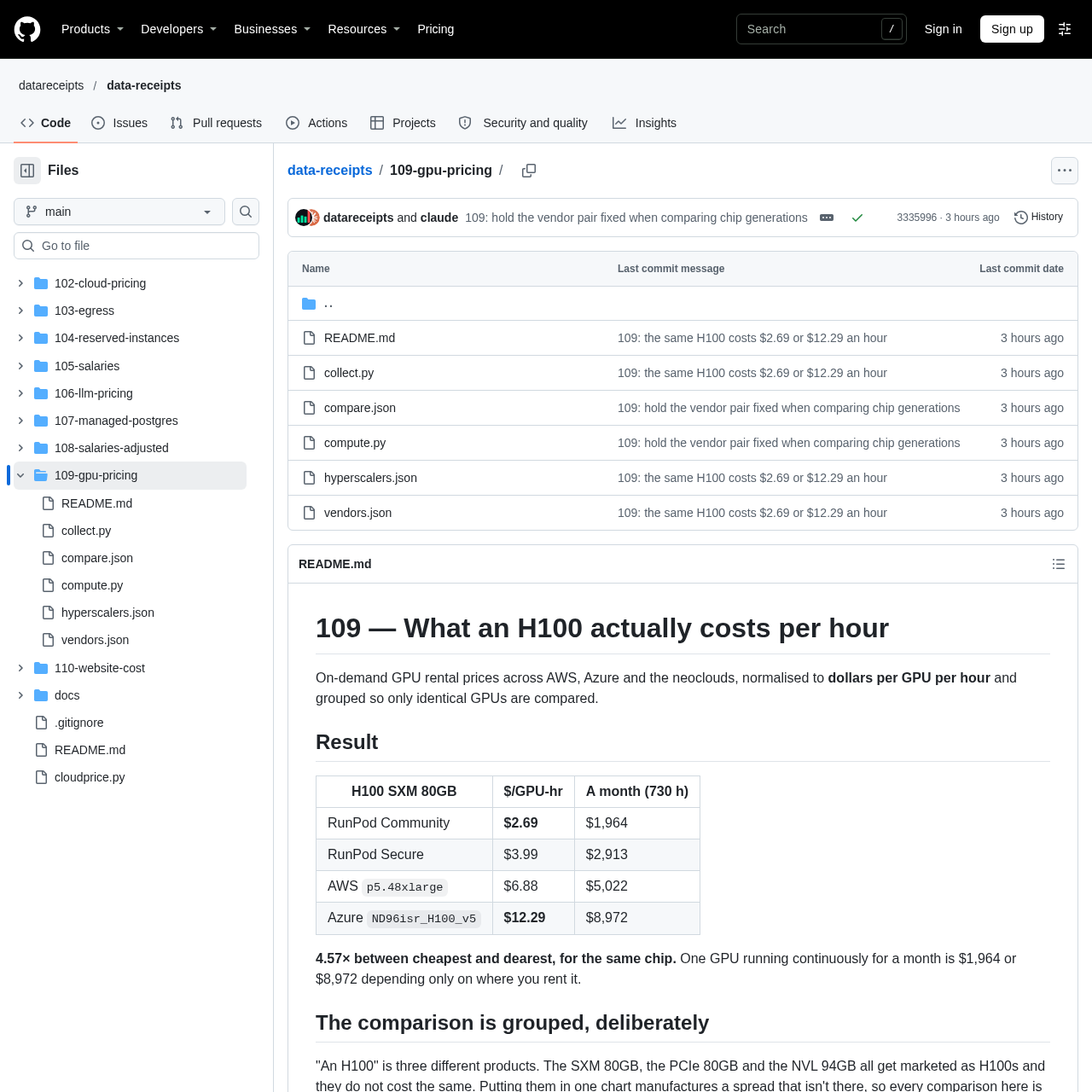
A survey published in the data-receipts repository, on GitHub, compared the hourly price of the same GPU model across different cloud providers and arrived at a number that should bother anyone approving AI infrastructure budgets: the H100 SXM 80GB, when rented on demand, costs $2.69 to $12.29 per hour depending on where you rent it. Running the chip 24 hours a day for a month (730 hours), that's the difference between $1,964 and $8,972 for the same piece of hardware.
The data comes from the repository's 109-gpu-pricing directory, which uses the official pricing APIs from AWS and Azure (collect.py pulls the AWS Price List and Azure Retail Prices, without authentication) and cross-references them with manually transcribed neocloud prices, with the date and source URL recorded in vendors.json.
The price gap, in numbers
The comparison is restricted to the H100 SXM 80GB, the same GPU variant across all providers:
| Provider | VM/SKU | $/GPU-hour | $/month (730h) |
|---|---|---|---|
| RunPod Community | third-party hardware | $2.69 | $1,964 |
| RunPod Secure | - | $3.99 | $2,913 |
| AWS | p5.48xlarge | $6.88 | $5,022 |
| Azure | ND96isr_H100_v5 | $12.29 | $8,972 |
The ratio between the cheapest and the most expensive end is 4.57 times. RunPod Secure and RunPod Community are counted as the same company in the calculation, since Community is just a layer of third-party hardware hosted by the same platform.
An H100 isn't always the same H100
The survey's methodology avoids a common mistake in GPU price comparisons: treating "H100" as a single product. There are at least three variants sold under that name, with different memory and interconnect, the SXM 80GB, the PCIe 80GB, and the NVL 94GB, and mixing them artificially inflates the spread. That's why every comparison in the repository is done within a single (model, memory) group.
The same care applies within a single provider. Azure sells the A100 PCIe 80GB in one-, two-, and four-GPU VMs, and the price per GPU changes: $3.67 on the one-GPU VM, $4.78 on the two- and four-GPU ones. If the comparison picked the wrong configuration on either side, a price difference within Azure itself would show up as if it were a market difference between providers. The survey always uses the cheapest route from each vendor down to the specific GPU.
What the cheap price doesn't include
In short: the 4.57x isn't pure margin, the project's README is explicit about that. Moving from Azure's ND96isr_H100_v5 SKU to RunPod Community means giving up three concrete things:
- High-speed InfiniBand. Azure's ND SKU has 400 Gbps per GPU of Quantum-2 interconnect with GPU Direct RDMA, which enables distributed training across multiple nodes. It's this interconnect that justifies the ND SKU costing more than Azure's own
NCSKU for a single H100, which runs at $6.98 per hour. - Datacenter SLA. RunPod Community is third-party hardware renting out its own capacity, without the operational guarantee of a hyperscaler datacenter.
- Corporate compliance, reserved capacity, and the rest of a hyperscaler's surface, which matters in contracts with large companies but not in a standalone instance.
The project sums up the trade-off directly: whoever does fine-tuning on a single node is paying for an interconnect they'll never use; whoever trains on 64 nodes doesn't have the cheap line as an option.
When it's worth paying more (and when it isn't)
This distinction matters in practice for whoever decides where to run AI workloads day to day. Inference, single-model fine-tuning, and single-node experimentation don't benefit from 400 Gbps InfiniBand between GPUs that will never communicate across machines, so the difference between $6.88 (AWS p5.48xlarge) and $2.69 (RunPod Community) is money left on the table with no corresponding technical gain.
Real distributed training, on the other hand, with synchronous checkpointing across dozens of nodes, depends on the interconnect that only the expensive SKU offers: trying to save there tends to blow out training time and cancel out the hourly savings. The decision of where to rent GPU, therefore, isn't just about the listed hourly price: it's about which part of the hardware stack the workload actually uses.
The numbers have explicit limits
The repository itself documents the method's limitations, which are worth reproducing because they change the practical reading of the spread:
- These are on-demand list prices. Reserved, committed-use, or spot pricing cuts the hyperscaler numbers, and spot in particular would narrow the difference between the 4.57x considerably.
- One region per provider. AWS in
us-east-1, Azure ineastus; prices vary by region. - The GPU count per VM comes from manufacturer documentation, not from the price label, since AWS reports "640 GB HBM3" for the
p5and Azure reports total accelerator memory, without stating the per-GPU model in either case. - Lambda Labs was left out of the main spread. The company's public page states that the listed rates take effect on November 16, 2026; current rates are behind a login, so Lambda's data appears separately and labeled in the repository, not mixed into the 4.57x calculation.
- Availability isn't part of the price. A cheap H100 you can't actually provision isn't, in practice, a price.
Anyone who wants to reproduce or update the comparison has the full pipeline published: running python3 collect.py downloads the AWS price index (about 1 GB) and Azure's retail prices, and python3 compute.py redoes the grouping and spread calculation from hyperscalers.json, vendors.json, and compare.json. For an engineering team that decides where to run GPU workloads with some regularity, that's a better reference spreadsheet than trusting a single provider's pricing page.
Translated from the Brazilian Portuguese original · Read the original

Anthropic launches Claude Fable 5.2 and Mythos 5.2 with focus on code and reasoning
The new models arrive two months after version 5.1 and promise to solve engineering and reasoning problems faster. Only one of them is available to everyone.