Creating a ChatBot in Under 5 Minutes? Yes, It's Possible!


- Reading
- 3 min
- Code
- 5
In this article, Gláucia Lemos presents a step-by-step guide teaching how to create a ChatBot in less than five minutes.
Is it possible to create a ChatBot in less than five minutes? I'll answer right away: yes, it's possible!
But before showing the video proving it's possible, I want to teach all of you how to build the ChatBot, and at the end I'll show a video proving that it's possible to create it in less than five minutes.
Shall we get started?
Required resources
To create our ChatBot, I'll use the new version of the Microsoft Bot Framework: v.4. If you'd like to learn more details about what's new in version 4, check out the links below:
To develop our 'echoBot', we'll need to install:
As mentioned above, we'll use the SDK v.4 to develop our echoBot.
Here we go!
Let's go step by step so everyone can follow along. First, please install Node.js and then Yeoman.
If you're a Windows user, please take a look at the documentation I created in the demo repository, since you'll need to install Python 2.7.x (for Windows users) and then run the command:
> npm install -g windows-build-toolsThen create a folder with the project's name. Just follow the steps below:
> mkdir chatBot
> cd chatBot
Great! Folder created. Now run the command below:
> npm install -g yo generator-botbuilderWhat is this command doing? We'll install the package that will create a scaffold for our ChatBot. It uses Yeoman precisely for this, which is why we need to install this package globally. If you'd like to learn more about this package, check out the link below:
Great! Now let's do the following: inside the folder, type the following command:
> yo botbuilderFollow the execution as shown in the gif below:
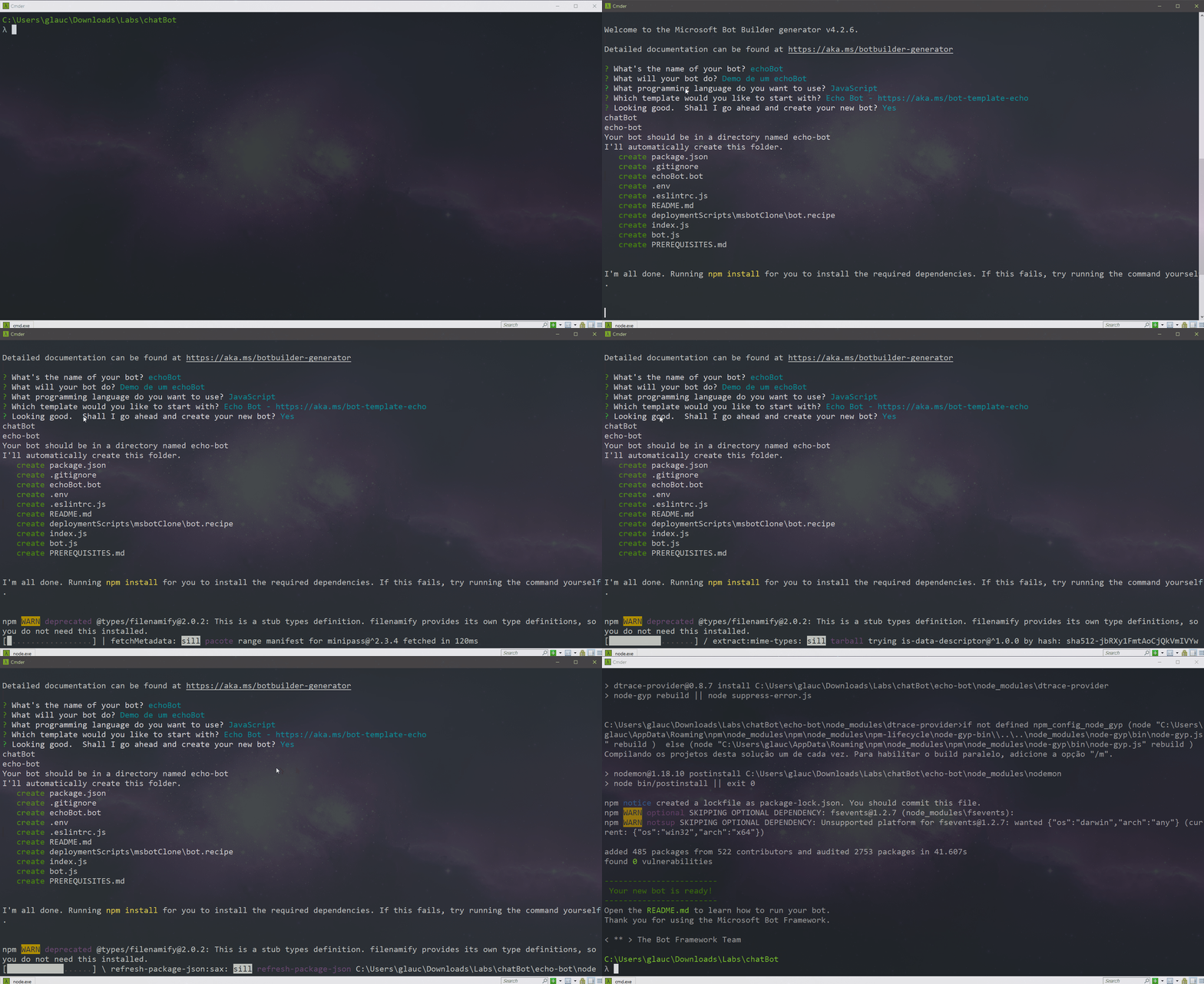
Notice that it creates a ready-made scaffold, just waiting to be run, and that's exactly what we'll do now. Go to the created folder 'echoBot' and run the following command:
> nodemonOnce that's done, run the Bot Emulator and see how to proceed to run our 'echoBot' in the gif below:
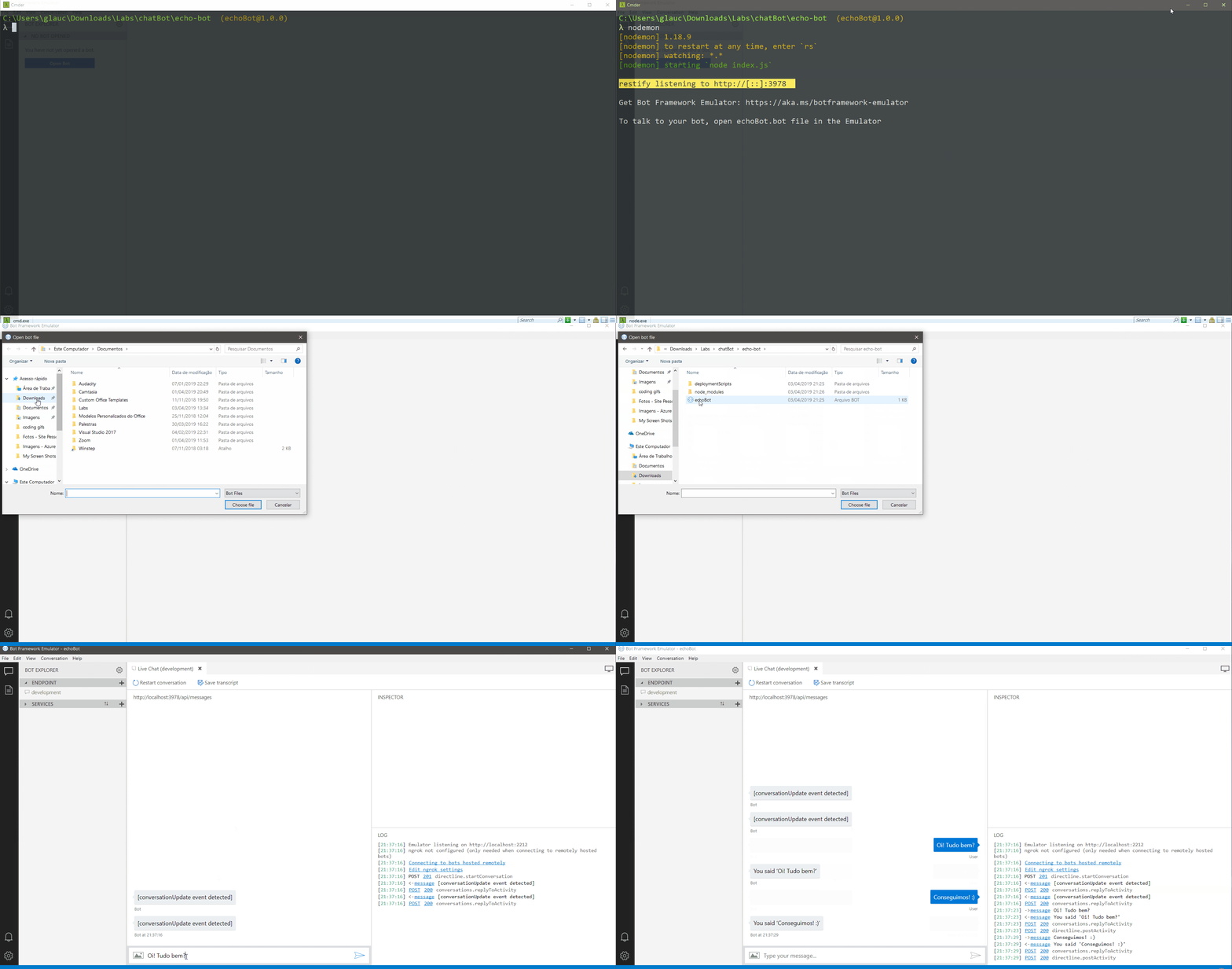
Simple, isn't it? Notice that when we run the 'nodemon' command, it automatically runs on restify's default port. Then we'll open the Bot Framework Emulator to run our echoBot, which is marked with the Bot Framework symbol.
And voilà! Our ChatBot is ready, built in less than five minutes. As proof, I made a video showing that it's true it can be created in such little time:
I know it's a simple ChatBot, but it's just to show all of you here that yes, it is possible to create a ChatBot in less than 5 minutes.
If you want to build a more elaborate ChatBot, I suggest using Microsoft's cognitive services. Want to know more details? Take a look at this link.
There are six cognitive services you can include in your ChatBot. They are:
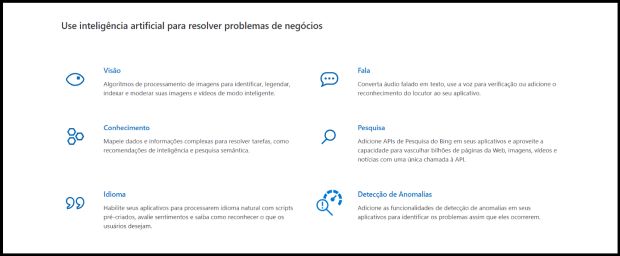
Of the six above, my favorite to use is LUIS, a Natural Language Processing cognitive service. If you'd like to learn how to build a ChatBot integrated with LUIS, check out this excellent course.
Conclusion
The use of ChatBots has become very common in our daily lives. In fact, they are extremely useful, since they help us answer necessary questions at any moment and any time, 24/7, without needing a telemarketing agent.
And if this ChatBot's experience is integrated with the use of AI through Cognitive Services, rest assured the user will feel very happy with the experience.
I recommend you start studying the development of ChatBots integrated with AI-powered Cognitive Services.
Soon I'll do a new ChatBot training on my YouTube channel, using precisely version 4. For those interested, there's already a version 3 playlist available:
If you'd like to stay up to date on this and other news, follow me on Twitter. I've been posting a lot of great tips there.
See you next time, everyone!
Translated from the Brazilian Portuguese original · Read the original

The next generation of startups may not sell software; it will sell work done
The announcements from Oracle AI World 2026 show how AI agents are beginning to execute business processes, beyond just assisting users. The article analyzes the impacts of this transformation on the SaaS model and the opportunities for Brazilian startups to build specialized solutions, integrate systems, and generate value through market knowledge.