
GitHub shows repository protection status in security risk reports

- Reading
- 4 min
As of November 2, 2026, GitHub's code and secret risk assessments flag whether each finding sits in a protected repository or not, making it easier to prioritize where to reinforce coverage.
On November 2, 2026, GitHub updated the platform's security risk assessment screens to include information that used to stay hidden: whether the repository where an issue was found is protected or not. The change applies to two specific features, code security risk assessment and secret risk assessment, according to GitHub's official changelog.
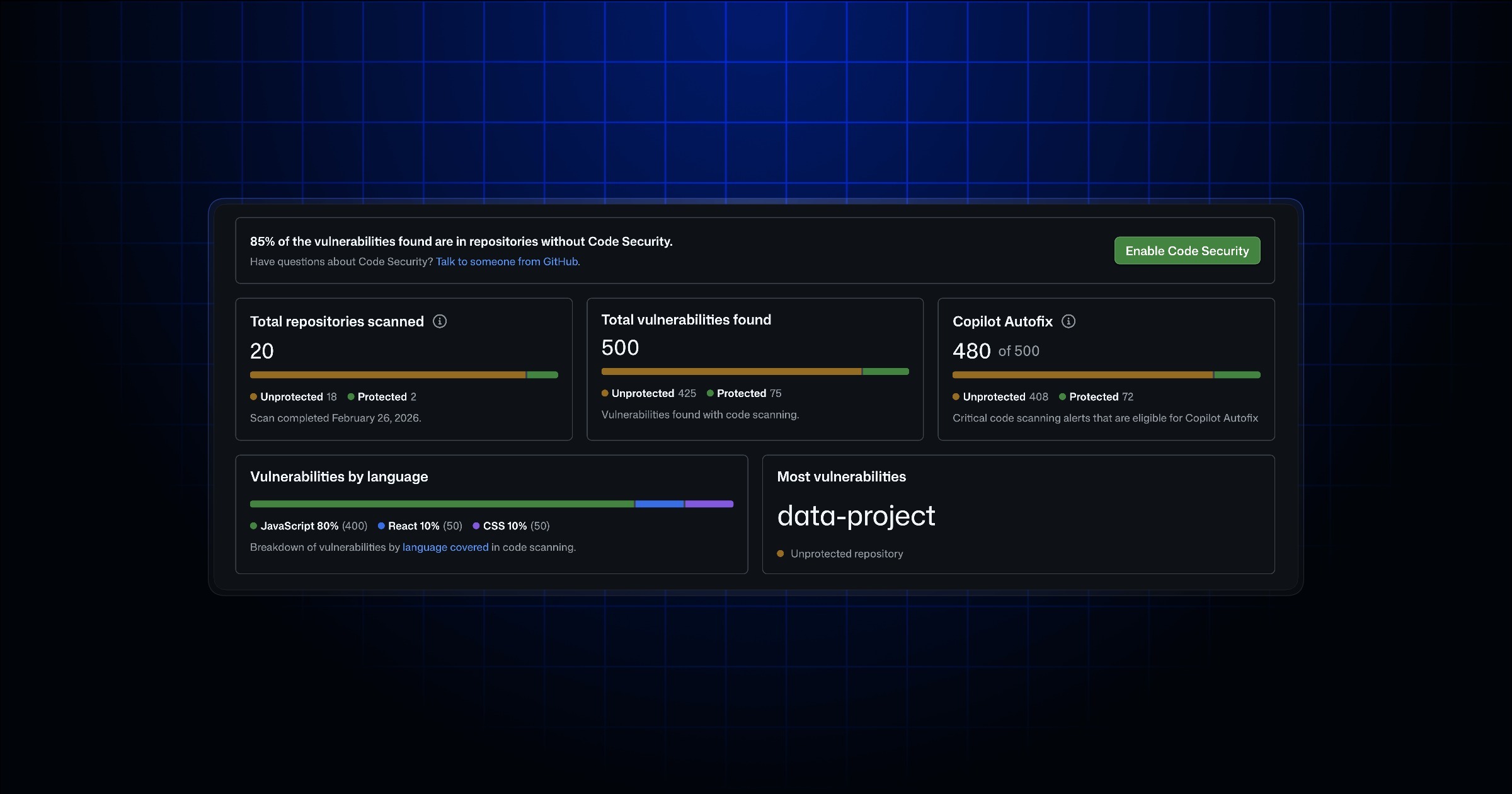
In practice, this means that when opening a risk assessment, the security team no longer sees only "there are X vulnerabilities" or "there are Y exposed secrets": it also sees in which of these cases the repository already has some active protection layer and in which it has none. It's the difference between knowing a problem exists and knowing where that problem is most exposed.
Where this screen lives and who can access it
The feature itself isn't new: GitHub already offered risk assessments for code security and for secret scanning within organizations' Security tab. What changed was the content displayed per finding.
Organization admins and security managers remain the roles that start an assessment, via Security > Assessments in the organization. After it runs, the difference shows up in the list of findings: each one comes marked as being in a protected or unprotected repository, which already allows segmenting the view without having to manually cross-reference branch protection spreadsheets with the vulnerability list.
Why "protected" matters more than "exists"
Anyone who works with AppSec at large organizations knows the problem: having visibility into vulnerabilities is easy, the hard part is deciding where to start fixing. A critical finding in a repository that already has push protection enabled for secrets, mandatory pull request review, and code scanning configured tends to be less urgent than the same finding in an orphaned repository, with no branch protection policy at all.
Until this change, cross-referencing these two pieces of information, the severity of the finding and the protection level of the repository where it lives, required manual work: exporting the list of findings, exporting the list of repositories with configured protection rules, and doing the join by hand (or via API). Now that correlation already comes ready within the risk assessment screen itself.
In short: the change doesn't create a new finding or fix anything on its own; it reorganizes information that already existed so remediation prioritization comes out of a security meeting faster.
What counts as a "protected repository"
GitHub's changelog doesn't detail, line by line, the exact criteria that define a repository as protected within this assessment. Based on GitHub Advanced Security (GHAS) historical documentation, the most likely reading is that the status reflects the combination of branch protection rules (mandatory review, mandatory status checks) with the presence of active security features in the repository, such as code scanning and secret scanning with push protection.
This matters because it changes how to interpret the signal: "unprotected" here doesn't necessarily mean "no security at all", it may just mean one of the expected layers is missing. Before using this status as the definitive ruler for priority, it's worth checking within the organization itself which protection policies are configured as default, because the label is only as reliable as the policy it measures.
Availability by plan
The feature doesn't arrive the same way for everyone. According to GitHub:
- It's already available on GitHub Enterprise Cloud and GitHub Team, for both code security risk assessment and secret risk assessment;
- For GitHub Enterprise Server, the feature arrives only with version 3.24, and only for secret risk assessment.
Those running GitHub Enterprise Server on a version prior to 3.24 don't have access to this view yet, neither for code nor for secrets. This matters for teams with on-premises infrastructure planning their upgrade calendar: the update to 3.24 now carries, along with the usual bugfixes, a workflow change in how the security team prioritizes findings.
What this change doesn't solve
It's worth being direct about the limits of this update, because it's easy to overestimate a visibility improvement:
- It doesn't detect anything new: it's a layer of context on top of findings that code scanning and secret scanning already produced before;
- It doesn't automatically fix unprotected repositories, it only helps identify which ones deserve attention first;
- It assumes the organization already uses GHAS features (code scanning, secret scanning) broadly; those with partial coverage of these features will only see protection status on repositories where some scan is already running.
For small teams, with few repositories and no formal AppSec program, the gain is marginal: it's possible to simply look at each repository individually and decide manually. The real value shows up in organizations with dozens or hundreds of repositories, where risk assessment was already used as a prioritization tool and precisely this cross-reference between severity and exposure was missing.
Where to check the details
GitHub published specific documentation for both code security risk assessment and secret risk assessment, referenced in the changelog itself. It's worth reading before running the first assessment after the update, especially to confirm the technical criteria that define protection in the product version in use, since GitHub Enterprise Cloud, Team, and Server may evolve this detail at different paces.
Translated from the Brazilian Portuguese original · Read the original
GitHub Copilot gets server-to-server authentication for agents
As of October 27, 2026, GitHub Apps installed in organizations can call the Copilot SDK with their own identity, without depending on a logged-in user to authenticate or foot the bill.