
6 min read
Vertex AI Agent Retrieval gains managed ingestion and document search with automatic citation
 Alan AndradeAuthor
- Reading
- 6 min
- Code
- 2
Two new Agent Retrieval (formerly Vector Search 2.0) functions take parsing, chunking and indexing files off the developer's plate: just point to a bucket and call a search API that already returns the page or timestamp of the answer.
Building a decent RAG pipeline still means writing a lot of code that has nothing to do with the application itself: a PDF parser, a chunk splitter, an embedding job, a vector database, and on top of all that, learning that database's schema just to run a query. With video the problem doubles, because you need to transcode, cut into clips, extract frame embeddings, and still track which second of which file each clip belongs to.
This is the slice of work that Google took off the developer's hands with two functions announced on November 24, 2026, on Google's developer blog, now in Public Preview within Agent Retrieval (the service that until recently was called Vector Search 2.0): managed ingestion and SearchDocuments. For anyone building an AI agent in production who doesn't want to maintain search infrastructure as a side project, the change matters.
What managed ingestion actually replaces
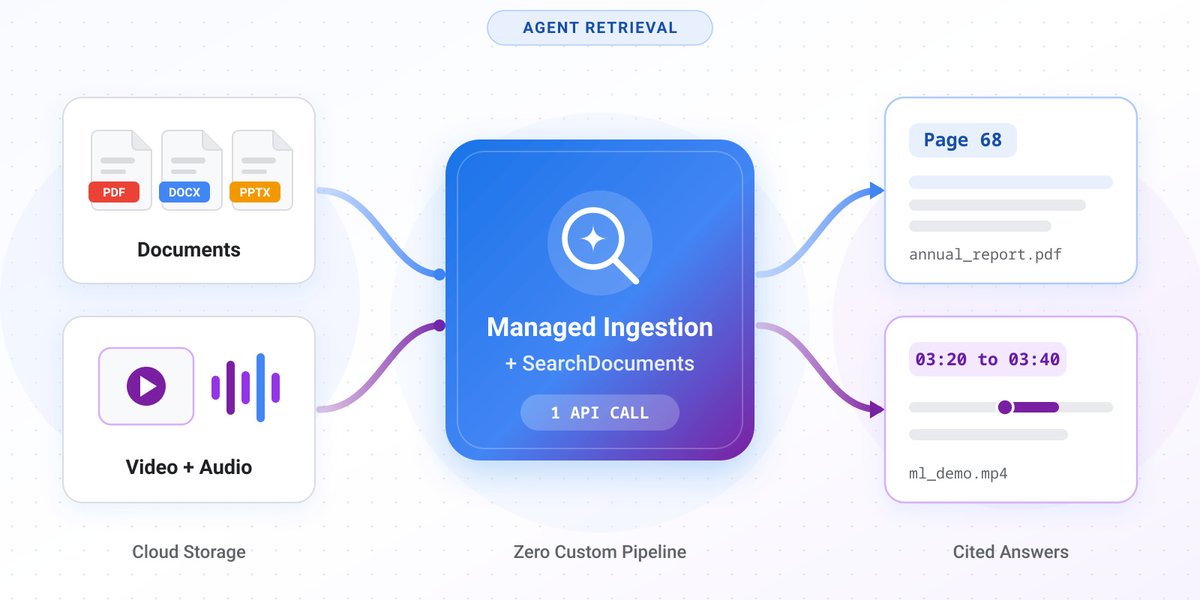
Before, every stage of the RAG pipeline was custom code: reading the file, deciding how to chunk it, calling the embedding model, writing to the vector database, and keeping that schema in sync with what the application expects. Managed ingestion creates a data store that points to files in Cloud Storage and handles parsing, segmentation, and embedding with Gemini Embedding 2 automatically.
Underneath, the data store is still a regular Agent Retrieval Collection. This means that when the use case demands fine-grained control (a custom vector field, a specific search strategy), you can query the Collection directly, without losing the option to step off the managed path.
Creating a document data store
The data store and SearchDocuments APIs are in v1beta, served via REST (Python SDK support is planned but doesn't exist yet). Google's example authenticates with google-auth and creates an authorized session before calling the endpoint:
import google.auth
from google.auth.transport.requests import AuthorizedSession

credentials, _ = google.auth.default(
    scopes=["https://www.googleapis.com/auth/cloud-platform"]
)
session = AuthorizedSession(credentials)

PARENT = "https://vectorsearch.googleapis.com/v1beta/projects/PROJECT_ID/locations/us-east4"

session.post(
    f"{PARENT}/dataStores",
    params={"data_store_id": "investor-reports"},
    json={
        "document_type": "UNSTRUCTURED",
        "processing_config": {
            "unstructured_processing_config": {
                "segmentation_config": {"page_segmentation_config": {}},
                "parsing_config": {"digital_parsing_config": {}},
            }
        },
    },
)
There are two segmentation modes, and the choice matters for citation precision. Chunk segmentation (default) splits text into blocks of 100 to 500 tokens and already detects tables and headings via layout parsing; page segmentation generates one segment per page. For paginated PDFs, both modes record startPage and endPage, but only page segmentation guarantees that each result points to a single page.
Import and search in two calls
Import accepts a URI pattern (gs://my-bucket/reports/*.pdf) or a JSONL manifest when you need to control the document ID and attach filterable metadata, such as doc_type or year. Reimporting the same file updates the document instead of duplicating it, and files with no content changes are skipped automatically.
With the data imported, search is a single call, without passing the Collection name, vector field, or task type:
response = session.post(
    f"{PARENT}/dataStores/investor-reports/documents:search",
    json={
        "text_query": {"text": "How much did Google Cloud revenue grow?"},
        "top_k": 5,
    },
).json()
Each result item already comes with the text excerpt, the source file's URI, and the page range (pageRange), ready to become a citation in the agent's response. SearchDocuments runs semantic search and full-text search at the same time and merges the two lists, which makes both the paraphrased question and the exact term match the result.
Filtering and reranking: where precision actually improves
Metadata filters (document_ids, schema fields) restrict the search to specific files or pages. In Google's test, filtering by page 1 and searching "What did the CEO say about AI?" brought back the CEO's quote on the opening page of five different reports at once.
Reranking, enabled with a single field ("ranking_spec": {"reranking_spec": {"enabled": True}}), reorders candidates with the same semantic-ranker-fast@latest model used by Agent Retrieval's VertexRanker. The reported quality difference is concrete: in the search "How many employees does Alphabet have?", plain hybrid search returned two balance-sheet pages that don't even mention employees among the top five results; with reranking enabled, all the top results reported the correct headcount, including the phrase "Alphabet had 190,234 employees" from the annual report.
In short: filtering solves scope, reranking solves relevance, and both are optional in the same call.
Video: search by image and by speech, without transcription
For video the flow is the same, with document_type: VIDEO. The service transcodes each file, splits it into windows of configurable duration (30 seconds by default, from 10 to 80 seconds depending on the case), and embeds each window. Each result returns the exact interval where the answer appears, such as {"startOffset": "60s", "endOffset": "80s"}.
In Google's own test, five sample videos (about 19 minutes total) were searched by scene description: the query "Cucumbers being sorted by a machine" returned the segment from 03:20 to 03:40 of a video about machine learning, with no prior tag or caption, in 0.3 to 0.5 seconds per query.
There's also an audio mode (audio_mode: ENABLED) that embeds the first audio track along with the frames. Turned off, search only sees what appears on screen; turned on, a question about what a speaker said finds the right moment even when the image shows something else. In a test comparing both configurations for the same question about a keynote speech, only the data store with audio enabled found the right segment.
What still isn't automatic
The list of caveats matters as much as the list of features:
- Limited regions: during Public Preview, only
us-east4oreurope-west4are available. - No Python SDK yet: calls are plain REST in
v1beta; SDK support is only planned. - Specific permission: you need to grant
roles/vectorsearch.serviceAgentto the Agent Retrieval service agent so it can read files in Cloud Storage. - Reranking doesn't apply to video:
reranking_speconly works on document data stores. - Video import time: in Google's test, importing five videos across two data stores took 20 to 45 minutes, and each data store processes one import at a time (different data stores run in parallel).
- Manual cleanup: deleting a data store without the
force=trueandbacking_collection_deleted=trueparameters leaves the underlying Collection orphaned; the deletion itself took about 20 minutes in testing.
On cost: during Public Preview, managed ingestion itself generates no separate charge, but the underlying Collection is billed at Agent Retrieval's standard price, and ingestion billing begins once the feature moves from preview to general availability (GA).
When it's worth replacing the custom pipeline
The real gain here isn't retrieval quality, it's who writes and maintains the code. A well-tuned custom pipeline can still win in very specific cases: a file format outside the supported list (PDF, DOCX, PPTX, XLSX, TXT, and video in MP4, MOV, WebM, MKV), the need for an embedding model other than Gemini Embedding 2, or chunking logic that depends on business rules that page or default chunk segmentation doesn't cover.
Outside those cases, the practical rule that Google's own post proposes is direct: if the data is a file, let the data store ingest it and search with SearchDocuments; only drop down to the Collection when you need control that the data store doesn't offer. For anyone prototyping an agent with RAG over a base of documents or institutional videos, this cuts weeks of infrastructure off one side of the equation, even with the caveat that the feature is still in preview, restricted to two regions, and without a Python SDK.
Translated from the Brazilian Portuguese original · Read the original
How iFood scales code agents across 15,000 repositories with an internal API
The Brazilian company built an internal platform that turns engineering tasks into API calls, runs agents in an isolated sandbox and returns the result as a merge request. The case, published by OpenAI on November 24, 2026, shows what changes when code automation needs to work across thousands of repositories at the same time.