Google's AI Overviews: what the official documentation requires (and doesn't require) from your page
Google Search Central updated the "AI features and your website" page and made it clear: there's no magic structured data for AI Overviews, but there are specific controls to limit or allow what appears.
- Reading
- 6 min
- Tables
- 1
Google Search Central updated the "AI features and your website" page and made it clear: there's no magic structured data for AI Overviews, but there are specific controls to limit or allow what appears.
Google Search Central maintains a reference page called "AI features and your website," written from the perspective of content publishers, not search users. The most recent version was updated on December 10, 2025, and consolidates, in a single place, how AI Overviews and AI Mode decide to cite a page and what controls a site has over that. For those who handle technical SEO, it's the closest thing to an official specification that exists so far.
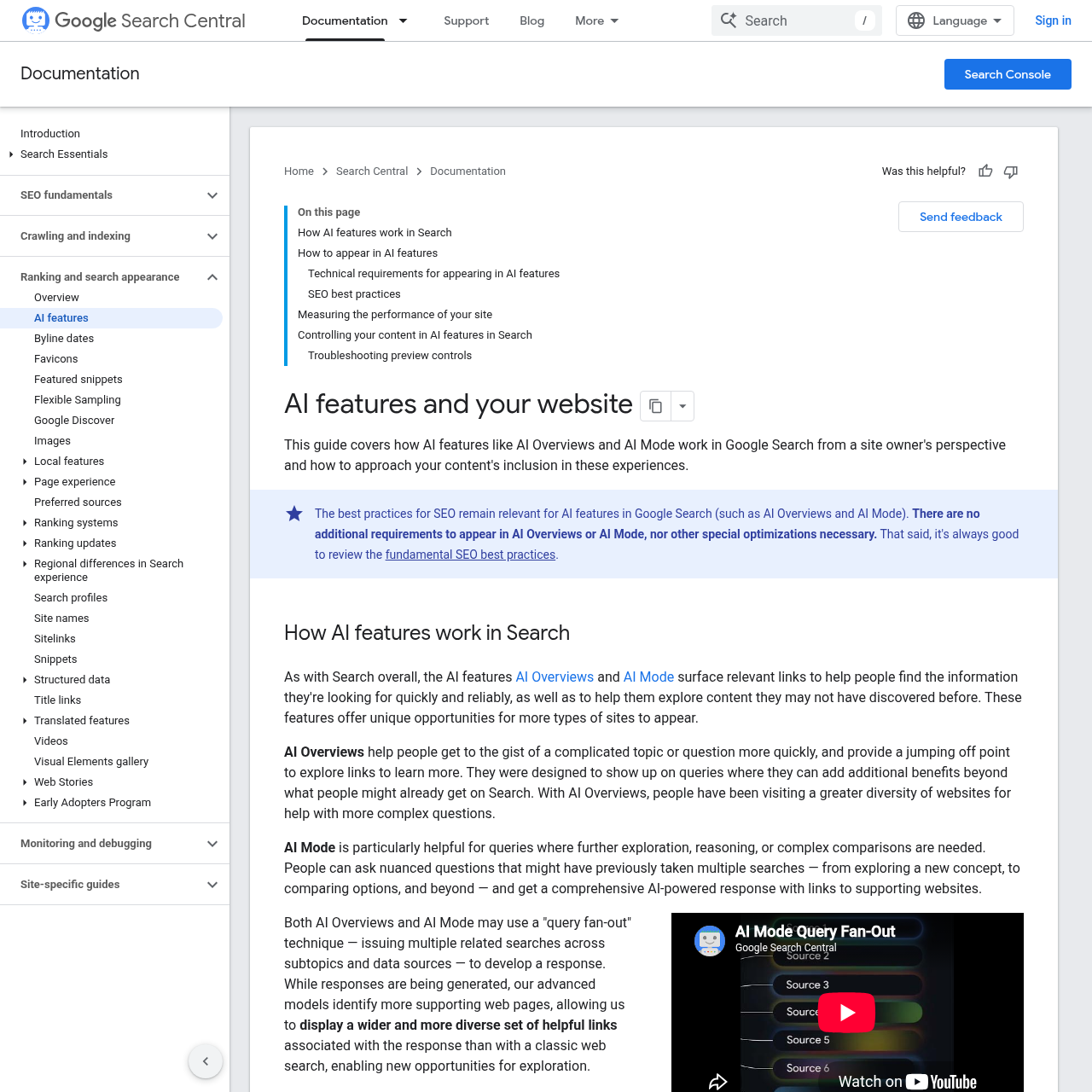
Its most important angle isn't what it adds, but what it doesn't add: Google states, in plain language, that AI Overviews and AI Mode "do not require specific optimization" beyond the SEO fundamentals that already apply to traditional search. This contradicts much of the market discourse around "GEO" as a discipline with its own rules and exclusive structured data.
How Google decides to include a link in the AI-generated summary
According to the documentation, both AI Overviews and AI Mode can use a technique Google calls "expanded search": the system fires off several related searches, covering different subtopics and data sources, before assembling the response. This means the model identifies more supporting pages than a traditional search would, which widens (rather than narrows) the pool of citable sites.
AI Overviews works as a starting point for complex topics, with links for further reading; according to Google, it only appears when the system calculates that it adds something beyond conventional search, which is why it doesn't trigger on every query. AI Mode specifically targets questions that would previously require several sequential searches, such as nuanced comparisons, and returns a broader answer in a single interaction, always with supporting links.
The real technical requirement: being indexable, that's it
The document's technical requirements section is short for editorial reasons, not for lack of detail: to appear as a reference link in AI Overviews or AI Mode, a page needs to be indexed and meet the standard technical requirements for search well enough to appear with a snippet in regular results. The text is explicit: "there are no additional technical requirements."
The list of best practices Google recommends for these surfaces is the same old list:
- Make sure
robots.txt, CDN, or hosting infrastructure allow crawling. - Make content easy to find via the site's internal links.
- Offer a good page experience to the user.
- Present important content in text format, not just in images or video.
- Support text with quality images and videos when it makes sense.
- Make sure structured data accurately reflects the text that actually appears on the page.
- Keep Merchant Center and business profile information up to date.
- Verify the site in Search Console to catch technical issues quickly.
The point that matters most to anyone working with Schema.org is the fifth item: Google reinforces that structured data needs to match the page's visible text. This isn't a new rule for AI Overviews, but it carries more weight here, because a generative model that reads markup diverging from the actual content tends to discard the page as a source, rather than simply ignoring the markup the way a traditional rich result would.
The controls that actually change what appears
If there's no special structured data for getting into the AI Overview, there is a set of controls for getting out of it, or for limiting how much text Google reuses. These are the same mechanisms that already govern traditional snippets, and the document reaffirms them as the official way to manage presence in AI:
| Control | What it does | When to use it |
|---|---|---|
noindex | Removes the entire page from results, including AI Overviews and AI Mode | A page that shouldn't appear in any search |
nosnippet | Blocks any text, image, or video snippet extracted from the page | Content that can't be summarized or quoted |
data-nosnippet | Marks a specific piece of HTML to exclude just that block from the snippet, keeping the rest indexable | A sensitive paragraph within a page that is otherwise citable |
max-snippet | Limits the number of characters Google can use when building the snippet | Controlling the size of reused text without blocking the citation |
Beyond these, Google sets apart a separate control for a different purpose: Google-Extended governs whether content feeds training and grounding for other Google AI systems, outside the context of search indexing. It's a decision independent of appearing or not in AI Overviews: you can allow citation in search while, at the same time, restricting the use of the content as training data.
And where does E-E-A-T fit in?
The documentation doesn't mention the E-E-A-T acronym directly. What it does is point, in the general recommendations section, to the guidance to produce "helpful, reliable, people-first content," the same umbrella that already underpins Google's quality guidelines for traditional search. In practice, this means there's no AI-exclusive E-E-A-T checklist: the experience, expertise, authoritativeness, and trustworthiness signals that already mattered for ranking remain the filter used before a page becomes a citable source in a generated summary.
How to measure whether your page is being cited
In Search Console, clicks and impressions coming from AI Overviews and AI Mode are aggregated into the performance report, under the "Web" search type, together with traditional results. According to the document, there is no separate tab just for AI within the standard report; Google recommends cross-referencing Search Console with tools like Google Analytics to isolate traffic and dwell-time variations.
One qualitative data point worth noting: according to the documentation itself, clicks originating from results pages with an AI Overview tend to generate higher-quality traffic, with longer time spent on the site. This is a claim Google makes about its own product, not an independent benchmark, but it helps justify why it's worth investing in eligibility even without direct control over when the feature triggers.
When the preview control doesn't work
The document also provides a troubleshooting roadmap for anyone who applied nosnippet, data-nosnippet, or max-snippet and still sees the content appearing in AI summaries:
- Confirm the control is correctly implemented and visible to Googlebot, using the URL Inspection tool to see the HTML Google actually received when crawling the page.
- Wait for the change to be recrawled and processed, a process that can take anywhere from days to months depending on how often Google decides to update that page; it's possible to request a new crawl manually.
- If the issue persists after these steps, open a question in the Google Search Central help community.
For those doing technical SEO, the practical takeaway from the update is modest but useful: stop looking for a secret schema for "AI Overviews" and make sure the basics, crawlability, structured data that's faithful to the visible text, and well-implemented snippet controls, are actually working. The rest is the same SEO as always, just with one more possible destination for the click.
Translated from the Brazilian Portuguese original · Read the original

Google documentation confirms: no extra technical requirement to appear in AI Overviews
Google Search Central guide, updated in December 2025, reinforces that eligibility for AI Overviews and AI Mode depends on the same technical indexing fundamentals as Search, with no additional criteria.