

What's New in C# 8.0: Switch Expressions

- Reading
- 3 min
- Code
- 3
In this article, Renato Groffe presents one of the new features of C# 8.0, Switch Expressions, a great option for those who want to simplify their code.
One of the new features introduced by C# 7.0 was the feature known as Pattern Matching, designed to eliminate the need to code a typecast and thus help achieve cleaner, more direct code. I already covered this in the following article:
C# 7.1 expanded the possibilities involving Pattern Matching by also supporting the use of generic types with this feature. I also presented this new feature in detail in the following article:
C# 8.0, in turn, further expanded the scope of use regarding Pattern Matching, and one highlight now is the introduction of switch expressions.
Note: the tests described in this article used Visual Studio 2019 Preview 4.3 and .NET Core 3.0 Preview 3.
Suppose a block of code like the one shown in the following listing (with the enum FiguraGeometrica and the static class Area), which uses the switch, case, and default statements inside a method:
using System;

namespace ExemploSwitchExpressions
{
    public enum FiguraGeometrica
    {
        Quadrado,
        Retangulo,
        Triangulo
    }

    public static class Area
    {
        public static double Calcular(
            FiguraGeometrica figura, double medida1, double? medida2 = null)
        {
            switch (figura)
            {
                case FiguraGeometrica.Quadrado:
                    return medida1 * medida1;
                case FiguraGeometrica.Retangulo:
                    return medida1 * medida2.Value;
                case FiguraGeometrica.Triangulo:
                    return (medida1 * medida2.Value) / 2.0;
                default:
                    throw new ArgumentException("Figura Geométrica inválida!");
            }
        }
    }
}
By using switch expressions, this code becomes much simpler, as shown in the next listing (which contains a refactored version of the Area type):
- The use of case was dropped, with the value to be evaluated followed by => and the return expression
- The use of the default keyword was replaced with _
using System;

namespace ExemploSwitchExpressions
{
    public enum FiguraGeometrica
    {
        Quadrado,
        Retangulo,
        Triangulo
    }

    public static class Area
    {
        public static double Calcular(
            FiguraGeometrica figura, double medida1, double? medida2 = null) =>
        figura switch
        {
            FiguraGeometrica.Quadrado => medida1 * medida1,
            FiguraGeometrica.Retangulo => medida1 * medida2.Value,
            FiguraGeometrica.Triangulo => (medida1 * medida2.Value) / 2.0,
            _ => throw new ArgumentException("Figura Geométrica inválida!")
        };
    }
}
The following listing shows an example of using the Area class and the FiguraGeometrica enum:
using System;

namespace ExemploSwitchExpressions
{
    class Program
    {
        static void Main(string[] args)
        {
            Console.WriteLine("Área de um quadrado de lado 4: " +
                Area.Calcular(FiguraGeometrica.Quadrado, 4));
            Console.WriteLine("Área de um retângulo de 5 x 6: " +
                Area.Calcular(FiguraGeometrica.Retangulo, 5, 6));
            Console.WriteLine("Área de um triângulo de base 7 e altura 8: " +
                Area.Calcular(FiguraGeometrica.Triangulo, 7, 8));
        }
    }
}
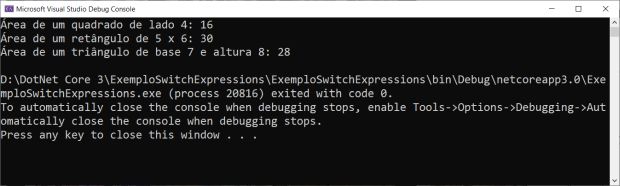
As a result of running this application, we get:
Here are links to the other articles I've already published about the new features in C# 8.0 and Visual Studio 2019:
- Visual Studio 2019 and .NET Core 3: First Tests
- What's New in C# 8.0: How to Enable, Ranges and Indices
- What's New in C# 8.0: Nullable Reference Types
- Visual Studio 2019: Preview 2.1 and New Features in Debugging Console Applications
- .NET Core 3 Preview 3, VS 2019 Release Candidate, Using Declarations in C# 8.0
- What's New in C# 8.0: Static Local Functions
Also, here's the recording of the hangout held on March 6 on the Canal .NET, in which I discussed new features involving .NET Core 2.2, ASP.NET Core 2.2, .NET Core 3.0, ASP.NET Core 3.0, and Visual Studio 2019:
References
Translated from the Brazilian Portuguese original · Read the original

Before giving more tools to your AI agent, check if it knows how to use the ones it already has
A model had a calculator available and still failed at some basic math problems. The calculator worked perfectly, but the problem was the model knowing when to use the tool and what information to pass to it.