
Google explains how nosnippet, data-nosnippet, and max-snippet control site citation in AI Overviews
- Reading
- 7 min
- Tables
- 1
- Code
- 5
A Google Search Central guide, updated in December 2025, details the technical directives that decide whether and how a site appears as a source in AI Overviews and AI Mode, and how to track the effect of this in Search Console.
Guide from Google Search Central, updated in December 2025, details the technical directives that decide whether and how a site appears as a source in AI Overviews and AI Mode, and how to track the effect of this in Search Console.
Editor's note: the section "How to measure before and after in Search Console" describes a methodology for comparing reports before and after applying a directive that is not explicitly detailed in the official Google documentation consulted for this story. The source confirms that AI Overviews clicks are counted in the Performance report under "Web" and mentions the possibility of combining Search Console data with Google Analytics, but it does not attribute to Google the specific pre/post-directive comparison steps presented here. Treat this part as a practical recommendation from our team, not as a textual instruction from Google.
Google Search Central published a guide dedicated to explaining, from the perspective of a site owner, how AI Overviews and AI Mode decide which pages to cite in AI-generated responses within Search. The document, updated on December 10, 2025, does not introduce a new tag or a special AI-optimization badge: it reuses a set of directives that has existed for years in robots.txt and in snippet-control meta tags, and makes clear that this is the only game available to anyone who wants to adjust their presence in these responses.
What changes when the answer is already assembled
AI Overviews and AI Mode work differently from classic search. Instead of assembling a list of ten links, the system can fire off several related searches in parallel (the technique Google calls query fan-out) to gather subtopics and sources before generating the final answer. This means a page can be used to support an answer without necessarily appearing at the top of the traditional result for that same query.
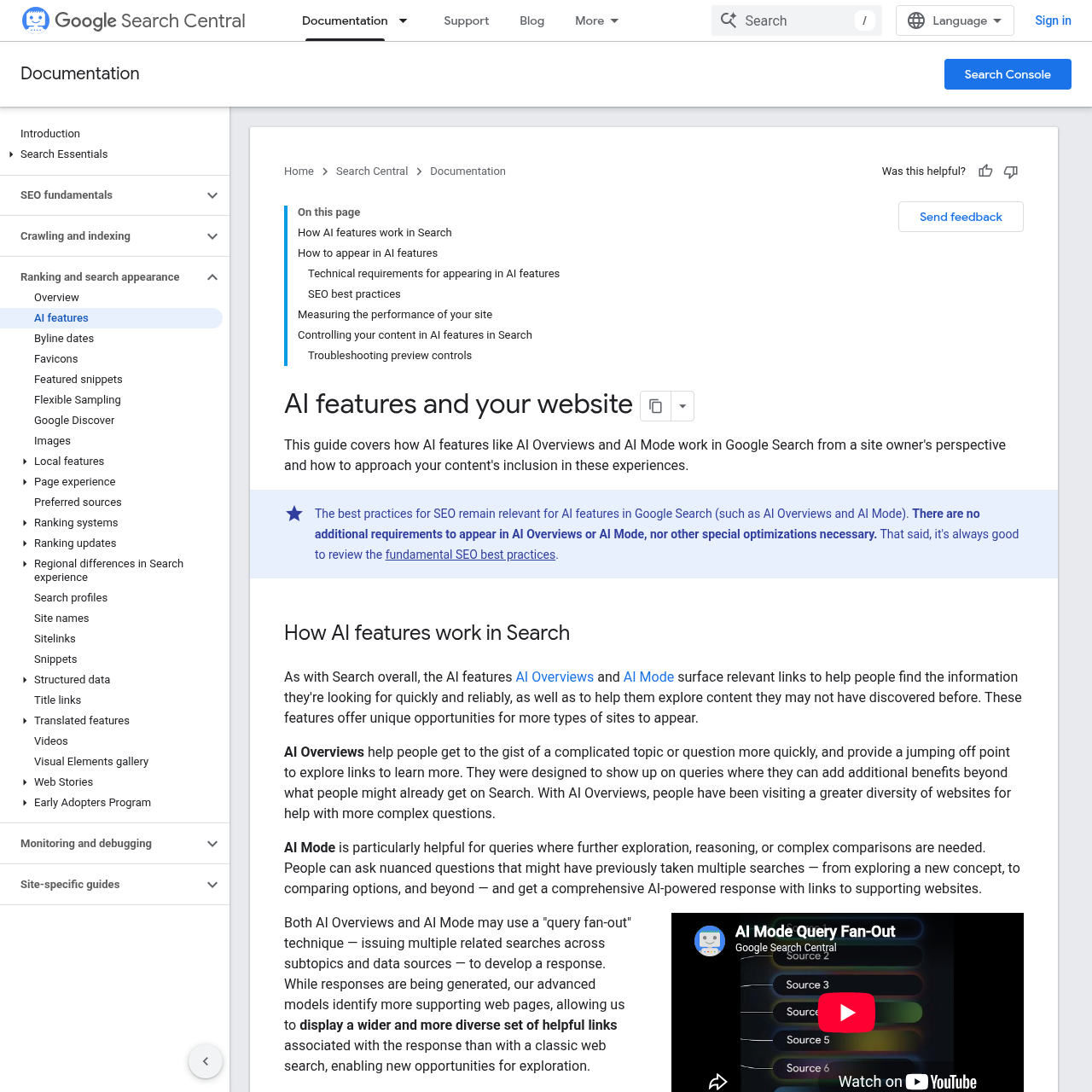
Google states that, with AI Overviews, people have started visiting a wider diversity of sites to resolve complex questions, and that clicks coming from results with AI Overviews tend to be more qualified: users who arrive this way spend more time on the site. This is Google's own reading, with no public number attached, but it is already reason enough for any growth team to stop treating AI Overviews as noise and start treating it as a channel with its own behavior.
The technical requirements haven't changed
The most important part of the guide, for anyone expecting a magic formula, is precisely the absence of one. To be eligible to appear as a supporting link in AI Overviews or AI Mode, a page only needs to be indexed and eligible to appear in Search with a snippet, meeting Google Search's standard technical requirements. There is no additional technical requirement specific to AI.
In practice, this pushes the work back to the basics that every technical SEO team should already be doing: allowing crawling in robots.txt (including by CDN and hosting infrastructure), maintaining internal links that make content easy to find, ensuring a good page experience, having relevant content available in text form (not only in image or video without a transcript), supporting the text with quality images and videos when it makes sense, keeping structured data consistent with what is visible on the page, and keeping Business Profile and Merchant Center information up to date when applicable.
The four directives that decide what appears
Since there is no AI-specific tag, control happens through the same directives that already regulate the classic snippet. The guide stresses that these are just four tools, each with a different effect:
| Directive | What it does | Practical effect |
|---|---|---|
nosnippet | Blocks any text, image, or video snippet from the page | The page can be cited as a link, but without an excerpt extracted from it |
data-nosnippet | Marks a specific HTML excerpt as off-limits for use as a snippet | The rest of the page remains normally eligible for a snippet |
max-snippet | Sets a character limit for the displayed snippet | Controls the size of what is shown, without blocking everything |
noindex | Removes the entire page from indexing | The page disappears from Search and, as a result, from any AI response |
In practice, the implementation is the usual one. To block any excerpt of a page:
<meta name="robots" content="nosnippet">To prevent only a specific paragraph from becoming a snippet, while keeping the rest of the page free:
<p>This paragraph can appear normally in a snippet.</p>
<p data-nosnippet>This excerpt should not be extracted as a snippet, even if the page as a whole is eligible.</p>
To limit the snippet size to, for example, 160 characters:
<meta name="robots" content="max-snippet:160">And to remove the entire page from indexing, including from any AI response:
<meta name="robots" content="noindex">Google-Extended is a different control, for a different problem
It's worth separating two decisions that growth teams often mix up. The directives above control what appears in Search, including AI Overviews and AI Mode, because the AI there is an integral part of Search itself. To limit the use of content for model training and for grounding other Google systems, outside of Search, the control is different: the Google-Extended token in robots.txt.
User-agent: Google-Extended
Disallow: /
Blocking Google-Extended does not remove the page from AI Overviews or AI Mode, because this block does not affect the Googlebot used for Search crawling. These are different surfaces and different contracts, and treating both as the same decision is the most common mistake made by anyone configuring this for the first time.
How to measure before and after in Search Console
Here is the point that most frustrates anyone trying to isolate the effect of AI Overviews: the guide confirms that clicks and impressions coming from AI Overviews and AI Mode are counted in the Search Console Performance report under the "Web" search type, alongside the rest of organic traffic. Today, there is no dedicated filter to separate "clicks that came from an AI response" from the rest.
Given this, an indirect way to assess impact, in the absence of a dedicated filter, is to track the Performance report by page or by page group over time and cross-reference that variation with time on site in Google Analytics, since the guide itself mentions the possibility of combining Search Console and Analytics data for this type of analysis. Clicks coming from results with AI Overviews tend to show longer sessions, according to Google itself, which can serve as an indirect signal that that specific traffic is changing, even without an exclusive label in the report.
For any team running this test: record the exact date of the directive change, segment the Performance report by page or URL pattern, and wait for Google's recrawl window before drawing conclusions, because without that, the "before and after" mixes the effect of old cache with the real effect of the change.
When the directive doesn't take effect: troubleshooting steps
The guide lists a specific roadmap for when a page continues to appear in AI Overviews even after the directive has been applied:
- Confirm that the control is correct and visible to Googlebot, using the Search Console URL Inspection tool to see exactly the HTML that Googlebot received when crawling the page.
- Give Google time to crawl and process the change again: the document itself admits that this recrawl can take anywhere from a few days to several months, depending on how often the system decides to update that page.
- Explicitly request a new crawl of the page through Search Console, instead of waiting for the natural cycle.
- If none of this works, open a topic in the Google Search Central help community, which is the official channel for this type of escalation.
This roadmap reinforces a point that is often ignored: a snippet directive is not instant. Any "before and after" assessment made before the full recrawl will measure noise, not a real effect, and it is this timing detail, more than the choice between nosnippet or max-snippet, that decides whether the growth team's test will produce a reliable conclusion or not.
Translated from the Brazilian Portuguese original · Read the original

Google documentation confirms Search Console doesn't isolate AI Overviews traffic
Official Google Search Central documentation, updated in December 2025, makes clear that AI Overviews clicks and impressions fall into the same bucket as 'Web' traffic. For growth teams, this changes how to measure what generative AI is actually bringing in.