Robots.txt for the AI era: how to configure Google-Extended and Googlebot correctly

- Reading
- 6 min
- Tables
- 1
- Code
- 3
A practical guide to auditing the robots.txt of a Brazilian site, separating what each Google crawler does, and understanding why blocking AI training should not, in theory, remove your page from AI Overviews.
Robots.txt has become an AI control panel, not just an indexing one
Editor's note: this article cites the update date of Google Search Central's crawler documentation as November 2, 2026; the source page actually indicates November 3, 2026 ('Ostatnia aktualizacja: 2026-11-03 UTC'). The technical content about user-agents and their functions was checked and matches the source in full; only this specific date is incorrect.
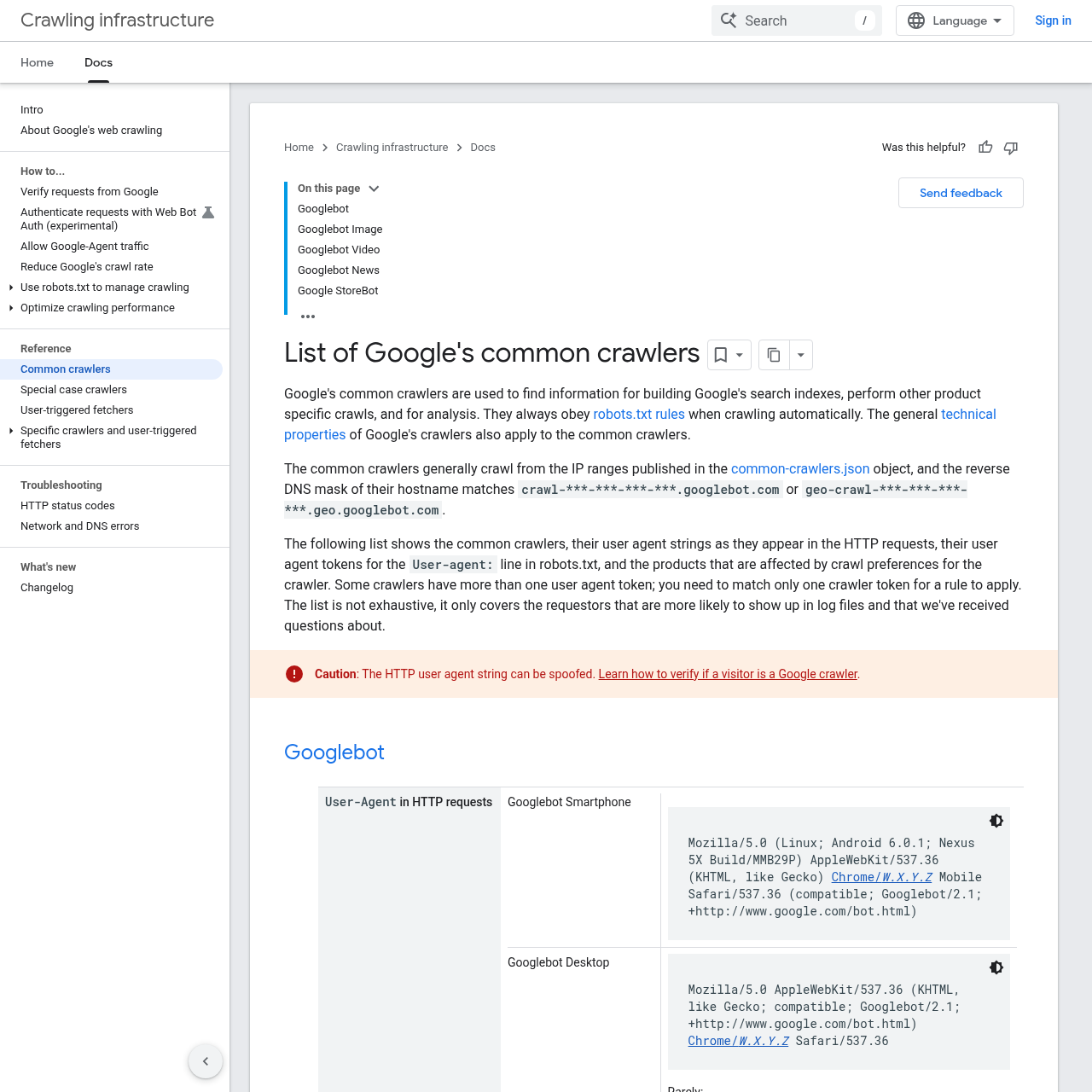
For a long time, robots.txt answered just one question: can this crawler read this URL or not? With the arrival of Google's generative models, the file started answering another question, separate from the first: can this content train an AI model? These are independent decisions, and Google Search Central's crawler documentation (updated on November 2, 2026) makes this explicit by listing each user-agent and the product it affects.
The problem is that most robots.txt files out there were written before this distinction existed. They block or allow the generic Googlebot and ignore that, today, there are more than ten Google user-agent tokens in circulation, each with a different effect. Auditing this is the first step before touching any line.
Google's user-agents, one by one
The table below summarizes what the official documentation says about each token that can appear in a user-agent: block of robots.txt. It's the reference I would check before writing any new rule.
| Token in robots.txt | What it crawls | What it affects |
|---|---|---|
Googlebot | General search (desktop and smartphone) | Google Search (including Discover and other search features), plus other products such as Google Images, Video mode, and Google News |
Googlebot-Image | Images | Google Images, favicons, thumbnails in results |
Googlebot-Video | Videos | Video features in search |
Googlebot-News | News | news.google.com and the Google News app |
Storebot-Google | E-commerce | Google Shopping and the Shopping tab in search |
Google-InspectionTool | On-demand testing | Rich Results Test and URL inspection in Search Console |
GoogleOther | Generic crawling | Internal research and development, with no specific product |
GoogleOther-Image / GoogleOther-Video | Variant of GoogleOther | Same, optimized for image or video |
Google-CloudVertexBot | Customer on-demand crawling | Vertex AI agents, does not affect search |
Google-Extended | None (uses the already existing user-agents) | Training of Gemini models and grounding in Gemini and Vertex AI |
Notice one thing: Google-Extended doesn't have its own user-agent string in an HTTP request. It doesn't show up in the server log as a distinct visitor; it's purely a control token within robots.txt, triggered during crawls already carried out with Google's conventional user-agents.
Google-Extended is not the switch to opt out of AI Overviews
This is where the most common mistake I see in audits lies: thinking that blocking Google-Extended removes the page from AI Overviews. Google's own documentation is direct in stating that this doesn't affect the site's inclusion in Search, although it doesn't specifically address the AI Overviews feature.
Google-Extended does not affect the site's inclusion in Google Search and is not used as a ranking signal in Google Search.
Google Search Central, crawler documentation
In short: Google-Extended controls two specific things, training of future Gemini models and grounding (the technique of feeding the model with excerpts from the search index at response time, to improve factual accuracy) within the Gemini app and Vertex AI. The official documentation doesn't specifically address AI Overviews, but it's reasonable to assume, in my reading, that, since it's a feature within Search itself, it depends on the same index built by Googlebot. If this reading is correct, blocking Google-Extended doesn't remove the page from that index or that feature, but this extension is not explicitly stated by Google.
If the goal is really to not appear in AI Overviews, the right tool isn't Google-Extended: it's noindex, nosnippet, or max-snippet via meta robots, and this has the side effect of also removing the page from regular results or the snippet shown in them. There is no switch today that keeps the page in traditional ranking while excluding it only from the AI box.
Step by step: auditing the robots.txt of a typical site
In a typical project for a Brazilian content site (a technical blog, a news portal, an e-commerce store), this is the roadmap I'd follow before touching any line of the file.
- Download the production file: go to
https://seudominio.com.br/robots.txtdirectly in the browser and save the current content before editing. - List every existing
user-agent:block and mark which tokens from the table above appear (and which don't, because silence is also a decision). - Separate rules by objective: normal indexing (
Googlebot), appearance in images or videos (Googlebot-Image,Googlebot-Video), AI training and grounding (Google-Extended). - Check server logs for user-agents claiming to be from Google and validate with reverse DNS: a legitimate Google crawler resolves to
crawl-***-***-***-***.googlebot.comorgeo-crawl-***-***-***-***.geo.googlebot.com. Anything outside this pattern could be spoofing. - Decide, rule by rule, which token gets
allowordisallow, without copying a generic block from another site.
Configuring by objective
With the tokens identified, configuration becomes a matter of combining blocks. An example of a robots.txt that indexes normally but denies AI training and grounding:
User-agent: Googlebot
Allow: /

User-agent: Googlebot-Image
Allow: /

User-agent: Google-Extended
Disallow: /

User-agent: GoogleOther
Disallow: /
This file keeps the site eligible for search, Discover, and Google Images (because Googlebot and Googlebot-Image keep Allow: /), refuses to let the content train future Gemini models or feed grounding (Google-Extended with Disallow: /), and closes the door to exploratory crawls of products not yet documented (GoogleOther).
If the goal is the opposite, allowing the content to help train the models (some publishers do this on purpose, trading visibility in AI answers for referral traffic), just invert the rule:
User-agent: Google-Extended
Allow: /
And if the intent is to block a specific section, like a forum with user-generated content, without removing the rest of the site from training, Disallow accepts a path:
User-agent: Google-Extended
Disallow: /forum/
Allow: /
Validating in Search Console and the tester
Editing robots.txt without validating is where most audit mistakes appear. Two complementary paths solve this.
- URL Inspection: tests a specific page and shows whether it's blocked for
Googlebot; this check runs with theGoogle-InspectionTooluser-agent, which the documentation confirms doesn't affect search itself, only the testing tool. - Manual command-line test:
curl -A "Googlebot" https://seudominio.com.br/paginasimulates the request and confirms the server isn't blocking through another mechanism (firewall, CDN) besidesrobots.txt.
Neither of these tools confirms, however, whether a specific page is being used to train Gemini or appear in grounding: that's an internal Google effect and, today, has no public verification panel. The most you can measure is whether the Google-Extended rule was read without a syntax error.
What remains open
Two limitations are worth making clear for anyone measuring the impact of this change. First, since Google-Extended doesn't generate its own user-agent string in logs, you can't confirm via server log whether the block is actually preventing a crawl, only whether the file was read correctly. Second, there is currently no granular control to remove a page only from AI Overviews without also removing it from traditional results, so anyone who depends on search traffic has to accept this bundled package or give it up entirely.
Translated from the Brazilian Portuguese original · Read the original


Microsoft Confirms Ads Inside AI Overviews in Bing Search
Microsoft has officially confirmed what had already been running for weeks: ads mixed into AI-generated responses on Bing. For media buyers, this changes where and how search budgets need to be monitored.