
Favicon in Google Search: how to audit and fix the redirect chain
Google Search Central's documentation on favicons was updated in September 2026 and reinforces rules that many redirect chains and misconfigured CDNs break without anyone noticing.

- Reading
- 7 min
- Code
- 5
Editor's note: the first two paragraphs below contain a date error (they cite 'September 2026') that is a residue from an earlier revision of the text and was not removed in time. The correct update date for the Google Search Central documentation, confirmed in the source itself, is October 27, 2026, as correctly appears starting from the third paragraph and throughout the rest of the article.
Google Search Central's documentation on favicons was updated in September 2026 and reinforces rules that many redirect chains and misconfigured CDNs break without anyone noticing.
Google Search Central's documentation on favicons was updated in September 2026 and reinforces rules that many redirect chains and misconfigured CDNs break without anyone noticing.
Google Search Central's documentation on favicons was updated on October 27, 2026 and reinforces rules that many redirect chains and misconfigured CDNs break without anyone noticing.
What the updated documentation reinforces
The official Google Search Central page on favicon in Search was updated on October 27, 2026 (UTC). The underlying content isn't new, but it's worth revisiting because it's exactly the kind of rule that breaks silently: no one notices until the icon disappears from the search result.
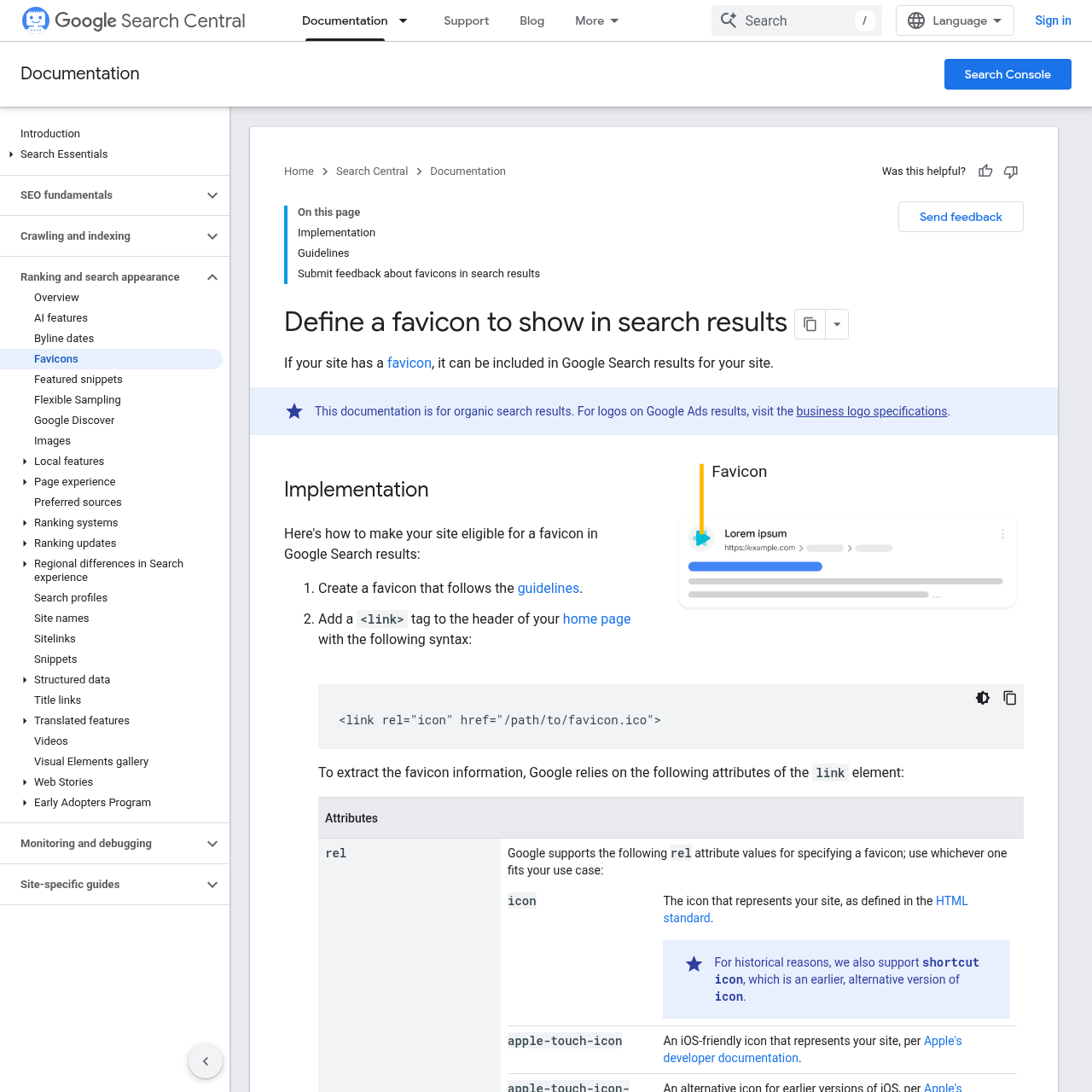
The rules that matter for anyone auditing are four. A host can only have one favicon (a subdirectory doesn't count, a subdomain counts as a separate site). The file needs to be at least 8x8 pixels, with 48x48 recommended. The accepted formats are BMP, GIF, ICO, PNG, JPEG, PPM, and TIFF. And the favicon URL needs to be stable, without changing with every deploy.
The point that usually goes unnoticed: both Googlebot and Googlebot Image need to be able to crawl the favicon file and the home page without being blocked. This is where the redirect chain comes in, and it's where most of the problems I see on Brazilian sites live.
Why the redirect chain brings down the favicon
A favicon is rarely served directly. In practice, the URL declared in <link rel="icon"> goes from http to https, then from www to the root domain (or the other way around), sometimes lands on a CDN subdomain, and, if the deploy changed the folder structure, can end up in a 404 that the framework masks with an error page returning 200. Each of these hops is a point of failure.
Googlebot-Image needs to be able to crawl the favicon file, and, according to the documentation, no URL in the chain can be blocked by robots.txt or other means. If the second-to-last hop is on a CDN domain with a generic robots.txt blocking everything, the favicon never gets processed, even if the home page is perfectly indexable.
Step 1: confirm the tag on the homepage
The first step is visual and quick: open the source code of the homepage (not a subpage) and look for the tag.
<link rel="icon" href="https://cdn.exemplo.com.br/assets/favicon.ico">Notice that the URL can be relative or absolute, and can point to a host different from the site, such as a CDN. This is allowed by the documentation. The problem isn't the destination host, it's whether it responds stably and without being blocked.
Step 2: follow the chain with curl
Editor's note: the code in this section was not executed in a real environment. Validate before using in production.
With the URL in hand, the command I run first is curl -IL, which follows redirects showing only the headers of each hop:
curl -IL https://www.exemplo.com.br/favicon.icoWhat I look for in the output is the sequence of status codes. A healthy chain has at most one or two 301/302 before a final 200. More than that is already a warning sign, because each extra hop is a chance for Googlebot Image to give up or land on a blocked domain.
To see the full path, including the Location header of each redirect, I use -v instead of -I:
curl -v -L https://www.exemplo.com.br/favicon.ico 2>&1 | grep -E "HTTP|Location"This command lists, in order, each intermediate URL. This is where the classic cases show up: http://exemplo.com.br redirecting to https://www.exemplo.com.br, which in turn redirects to https://cdn.exemplo.com.br/assets/favicon.ico, which returns 404.
Step 3: audit the robots.txt on each domain in the chain
Every domain that appears in the chain needs to have its own robots.txt checked, not just the main domain. If the favicon is on a CDN, the CDN's robots.txt is what counts for that file.
curl https://cdn.exemplo.com.br/robots.txtA common mistake in asset CDN configurations is an overly broad block, meant to prevent product image indexing, but that ends up catching the favicon along with it:
User-agent: Googlebot-Image
Disallow: /assets/
If the favicon lives at /assets/favicon.ico, this rule blocks exactly the file you want to appear in search. The fix here is to open a specific exception or move the favicon to a path that doesn't fall under the Disallow rule.
Step 4: confirm in Search Console with URL Inspection
curl shows what the server responds, but doesn't necessarily show what Googlebot is seeing at the moment. For that, I use the Search Console's URL inspection tool, inspecting the homepage (not the favicon directly, since it isn't an indexable URL on its own).
On the results screen, the step that settles the doubt is running the live test ("test live URL") and analyzing the rendered result, checking for any indication of blocked resources during the homepage's loading.
In short: signs of blocking in the tool reinforce the suspicion raised by curl; their absence, combined with the favicon's absence from the search result, points more toward a problem in the tag declaration than in access to the file.
Step 5: validate with the rich results test
As a second source of confirmation, it's also worth running the rich results test (search.google.com/test/rich-results) on the same homepage, which allows you to inspect the HTML rendered by Google. Comparing the results of both tools helps rule out a false positive: if both indicate the page loads without resource errors, the technical chain is likely correct and any delay for the favicon to appear in search is just a matter of reprocessing.
The case of CDN and asset subdomains
The documentation is clear that the favicon URL can live outside the site's domain, on a CDN. But the "one favicon per site" rule is about the host of the PAGE, not of the file: www.exemplo.com.br and blog.exemplo.com.br are different hosts and can (and should) declare different favicons, even if both files physically reside on the same CDN.
The mistake I see frequently is the asset CDN being shared across several sites or subdomains of the same group, with that CDN's robots.txt configured with only the main site in mind. In this scenario, the secondary subdomain ends up with its favicon blocked without anyone having touched its code.
After fixing: requesting reindexing
Once the redirect or robots.txt is fixed, the next step is to go back to URL Inspection, run the live test again to confirm the resource no longer appears blocked, and then click "request indexing" within the tool itself. Google's documentation is direct about the timeline: reprocessing can take anywhere from a few days to a few weeks, depending on the crawl frequency Google already assigns to that homepage.
Common pitfalls this audit catches
- Redirect to a masked error: the framework returns
200on a generic error page instead of a real404, andcurl -ILdoesn't deliver a clear signal of the break. - Unstable favicon: deploy pipelines that generate a hash in the file name (
favicon.a1b2c3.ico) violate the stable URL rule on every build. - Generic robots.txt on the CDN: a block designed for another purpose (avoiding indexing of product images) catches the favicon along with it.
- Missing tag on the homepage: the
<link rel="icon">exists on internal pages, but was forgotten in the specific homepage template, which is the only place that counts. - Forgotten subdomain:
blog.exemplo.com.brorloja.exemplo.com.brnever got their own favicon because the team assumed the main domain's favicon "would count for everything".
Source
This article references the official Google Search Central documentation on favicon in Search, available at https://developers.google.com/search/docs/appearance/favicon-in-search.
Translated from the Brazilian Portuguese original · Read the original
Google details how AI Overviews and AI Mode choose and cite pages
Guide updated in December 2025 explains how AI Overviews and AI Mode select supporting pages, but makes one thing clear: appearing in an AI response doesn't always generate a trackable click.