

Llms.txt v2 in Practice: How to Generate, Validate and Monitor the File for Generative AI

- Reading
- 6 min
- Tables
- 1
- Code
- 5
The llms.txt specification has a version 2, with companion markdown pages and standardized HTTP headers. See the roadmap for migrating a Brazilian site, and what, honestly, still can't be proven about whether AI bots actually read it.
From v1 to v2: What Really Changes
The llms.txt proposal was born in 2024 to solve a concrete problem: HTML pages load navigation, ads, and JavaScript that get in the way of a language model extracting useful information. The original idea was simple: a markdown file at /llms.txt with links to relevant documentation. After two years of adoption, according to the specification itself at llmstxt.org, the author revised the format and published v2, incorporating what worked and what was missing.
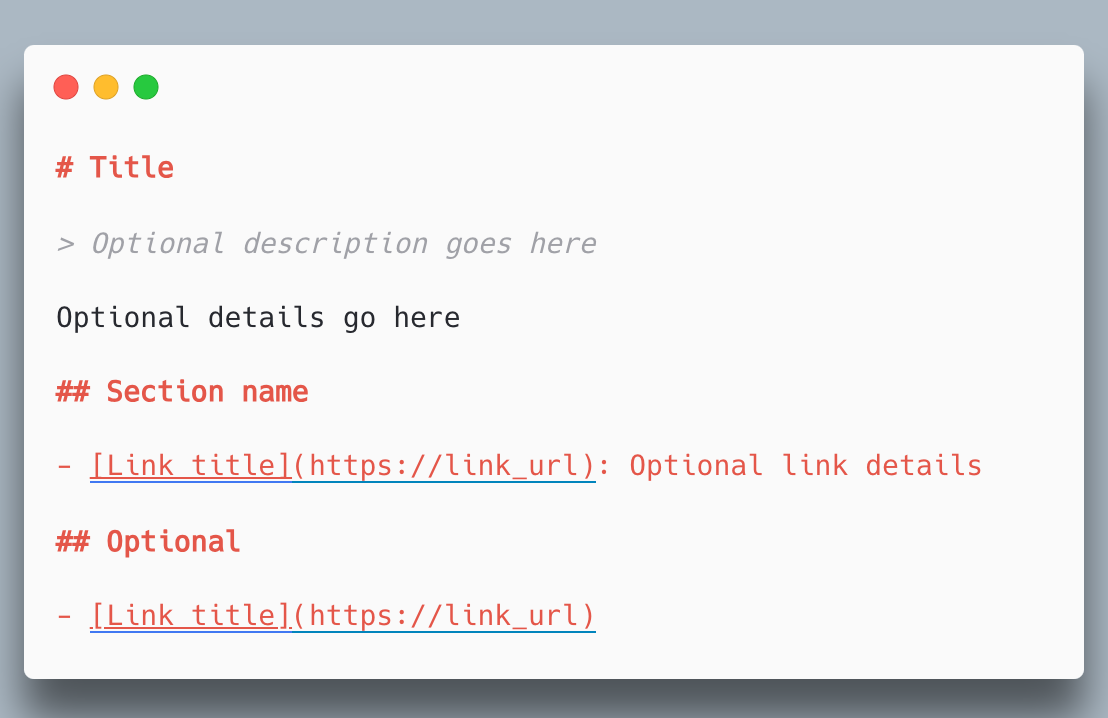
The central difference isn't in the structure of the file itself, which remains a mandatory H1, a summary blockquote, and H2 sections with lists of links. What's new in v2 is how the content behind those links should be served.
| Aspect | v1 | v2 |
|---|---|---|
/llms.txt file | H1, summary, lists of links | Same structure, kept |
| Linked pages | Any format | Markdown version at the same URL (.html.md or .md) |
| Discovery by the agent | Only via llms.txt itself | Also via <link rel="alternate"> and <link rel="describedby"> |
| CDN implementation | Not foreseen | Configurable Link: HTTP header without touching the pages |
That last row is what matters for anyone already running a large site: the HTTP header lets you declare the relationship with llms.txt directly in the server or CDN configuration, without editing each page.
Step 1: Map What's Worth Exposing
Before writing a single line of markdown, I would list only the content an agent would actually need to answer questions about the product: API documentation, quickstart guides, relevant policies. The specification is explicit about this: the file needs to fit within the model's context, so detail belongs in the links, not in the llms.txt itself.
For a Brazilian technical documentation site, for example, this means choosing the /docs/ folder as the scope and leaving out institutional or marketing pages that don't help a coding agent resolve an API call.
Step 2: Generate Markdown Versions of the Pages
v2 requires every relevant page to have a .md version at the same URL, either by appending the extension (page.html.md) or replacing it (page.md). On a static site generated with Next.js or Docusaurus, this usually means an extra build step that runs alongside HTML generation.
A simple example script to generate the companion markdown from the source content, assuming the documentation already exists in .mdx files:
for f in docs/**/*.mdx; do
  out="public/${f%.mdx}.md"
  mkdir -p "$(dirname "$out")"
  npx remark "$f" --no-stringify-positions -o "$out"
done
Projects that already use VitePress or Docusaurus don't need to write this by hand: the vitepress-plugin-llms and docusaurus-plugin-llms plugins, listed in the specification itself, automate the generation of .md files and llms.txt during the build.
Step 3: Write the llms.txt
With the markdown files published, llms.txt becomes a curated index. An example adapted for a fictional Brazilian API site:
# API My Company

> REST API for order and payment management, used by e-commerce integrators in Brazil.

Important notes:

- The API uses OAuth2 authentication, not simple API keys.
- Sandbox endpoints are under /v1/sandbox/, don't confuse with production.

## Docs

- [Quickstart guide](https://api.minhaempresa.com.br/docs/quickstart.html.md): authentication and first call
- [Endpoint reference](https://api.minhaempresa.com.br/docs/reference.html.md): all resources and parameters

## Optional

- [Full changelog](https://api.minhaempresa.com.br/docs/changelog.html.md)
Notice that the Optional section follows the specification's own convention: it's where you put what an agent can ignore when it needs a leaner context.
Step 4: Expose the Link Relations
The real gain of v2 lies in declaring the relationship between the HTML page, its markdown version, and the llms.txt that covers it. This can go inside the <head> of each page:
<link rel="alternate" type="text/markdown" href="/docs/quickstart.html.md">
<link rel="describedby" href="/docs/llms.txt">
Or, in a more scalable way, as an HTTP header configured directly on the web server, without touching each template. In Nginx, for example:
location /docs/ {
    add_header Link '</docs/llms.txt>; rel="describedby"' always;
}
The Link: header has an advantage that the HTML <link> doesn't: it also works for resources that aren't HTML pages, such as the .md files themselves, and it can be added to CDN configuration without altering any page.
Step 5: Validate Before Publishing
The most direct way to check whether the implementation is correct is to inspect the response headers:
curl -I https://api.minhaempresa.com.br/docs/quickstart.htmlIf the Link: header appears with rel="alternate" and rel="describedby" pointing to the right places, the discovery part is working. Chrome's own Lighthouse already includes, according to the specification, a check for the presence of llms.txt as part of its agentic browsing checks, which gives an automated and reproducible validation point.
Community directories such as llmstxt.site, directory.llmstxt.cloud, and llmstxthub.com also list published files, but they serve more as a showcase of adoption than as proof that some agent actually consumed the content.
What's a Promise and What's Measurable Today
This is where, as a GEO practitioner, I tread more carefully. The specification cites that OpenAI, Anthropic, and Gemini publish llms.txt for their own developer documentation. That proves the labs use the format to expose their own content, not that their production crawlers consult third-party llms.txt files before answering a user.
In short: there are three very different layers of evidence today, and mixing them up is the most common mistake I see in those rushing to publish the file.
- Measurable and verifiable by you: correct presence and format of
llms.txt, configuredLink:headers, Lighthouse check, accessible.mdpages. - Adoption documented by the source, but with no guarantee of production use: thousands of sites publish the file, documentation platforms generate it automatically, AI labs use it for their own documentation.
- Still not publicly provable: whether an AI assistant in production, when answering a user about your product, actually fetched and used your
llms.txtbefore generating the response.
This third layer is the one that matters most to anyone measuring GEO impact, and it's precisely the one no public source documents in an auditable way so far.
How I Would Track the Impact
In the absence of an analytics tool dedicated to this, the path I would follow on a real project is to look at server logs for requests to /llms.txt and the .md files, filtering by known AI crawler user agents such as GPTBot, ClaudeBot, Google-Extended, and PerplexityBot. This doesn't prove the content was used in a final answer, but it shows whether the file is being fetched.
It's worth cross-referencing this data with the volume of traffic referred by conversational search tools over a few weeks, always recording the file's publication date as a before/after marker. Without that baseline, any traffic variation becomes a guess, not a measurement.
What remains open is whether the community will, over time, get some kind of official confirmation from the labs about the actual use of llms.txt in production, something none of the sources consulted guarantees in writing today.
Translated from the Brazilian Portuguese original · Read the original

llms.txt reaches version 2, but support from major AI models is still unconfirmed
The llmstxt.org specification reached its second version after two years of adoption since 2024. For those doing GEO, the question that matters is whether publishing the file actually moves traffic or only serves those who already publish on their own.